About ten years ago I found myself in need of a hardware MIDI solution for my Windows XP machine. At the time I had a Sound Blaster X-Fi in the machine, but it did not have a hardware MIDI IN and OUT port. The add-on that would add these ports was very expensive at the time, but I needed a hardware MIDI solution to use my Roland MIDI modules such as the CM-500 I had at the time. A less expensive solution was a USB MIDI interface, so I decided to buy one. The one I bought was the Edirol/Roland UM-1X, and it was not particularly inexpensive but I figured I needed a good quality solution for non-GM devices like the MT-32.
The UM-1SX is the same interface as the UM-1X but you need to plug in your own MIDI 5-pin cables. There were earlier UM-1 and UM-1S, which appear to function identically to the UM-1X and UM-1SX except they do not have the Advanced Driver Switch on them. After the UM-1X is the UM-1EX, which adds a switch for toggling MIDI OUT and MIDI THRU functionality and the UM-2EX, which adds a second MIDI OUT. After the 1EX and 2EX came the UM-ONE and the Roland UM-ONE mk2. The UM-ONE mk2 is the only one of these products which is not discontinued. The ONE and the ONE mk2 are the only one of these interfaces that have Windows 10 drivers. The rest have drivers only until Windows 8/8.1.

Showing posts with label Roland MT-32. Show all posts
Showing posts with label Roland MT-32. Show all posts
Sunday, December 18, 2016


Tuesday, November 18, 2014
Half of Me, Useless to Thee
Some vintage computing and gaming devices came with two interconnected components. They came with two distinct physical elements that combined together to function. Here I will give examples of what I mean :
Roland MPU-401 Units
The original Roland MPU-401 unit housed all its circuitry (microcontroller, RAM and firmware) in a metal box. This box connected via a male to male DB-25 cable to an interface card or cartridge for the computer in question. The unit had DIN connectors for MIDI IN and OUT and was intended to connect to MIDI devices. The interface card (MIF-IPC, MIF-IPC-A) was always a simple bit of circuitry to provide an input and an output port to the MPU-401. Typically, when a Roland MPU-401 is marketed for sale, it will only come with the unit, and not an interface card. While the circuitry in the unit handles all the intelligent MPU-401 commands, without an interface card, a PC has no way to connect to it. Designing a prototype interface board is possible, but not necessarily something that just anybody can do. Recently, there are clones available for the MIF-IPC-A, which is compatible with just about any PC with an ISA slot. However, they are really pricey for a simple card with no custom chips.
You can purchase perfectly functional replicas of the interface board here : https://www.lo-tech.co.uk/
Roland MPU-IPC Line
Roland later released the MPU-IPC, MPU-IPC-T and MPU-IMC. In this case, while there was a combo of an ISA card and an breakout box, this time all the circuitry was placed on the ISA card. The breakout box contained just the physical MIDI ports and some passive components. Usually, when these are advertised, only the breakout box is listed. The box on its own is useless. The card without the box also has no practical purpose unless you are trying to explore the MPU-401 as a programmer. Fortunately, if you have the card, it is feasible to solder together a MIDI OUT port so you can connect your MT-32 or other MIDI device to it. Even implementing a MIDI IN port is feasible with an opto-isolator. The MPU-IPC-T's manual, freely available online, gives the schematic for both it and the MPU-IPC.
The Roland LAPC-I is not useless without its breakout box, the MCB-1. The MCB-1 is useless without its card. However, they were sold separately, whereas for the MPU-IPC packages, card and box came together. The only thing you miss with an MCB-1 is the ability to connect external MIDI modules. The same applies for the IBM Music Feature card and its breakout box, but in IBM's case, the card came with the box. I have read that you can repurpose a common gameport-to-MIDI adapter to substitute for an MCB-1 because they both use a DA-15 connector. This pinout would almost certainly work :
LAPC I DA-15 Connector
+5v - 8, 11
GND - 9, 11
MIDI IN - 14
MIDI OUT - 13
Sound Blaster DA-15 Connector
+5v - 1, 8, 9
GND - 4, 5
MIDI OUT - 12
MIDI IN - 15
Wireless Controllers : Atari Remote Control Wireless Joysticks to Nintendo GameCube WaveBird Controller
Each Atari Wireless Joystick has an antenna jutting out of it and, compared to a wired joystick, a huge base housing the RF circuitry and the battery compartment. The receiver is a black box with a retractable metal antenna that plugs into the joystick ports of the 2600. The 2600's power adapter plugs into the receiver, which then has a cable which channels the power to the console. The range on these controllers was so poor that they were not worth the all the hassle.
Due to the unwieldy nature of Atari's RF solution, for the rest of the 1980s and 1990s, most controllers used Infrared Receiver Technology. This is the same type of technology found in your cable remote. Some controllers had an IR transmitter built into them, which did not add nearly as much weight and bulk (even with batteries) as the RF solutions did. All required a receiver to be plugged into a controller port. Nintendo released a 4-player adapter called the NES Satellite. The Satellite had a base where you could plug in four controllers. It also had a receiver which plugged into both of the NES's controller ports. Similarly, the SNES Super Scope also used a wireless IR receiver to determine the "gun's" position.
The WaveBird controller was the first modern wireless controller. It used RF signals in the 900MHz and 2.4GHz bands and did not require an unobstructed line-of-sight like previous IR controllers. The range was superior to IR controllers, supporting operation 20 feet from the console. It no longer mattered where the player was in relation to the receiver or what was between him and the receiver (within reason). The WaveBird was not substantially larger than the regular wired GameCube controller, unlike the Atari Wireless Joysticks. Unfortunately, the receivers are really small and often times get lost and thus are not included with every WaveBird auction. By the seventh generation, all wireless controllers used Bluetooth technology, with the transmitter/receiver located in the console.
Game Boy Player
The Nintendo Game Boy Player attaches to one of the ports underneath a Nintendo GameCube. It allows you to play Game Boy, Game Boy Color and Game Boy Advance Cartridges on the GameCube and on a TV screen, similar to the Super Game Boy for the SNES. However, while the Super Game Boy contained everything it needed to run inside its cartridge, the Game Boy Player includes a software disc. This disc must be present in the GameCube and must load before you can use the Game Boy Player. The Player screws into the underneath of the GameCube, but the mini-disc and its small case tended to get lost. The GameCube's copy protection must be bypassed to use a backup of the software disc. This is the only official way to play Game Boy Color or Game Boy Advance games on a TV screen.
However, you need not despair anymore if you have the Player and don't have a disc. You can run Game Boy Interface, which can do even a better job than the real disc! Start here : http://retrorgb.com/gameboyinterface.html
Games Designed for a Particular Peripheral : R.O.B.
(I am not going to go through every example of a game that works with only a certain peripheral, but a few special cases come to mind)
Nintendo released R.O.B., the Robotic Operating Buddy, with the NES Deluxe Set back in 1985. R.O.B. came in this set with the pack-in game Gyromite. R.O.B. was also released alone and without a pack-in game. It is not uncommon to find loose R.O.B.s or Gyromite or even Stack-Up cartridges. However, without the special accessories for each game, R.O.B. is useless. Because the Gyromite accessories came with systems, they are more common than the Stack-Up accessories. However, finding complete sets of accessories is also a hit or miss affair. Gyromite has five pieces (two gyros, gyro holder, gyro spinner, controller stand) and Stack Up has ten (five blocks and five stands).
Games Designed for a Particular Peripheral : Miracle Piano Teaching System
The Miracle Piano Teaching System was a peripheral for the NES, SNES and Genesis, and also worked with the PC, Macintosh and Amiga systems. The Miracle Piano was a 49-key MIDI keyboard and came with software either on cartridge or disk. It is enormous as far as peripherals go. It also came with a custom cable to plug into the console's controller port and a foot pedal. On a PC, a pair of MIDI ports would work. All sound would be generated by the keyboard's speakers. The piano itself is the same regardless of the system it was intended for, only the software and cable differs from system to system. Loose carts do appear as well as loose pianos, but the cables tend to get lost. Pinouts for the cables can be found here : http://pianoeducation.org/pnompcab.html
Roland MPU-401 Units
The original Roland MPU-401 unit housed all its circuitry (microcontroller, RAM and firmware) in a metal box. This box connected via a male to male DB-25 cable to an interface card or cartridge for the computer in question. The unit had DIN connectors for MIDI IN and OUT and was intended to connect to MIDI devices. The interface card (MIF-IPC, MIF-IPC-A) was always a simple bit of circuitry to provide an input and an output port to the MPU-401. Typically, when a Roland MPU-401 is marketed for sale, it will only come with the unit, and not an interface card. While the circuitry in the unit handles all the intelligent MPU-401 commands, without an interface card, a PC has no way to connect to it. Designing a prototype interface board is possible, but not necessarily something that just anybody can do. Recently, there are clones available for the MIF-IPC-A, which is compatible with just about any PC with an ISA slot. However, they are really pricey for a simple card with no custom chips.
You can purchase perfectly functional replicas of the interface board here : https://www.lo-tech.co.uk/
Roland MPU-IPC Line
Roland later released the MPU-IPC, MPU-IPC-T and MPU-IMC. In this case, while there was a combo of an ISA card and an breakout box, this time all the circuitry was placed on the ISA card. The breakout box contained just the physical MIDI ports and some passive components. Usually, when these are advertised, only the breakout box is listed. The box on its own is useless. The card without the box also has no practical purpose unless you are trying to explore the MPU-401 as a programmer. Fortunately, if you have the card, it is feasible to solder together a MIDI OUT port so you can connect your MT-32 or other MIDI device to it. Even implementing a MIDI IN port is feasible with an opto-isolator. The MPU-IPC-T's manual, freely available online, gives the schematic for both it and the MPU-IPC.
The Roland LAPC-I is not useless without its breakout box, the MCB-1. The MCB-1 is useless without its card. However, they were sold separately, whereas for the MPU-IPC packages, card and box came together. The only thing you miss with an MCB-1 is the ability to connect external MIDI modules. The same applies for the IBM Music Feature card and its breakout box, but in IBM's case, the card came with the box. I have read that you can repurpose a common gameport-to-MIDI adapter to substitute for an MCB-1 because they both use a DA-15 connector. This pinout would almost certainly work :
LAPC I DA-15 Connector
+5v - 8, 11
GND - 9, 11
MIDI IN - 14
MIDI OUT - 13
Sound Blaster DA-15 Connector
+5v - 1, 8, 9
GND - 4, 5
MIDI OUT - 12
MIDI IN - 15
Wireless Controllers : Atari Remote Control Wireless Joysticks to Nintendo GameCube WaveBird Controller
Each Atari Wireless Joystick has an antenna jutting out of it and, compared to a wired joystick, a huge base housing the RF circuitry and the battery compartment. The receiver is a black box with a retractable metal antenna that plugs into the joystick ports of the 2600. The 2600's power adapter plugs into the receiver, which then has a cable which channels the power to the console. The range on these controllers was so poor that they were not worth the all the hassle.
Due to the unwieldy nature of Atari's RF solution, for the rest of the 1980s and 1990s, most controllers used Infrared Receiver Technology. This is the same type of technology found in your cable remote. Some controllers had an IR transmitter built into them, which did not add nearly as much weight and bulk (even with batteries) as the RF solutions did. All required a receiver to be plugged into a controller port. Nintendo released a 4-player adapter called the NES Satellite. The Satellite had a base where you could plug in four controllers. It also had a receiver which plugged into both of the NES's controller ports. Similarly, the SNES Super Scope also used a wireless IR receiver to determine the "gun's" position.
The WaveBird controller was the first modern wireless controller. It used RF signals in the 900MHz and 2.4GHz bands and did not require an unobstructed line-of-sight like previous IR controllers. The range was superior to IR controllers, supporting operation 20 feet from the console. It no longer mattered where the player was in relation to the receiver or what was between him and the receiver (within reason). The WaveBird was not substantially larger than the regular wired GameCube controller, unlike the Atari Wireless Joysticks. Unfortunately, the receivers are really small and often times get lost and thus are not included with every WaveBird auction. By the seventh generation, all wireless controllers used Bluetooth technology, with the transmitter/receiver located in the console.
Game Boy Player
The Nintendo Game Boy Player attaches to one of the ports underneath a Nintendo GameCube. It allows you to play Game Boy, Game Boy Color and Game Boy Advance Cartridges on the GameCube and on a TV screen, similar to the Super Game Boy for the SNES. However, while the Super Game Boy contained everything it needed to run inside its cartridge, the Game Boy Player includes a software disc. This disc must be present in the GameCube and must load before you can use the Game Boy Player. The Player screws into the underneath of the GameCube, but the mini-disc and its small case tended to get lost. The GameCube's copy protection must be bypassed to use a backup of the software disc. This is the only official way to play Game Boy Color or Game Boy Advance games on a TV screen.
However, you need not despair anymore if you have the Player and don't have a disc. You can run Game Boy Interface, which can do even a better job than the real disc! Start here : http://retrorgb.com/gameboyinterface.html
Games Designed for a Particular Peripheral : R.O.B.
(I am not going to go through every example of a game that works with only a certain peripheral, but a few special cases come to mind)
Nintendo released R.O.B., the Robotic Operating Buddy, with the NES Deluxe Set back in 1985. R.O.B. came in this set with the pack-in game Gyromite. R.O.B. was also released alone and without a pack-in game. It is not uncommon to find loose R.O.B.s or Gyromite or even Stack-Up cartridges. However, without the special accessories for each game, R.O.B. is useless. Because the Gyromite accessories came with systems, they are more common than the Stack-Up accessories. However, finding complete sets of accessories is also a hit or miss affair. Gyromite has five pieces (two gyros, gyro holder, gyro spinner, controller stand) and Stack Up has ten (five blocks and five stands).
Games Designed for a Particular Peripheral : Miracle Piano Teaching System
The Miracle Piano Teaching System was a peripheral for the NES, SNES and Genesis, and also worked with the PC, Macintosh and Amiga systems. The Miracle Piano was a 49-key MIDI keyboard and came with software either on cartridge or disk. It is enormous as far as peripherals go. It also came with a custom cable to plug into the console's controller port and a foot pedal. On a PC, a pair of MIDI ports would work. All sound would be generated by the keyboard's speakers. The piano itself is the same regardless of the system it was intended for, only the software and cable differs from system to system. Loose carts do appear as well as loose pianos, but the cables tend to get lost. Pinouts for the cables can be found here : http://pianoeducation.org/pnompcab.html
Saturday, March 29, 2014
Working with MT-32 & Yamaha FB-01 MIDI Files and Patches
1. Description of the MT-32's Capabilities
The MT-32 consists of eight instrument parts and one rhythm/percussion part. It calls them Parts 1-8 and R. Any part can be assigned to any of MIDI channels 1-16. The default is that parts 1-8 are assigned to MIDI channels 2-9. There is a setting to change this to MIDI channels 1-8. The rhythm/percussion part is always assigned to MIDI channel 10 by default.
These parts share 32-voices/notes of polyphony, but the dynamic allocation of polyphony is not efficient over 22-24 voices, especially on a first generation unit. The MT-32 does support an Overlow Assign mode where excess polyphony can be sent to a second MT-32 unit, but operation in practice is unreliable with first generation units.
A patch, which contains all the essential information for an instrument, is assigned to each part. Each patch can require up to 4 voices/notes to play, so there are restrictions on the sounds that can be played from the module. The use of multiple parts enables the MT-32 to be called Multi-Timbral, hence the name. This is done via a Program Change MIDI message, and the MT-32 contains built-in 128 instrument patches and 30 rhythm patches. A patch is made up of a timbre plus the patch parameter. Timbres are made up of up to four partials and common parameter setting for all partials. Each partial has many settings which can be individually controlled. Each partial takes one polyphony note/voice and can use either a waveform (square, rectangle or sawtooth) or a 16-bit PCM sample (128 available) as the basis of its sound.
A patch can call on four timbre banks, A, B, M & R. Timbre bank A corresponds to the first 64 built-in patches of the MT-32, bank B the second 64 built-in patches, bank R corresponds to the 30 percussion patches of the rhythm section (and the 33 sound effects of the LAPC-I/CM-32L), and bank M corresponds to an area where up to 64 user-created timbres are stored.
The MT-32 is a synthesizer because user created patches can be stored and recalled from memory. The SC-55, by contrast, is not a synthesizer. While each of the patches used by the 16 parts of the SC-55 can be adjusted similarly to an MT-32 timbre, there is much less flexibility and you can only modify the active patch. While the SC-55 is battery backed, this is intended to store the general settings of the module.
To dump or send custom patch/timbre data to the MT-32, System Exclusive MIDI messages are required. The sysex messages for patch/timbre data are unique to the MT-32 series and sequencers do not understand what they do. Moreover, most sequencer programs assume that Program Changes correspond to General MIDI instrument assingments, but the MT-32 has very different assignments.
2. Format of MT-32 Patches
The structure of an MT-32 patch, as contained in a sysex file, is as follows :
The various areas can be in any order, since each area is separate and independent in the MT-32's memory. The temporary areas may not be required to be transmitted.
The MT-32 sends and receives data in packets no larger than 256 bytes (really 128 bytes, see below). In order to send or receive bytes to the MT-32's various memory areas, System Exclusive messages are required. Each message adds 10 bytes to the data to be transmitted. By doing the math, up to 71 (MT-32) or 72 (CM-32L) System Exclusive messages may be sent at the start of a game to a LA synthesizer. The structure of a system exclusive message is as follows :
F0 - Begin System Exclusive Message
41 - Manufacturer ID (Roland)
10 - Device ID/Unit # (Default is Unit 17)
16 - Model ID (Roland LA Device)
11 - Command ID (Request Data 1/RQ1)
This is sent from the computer to the synthesier to tell it to send the data in a memory area to the computer. Command ID 12 is Data Set 1/DT1, and it is used when writing data to the synthesizer.
10 00 00 - The address of the area of memory to be addressed
00 00 17 - The number of bytes of data to be requested with RQ1. With DT1, this can be up to 256 bytes with a single sysex command.
59 - Checksum
F7 - End of System Exclusive Message
The sysex files from Quest Studios also include an MT-32 Display Message at the beginning and at the end of the sysex file, adding approximately 58 bytes to the file. The format of these commands is as follows :
F0 41 10 16 12 20 00 00 xx xx xx xx xx xx xx xx xx xx xx xx xx xx xx xx xx xx xx xx ck F7
The Display of the MT-32 supports 20 characters, but the command data need not include all twenty character places. Text is encoded in 7-bit ASCII. You will have to calculate the checksum for the message. You can find a Windows program that will avoid that tedious business here :
http://www.bwalk.com.au/Convert/Convert.html
This program can be used to convert text file containing command strings into a syx or a mid file :
http://www.bwalk.com.au/MidiUtil/FileConvert.html
Note that addresses and data never use a value above 7F, this is because these bytes are actually 7-bit bytes, not 8-bit bytes, the high bit is never used. The above program can convert decimal and hexadecimal to the 7-bit values the MT-32 uses.
With a rev. 0 MT-32, there must be a 40 microsecond delay between the sending of system exclusive messages. Thus it will take a minimum of three seconds to send a full patch bank to the MT-32. The rev. 1 MT-32 and all other MT-32 compatible LA synthesizers do not have this limitation.
There is no reason why you cannot send more than one dump receive request at one time. You can combine all the above dump receive commands into one file and use the file to obtain all the data at once. The resulting file size for the MT-32 will be 18,541 bytes. For the CM-32L, it will be 18,635 bytes. After accounting for the text messages, this dump will be 16 bytes larger than the Quest Studio's dumps. This is because QS missed the temporary patch area for the rhythm part.
Yamaha FB-01 and IBM Music Feature Card
The Yamaha FB-01 FM Sound Generator supports seven patch/voice banks. Each bank can hold up to 48 patches. Banks 1 and 2 are RAM banks and this is where users can store their custom patches. Banks 3-7 are ROM banks and have 48 patches each. As its name suggests, these are the built-in patches. Unlike the MT-32, there is no distinction between instrument and percussion channels/patches. Thus the device supports 240 built-in patches and 96 user-created patches.
A Program Change command only works with numbers 0-47, essentially confining the non-FB-01 aware device to a small subset of its available patches. To change the patch/voice bank requires a System Exclusive command to change the configuration parameters. This is how another voice bank is selected. The FB-01 has 16 RAM and 4 ROM choices for its Configuration Memory, which assigns MIDI channels, polyphony reserve, channel volume and the like.
The FB-01 receives 8 MIDI channels (8 parts), and by default uses MIDI channel 1-8. It only supports 8 simultaneous note playback (8 note polyphony). Each instrument patch can take from 1-8 notes. The core of the device is the Yamaha YM2614 FM Operator Type-P, which is musicially and (almost) functionally identical to the YM2151 chip found in many, many arcade machines. This chip supports 4-operator FM synthesis.
Sierra's games store custom patches in both RAM banks, so both will need to be dumped. The FB-01 can only receive System Exclusive messages on the MIDI channel assigned to a specific module (thus up to 16 modules can be supported via the MIDI channels) The default is channel 0/1. The system exclusive commands to do this are as follows :
F0 43 75 00 20 00 00 F7 (Voice Bank 0)
F0 43 75 00 20 00 01 F7 (Voice Bank 1)
Each resulting file will be 6,363 bytes.
Additionally, you may also need to dump the configuration memory. The command to dump all configuration memory is :
F0 43 75 00 20 03 00 F7
The file will be 2,616 bytes.
Sierra's games also use System Exclusive messages to change instruments and voice banks and adjust certain events like Note On and Note Off with a finer degree of control than possible with a standard message. This sysex is not generally large, but must be included to obtain an accurate rendition of the song.
This method works with either the IBM Music Feature Card or the FB-01. The makers of the FB-01 helpfully also decided to allow you to also send data from the module using the front panel buttons, but using the sysex above allows for saving the resulting data in one step.
The IBM Music Feature Card defaults to the memory protection function to off. It does not have a battery. The FB-01 defaults memory protection to on and has a spot-welded CR2032 battery. It needs to be set to off for custom patch data to be received by the FB-01. The IBM Music Feature Card's power on defaults allow all MIDI messages to pass from the MIDI IN (with the breakout box) to the music hardware on the card.
When the FB-01 or IBM card receives patch/configuration dumps, it will send back the following sysex : F0 43 60 0x F7. The 02 indicates an ACK, 03 indicates error, and 04 usually means you forgot to set the memory protection to off. The FB-01 will also show dump/received!! for a good dump, a dump/error for a bad dump and memory/protect if the memory protection is on. If you send all three sets of data, you will see the above sysex three times in the monitor.
If you want to send one sysex file to dump all three areas, put the configuration memory command first, then followed by the voice bank commands. I have found that the FB-01 will not acknowledge the configuration memory dump if it immediately follows a voice bank dump command. If it still doesn't work, send the dump commands as separate sysex files. A complete sysex file with all three areas will be 15,342 bytes, and should have the configuration memory sent first.
Capturing MT-32 or FB-01 Music
In order to obtain MT-32 or FB-01 song data, the following steps must be accomplished :
1. Capture the custom patches, if any
Not all games that support the MT-32 use custom patches. Games like King's Quest IV, Police Quest II, LOOM, The Secret of Monkey Island and Ultima VI do not use custom patches. However, they may still use a modest amount of sysex to modify existing patch and device parameters. Most games only load patches once, but some games like Ultima VII and Serpent Isle load three sets of patches, and each must be captured to capture all the music.
Fortunately, most games do not send an MT-32 reset once the player quits them. Additionally, MIDI cables are hot-swappable, so there are many ways to cut off a game and preserve its patches. So the first task is to start a game and let load its patches, then quit. The patches will be kept in the MT-32's memory.
The next step is to obtain those patches. If you are looking to dump a Sierra game's patches, the work has probably already been done and you can skip this step. Download the Sierra MT-32 Sound Library here : http://www.midimusicadventures.com/queststudios/mt32-resource/utilities/
The way I present here is a slightly tedious process, but typically you need only do it once per game. It requires a windows-compatible MIDI interface and the MIDI-OX program. The module will need to have its MIDI in and MIDI out cables connected to the interface. I found that an rev. 0 MT-32 did not send all the data to MIDI-OX, but a CM-32L did. The idea is to send sysex commands requesting that the module send the data in its memory. You will need one command for each section of memory, then you will need to save the resulting data to a file and perhaps convert it from text to a binary sysex file.
MIDI-OX is good because it has command called "Send/Receive Sysex", which will automatically save your data to a .syx file.
Note that an LAPC-I will not work to capture patches in this way. The LAPC-I is equilavent to an MPU-401 connected to a CM-32L by a MIDI OUT cable only. As there is no MIDI IN connection, the synthesizer has no way of sending data to the MPU-401 and thus the computer has no way to read it. The SCC-1 and all wavetable daughterboards have the same issue, but typically patch information is not requested from those devices.
When capturing a dump, do not use a crappy UART MPU-401 compatible interface like the ones found on a Sound Blaster 16. They failed to complete transfers of the MT-32's timbre banks.
2. Record the MIDI as played in a game
DOSBox is extremely useful for recording MIDI via its Capture Raw MIDI function. It saves all MIDI data to a MID file for easy editing in just about any sequencer.
You can also do this via a sequencer, which should be able to record MIDI data. This works best with two computers. In this case, connect the MIDI IN from your interface on computer one to the MIDI THRU of your MT-32. Computer two, preferably the older machine, will play the game and connect its interface to the MIDI IN of your MT-32.
3. Edit MIDI in Sequencer
In order to work with any MIDI file, you need a Sequencer. The best two sequencers back in the day were Voyetra Sequencer Plus Gold and Cakewalk Pro. Since we are talking to the MT-32, it is best to use vintage sequencers, and Quest Studios provides Voyetra's software for DOS and Cakewalk for Windows 3.1 Find them here :
http://www.midimusicadventures.com/queststudios/mt32-resource/utilities/
Both work in DOSBox, but because DOSBox does not implement the MIDI IN function, their functionality is somewhat crippled. Personally I prefer Cakewalk Pro.
MIDI files can be edited in a Sequencer similarly to how audio files are edited in an audio editing program. In this case, however, you will want to remove all the patch data that DOSBox captured. For the MT-32, DOSBox will fill all 256 banks (and they are not enough) with the patch data. Delete all of it with the Event List View. Do not delete any other sysex. For the FB-01, DOSBox will not completely capture the voice bank data, but you must only delete the sysex banks with the size 1024.
One thing you will want to do is to mute or delete any channels other than 2-10 for the MT-32. In Sierra's early SCI games, for example, channel 1 contains PC speaker data and channels 11-15 contains Adlib data. A CM-64 and CM-500 use channels 11-16 for their CM-32P and thus unintended sound will play on these channels if you are using those modules.
Cakewalk has the ability to play MIDI files, and you should avail yourself of this functionality. However, before you play a file, make sure to transmit the sysex patch bank with the Sysx view first. Find an empty bank and send it.
4. Embed patch to MIDI file (optional)
Cakewalk Pro uses .syx files to load patch banks in its bank manager. Load the .MID, go into the Sysex View page and load the sysex bank. Click on the Auto button and save your MID file. That is it! Additionally, it may be advisable to also embed an MT-32 reset sysex command so that you are sure you are not using any leftover data from any MIDI you played on the device prior. Finally, you may want to add a few extra measures of silence at the beginning of the song.
I do not believe that embedding is the best way to present these files. Many MIDI players have difficulty with large files or files with lots of sysex in it. Windows Media Player does not have any such issues, nor does DOSmid.
The MT-32 consists of eight instrument parts and one rhythm/percussion part. It calls them Parts 1-8 and R. Any part can be assigned to any of MIDI channels 1-16. The default is that parts 1-8 are assigned to MIDI channels 2-9. There is a setting to change this to MIDI channels 1-8. The rhythm/percussion part is always assigned to MIDI channel 10 by default.
These parts share 32-voices/notes of polyphony, but the dynamic allocation of polyphony is not efficient over 22-24 voices, especially on a first generation unit. The MT-32 does support an Overlow Assign mode where excess polyphony can be sent to a second MT-32 unit, but operation in practice is unreliable with first generation units.
A patch, which contains all the essential information for an instrument, is assigned to each part. Each patch can require up to 4 voices/notes to play, so there are restrictions on the sounds that can be played from the module. The use of multiple parts enables the MT-32 to be called Multi-Timbral, hence the name. This is done via a Program Change MIDI message, and the MT-32 contains built-in 128 instrument patches and 30 rhythm patches. A patch is made up of a timbre plus the patch parameter. Timbres are made up of up to four partials and common parameter setting for all partials. Each partial has many settings which can be individually controlled. Each partial takes one polyphony note/voice and can use either a waveform (square, rectangle or sawtooth) or a 16-bit PCM sample (128 available) as the basis of its sound.
A patch can call on four timbre banks, A, B, M & R. Timbre bank A corresponds to the first 64 built-in patches of the MT-32, bank B the second 64 built-in patches, bank R corresponds to the 30 percussion patches of the rhythm section (and the 33 sound effects of the LAPC-I/CM-32L), and bank M corresponds to an area where up to 64 user-created timbres are stored.
The MT-32 is a synthesizer because user created patches can be stored and recalled from memory. The SC-55, by contrast, is not a synthesizer. While each of the patches used by the 16 parts of the SC-55 can be adjusted similarly to an MT-32 timbre, there is much less flexibility and you can only modify the active patch. While the SC-55 is battery backed, this is intended to store the general settings of the module.
To dump or send custom patch/timbre data to the MT-32, System Exclusive MIDI messages are required. The sysex messages for patch/timbre data are unique to the MT-32 series and sequencers do not understand what they do. Moreover, most sequencer programs assume that Program Changes correspond to General MIDI instrument assingments, but the MT-32 has very different assignments.
2. Format of MT-32 Patches
The structure of an MT-32 patch, as contained in a sysex file, is as follows :
| Length in Bytes (Decimal) | MT-32 Area | Sysex Receive String |
| 33 | System Area | F0 41 10 16 11 10 00 00 00 00 17 59 F7 |
| 154 | Patch Temporary Area | F0 41 10 16 11 03 00 00 00 01 10 6C F7 |
| 266 | Rhythm Setup Temporary Area | F0 41 10 16 11 03 01 10 00 02 00 6A F7 |
| 360 | Rhythm Setup Temporary Area (CM-32L) | F0 41 10 16 11 03 01 10 00 02 54 16 F7 |
| 1064 | Patch Memory | F0 41 10 16 11 05 00 00 00 08 00 73 F7 |
| 17024 | Timbre Memory | F0 41 10 16 11 08 00 00 02 00 00 76 F7 |
The various areas can be in any order, since each area is separate and independent in the MT-32's memory. The temporary areas may not be required to be transmitted.
The MT-32 sends and receives data in packets no larger than 256 bytes (really 128 bytes, see below). In order to send or receive bytes to the MT-32's various memory areas, System Exclusive messages are required. Each message adds 10 bytes to the data to be transmitted. By doing the math, up to 71 (MT-32) or 72 (CM-32L) System Exclusive messages may be sent at the start of a game to a LA synthesizer. The structure of a system exclusive message is as follows :
F0 - Begin System Exclusive Message
41 - Manufacturer ID (Roland)
10 - Device ID/Unit # (Default is Unit 17)
16 - Model ID (Roland LA Device)
11 - Command ID (Request Data 1/RQ1)
This is sent from the computer to the synthesier to tell it to send the data in a memory area to the computer. Command ID 12 is Data Set 1/DT1, and it is used when writing data to the synthesizer.
10 00 00 - The address of the area of memory to be addressed
00 00 17 - The number of bytes of data to be requested with RQ1. With DT1, this can be up to 256 bytes with a single sysex command.
59 - Checksum
F7 - End of System Exclusive Message
The sysex files from Quest Studios also include an MT-32 Display Message at the beginning and at the end of the sysex file, adding approximately 58 bytes to the file. The format of these commands is as follows :
F0 41 10 16 12 20 00 00 xx xx xx xx xx xx xx xx xx xx xx xx xx xx xx xx xx xx xx xx ck F7
The Display of the MT-32 supports 20 characters, but the command data need not include all twenty character places. Text is encoded in 7-bit ASCII. You will have to calculate the checksum for the message. You can find a Windows program that will avoid that tedious business here :
http://www.bwalk.com.au/Convert/Convert.html
This program can be used to convert text file containing command strings into a syx or a mid file :
http://www.bwalk.com.au/MidiUtil/FileConvert.html
Note that addresses and data never use a value above 7F, this is because these bytes are actually 7-bit bytes, not 8-bit bytes, the high bit is never used. The above program can convert decimal and hexadecimal to the 7-bit values the MT-32 uses.
With a rev. 0 MT-32, there must be a 40 microsecond delay between the sending of system exclusive messages. Thus it will take a minimum of three seconds to send a full patch bank to the MT-32. The rev. 1 MT-32 and all other MT-32 compatible LA synthesizers do not have this limitation.
There is no reason why you cannot send more than one dump receive request at one time. You can combine all the above dump receive commands into one file and use the file to obtain all the data at once. The resulting file size for the MT-32 will be 18,541 bytes. For the CM-32L, it will be 18,635 bytes. After accounting for the text messages, this dump will be 16 bytes larger than the Quest Studio's dumps. This is because QS missed the temporary patch area for the rhythm part.
Yamaha FB-01 and IBM Music Feature Card
The Yamaha FB-01 FM Sound Generator supports seven patch/voice banks. Each bank can hold up to 48 patches. Banks 1 and 2 are RAM banks and this is where users can store their custom patches. Banks 3-7 are ROM banks and have 48 patches each. As its name suggests, these are the built-in patches. Unlike the MT-32, there is no distinction between instrument and percussion channels/patches. Thus the device supports 240 built-in patches and 96 user-created patches.
A Program Change command only works with numbers 0-47, essentially confining the non-FB-01 aware device to a small subset of its available patches. To change the patch/voice bank requires a System Exclusive command to change the configuration parameters. This is how another voice bank is selected. The FB-01 has 16 RAM and 4 ROM choices for its Configuration Memory, which assigns MIDI channels, polyphony reserve, channel volume and the like.
The FB-01 receives 8 MIDI channels (8 parts), and by default uses MIDI channel 1-8. It only supports 8 simultaneous note playback (8 note polyphony). Each instrument patch can take from 1-8 notes. The core of the device is the Yamaha YM2614 FM Operator Type-P, which is musicially and (almost) functionally identical to the YM2151 chip found in many, many arcade machines. This chip supports 4-operator FM synthesis.
Sierra's games store custom patches in both RAM banks, so both will need to be dumped. The FB-01 can only receive System Exclusive messages on the MIDI channel assigned to a specific module (thus up to 16 modules can be supported via the MIDI channels) The default is channel 0/1. The system exclusive commands to do this are as follows :
F0 43 75 00 20 00 00 F7 (Voice Bank 0)
F0 43 75 00 20 00 01 F7 (Voice Bank 1)
Each resulting file will be 6,363 bytes.
Additionally, you may also need to dump the configuration memory. The command to dump all configuration memory is :
F0 43 75 00 20 03 00 F7
The file will be 2,616 bytes.
Sierra's games also use System Exclusive messages to change instruments and voice banks and adjust certain events like Note On and Note Off with a finer degree of control than possible with a standard message. This sysex is not generally large, but must be included to obtain an accurate rendition of the song.
This method works with either the IBM Music Feature Card or the FB-01. The makers of the FB-01 helpfully also decided to allow you to also send data from the module using the front panel buttons, but using the sysex above allows for saving the resulting data in one step.
The IBM Music Feature Card defaults to the memory protection function to off. It does not have a battery. The FB-01 defaults memory protection to on and has a spot-welded CR2032 battery. It needs to be set to off for custom patch data to be received by the FB-01. The IBM Music Feature Card's power on defaults allow all MIDI messages to pass from the MIDI IN (with the breakout box) to the music hardware on the card.
When the FB-01 or IBM card receives patch/configuration dumps, it will send back the following sysex : F0 43 60 0x F7. The 02 indicates an ACK, 03 indicates error, and 04 usually means you forgot to set the memory protection to off. The FB-01 will also show dump/received!! for a good dump, a dump/error for a bad dump and memory/protect if the memory protection is on. If you send all three sets of data, you will see the above sysex three times in the monitor.
If you want to send one sysex file to dump all three areas, put the configuration memory command first, then followed by the voice bank commands. I have found that the FB-01 will not acknowledge the configuration memory dump if it immediately follows a voice bank dump command. If it still doesn't work, send the dump commands as separate sysex files. A complete sysex file with all three areas will be 15,342 bytes, and should have the configuration memory sent first.
Capturing MT-32 or FB-01 Music
In order to obtain MT-32 or FB-01 song data, the following steps must be accomplished :
1. Capture the custom patches, if any
Not all games that support the MT-32 use custom patches. Games like King's Quest IV, Police Quest II, LOOM, The Secret of Monkey Island and Ultima VI do not use custom patches. However, they may still use a modest amount of sysex to modify existing patch and device parameters. Most games only load patches once, but some games like Ultima VII and Serpent Isle load three sets of patches, and each must be captured to capture all the music.
Fortunately, most games do not send an MT-32 reset once the player quits them. Additionally, MIDI cables are hot-swappable, so there are many ways to cut off a game and preserve its patches. So the first task is to start a game and let load its patches, then quit. The patches will be kept in the MT-32's memory.
The next step is to obtain those patches. If you are looking to dump a Sierra game's patches, the work has probably already been done and you can skip this step. Download the Sierra MT-32 Sound Library here : http://www.midimusicadventures.com/queststudios/mt32-resource/utilities/
The way I present here is a slightly tedious process, but typically you need only do it once per game. It requires a windows-compatible MIDI interface and the MIDI-OX program. The module will need to have its MIDI in and MIDI out cables connected to the interface. I found that an rev. 0 MT-32 did not send all the data to MIDI-OX, but a CM-32L did. The idea is to send sysex commands requesting that the module send the data in its memory. You will need one command for each section of memory, then you will need to save the resulting data to a file and perhaps convert it from text to a binary sysex file.
MIDI-OX is good because it has command called "Send/Receive Sysex", which will automatically save your data to a .syx file.
Note that an LAPC-I will not work to capture patches in this way. The LAPC-I is equilavent to an MPU-401 connected to a CM-32L by a MIDI OUT cable only. As there is no MIDI IN connection, the synthesizer has no way of sending data to the MPU-401 and thus the computer has no way to read it. The SCC-1 and all wavetable daughterboards have the same issue, but typically patch information is not requested from those devices.
When capturing a dump, do not use a crappy UART MPU-401 compatible interface like the ones found on a Sound Blaster 16. They failed to complete transfers of the MT-32's timbre banks.
2. Record the MIDI as played in a game
DOSBox is extremely useful for recording MIDI via its Capture Raw MIDI function. It saves all MIDI data to a MID file for easy editing in just about any sequencer.
You can also do this via a sequencer, which should be able to record MIDI data. This works best with two computers. In this case, connect the MIDI IN from your interface on computer one to the MIDI THRU of your MT-32. Computer two, preferably the older machine, will play the game and connect its interface to the MIDI IN of your MT-32.
3. Edit MIDI in Sequencer
In order to work with any MIDI file, you need a Sequencer. The best two sequencers back in the day were Voyetra Sequencer Plus Gold and Cakewalk Pro. Since we are talking to the MT-32, it is best to use vintage sequencers, and Quest Studios provides Voyetra's software for DOS and Cakewalk for Windows 3.1 Find them here :
http://www.midimusicadventures.com/queststudios/mt32-resource/utilities/
Both work in DOSBox, but because DOSBox does not implement the MIDI IN function, their functionality is somewhat crippled. Personally I prefer Cakewalk Pro.
MIDI files can be edited in a Sequencer similarly to how audio files are edited in an audio editing program. In this case, however, you will want to remove all the patch data that DOSBox captured. For the MT-32, DOSBox will fill all 256 banks (and they are not enough) with the patch data. Delete all of it with the Event List View. Do not delete any other sysex. For the FB-01, DOSBox will not completely capture the voice bank data, but you must only delete the sysex banks with the size 1024.
One thing you will want to do is to mute or delete any channels other than 2-10 for the MT-32. In Sierra's early SCI games, for example, channel 1 contains PC speaker data and channels 11-15 contains Adlib data. A CM-64 and CM-500 use channels 11-16 for their CM-32P and thus unintended sound will play on these channels if you are using those modules.
Cakewalk has the ability to play MIDI files, and you should avail yourself of this functionality. However, before you play a file, make sure to transmit the sysex patch bank with the Sysx view first. Find an empty bank and send it.
4. Embed patch to MIDI file (optional)
Cakewalk Pro uses .syx files to load patch banks in its bank manager. Load the .MID, go into the Sysex View page and load the sysex bank. Click on the Auto button and save your MID file. That is it! Additionally, it may be advisable to also embed an MT-32 reset sysex command so that you are sure you are not using any leftover data from any MIDI you played on the device prior. Finally, you may want to add a few extra measures of silence at the beginning of the song.
I do not believe that embedding is the best way to present these files. Many MIDI players have difficulty with large files or files with lots of sysex in it. Windows Media Player does not have any such issues, nor does DOSmid.
Sunday, June 16, 2013
Roland MPU-401 : The Vintage Computing Part that Simply Works
I have, and have owned lots of vintage PC items since 2006. I used to have an Apple II Platinum with dual Mockingboards, that was quite the system. I have an Atari 800 that works, but I have no software for it. I also have had lots of PC compatible cards and components. I have owned one of every major iteration of the 3dfx Voodoo cards except the Voodoo 2 (and I had one of those back in the day). At one time I possessed a representative of every major ISA Sound Blaster. I currently possess a Game Blaster complete in box with all manuals, and while that is an exceptionally rare card, it is not what I consider the highlight of my collection. The quality of the music for the card or its chips is often third-rate (behind MT-32 and Adlib). I have the true IBM VGA 8-bit card, and while it is also extremely rare its not especially impressive in what it can do. I have a Gravis Ultrasound ACE, but from what I hear the full Ultrasound is not particularly incompatible with the Adlib or Sound Blaster, so its Adlib port disabling feature is not a great selling point. The 286 Express Tandy 1000/SX accelerator is also quite a find, but it can overheat with software. The ADP-50L is a fine 16-to-8 bit IDE card, but it has a very long bootup screen.
Perhaps most prized item in my possession is my Roland MPU-401 MIDI Processing Unit. Equally as important is the interface card that came with it, the MIF-IPC-A. The MPU-401 is essentially a computer in its own right, with a CPU, ROM, RAM and a bus interface. The external unit contains all the intelligent circuitry and can be connected to an Apple II, a Commodore 64, an MSX, Sharp X1, a Fujitsu FM7 or an NEC PC-88 or PC-98 machine in addition to a PC compatible. All you need is the appropriate adapter card or cartridge. The external unit connects to the interface card/cartridge through a DB-25 male/male cable. In my cable, pins 7, 8, 19, 20 and 21 are not connected and pins 13 & 25 are tied together (both GND).

Just as important, it came with all documentation and manuals. It had the Roland MPU-401 Technical Interface Manual, the MPU-401 Booklet and the sheet for the MIF-IPC(-A) with the schematic on the back. Finally, the equipment and manuals are in beautiful shape. It didn't come with the box as I recall. Later a friend of mine donated a second MPU-401 to me, but I don't have a second interface card for it.
What is the most important thing about this interface is what it represented. The principal function of this interface was to connect to a Roland MT-32 or CM-32L (have both of them). Unlike the Game Blaster, when a game supported the MT-32, the game almost always sounded best on it (not too hard when the competition was the Adlib Music Synthesizer Card and to a lesser extent the Game Blaster). Roland LA Synthesis had a very long reign in the PC sound realm, from 1988 to 1992 when General MIDI devices began taking over.
The interface card provides two I/O ports to the interface at I/O 330 & 331. By its design, it cannot use I/O 332-337 because pins A1 & A2 are unconnected The traces next to the comparator allow it to be put virtually anywhere in the PC's 10-bit address space. It can also use any interrupt request available on the ISA bus, but to use an IRQ other than the default 2/9, you also have to cut a trace. Essentially the card is a traffic cop and a buffer for the 8 data bits and a few other signals. It also supplies an Interrupt Request when the MPU-401 needs to assert an interrupt. The card uses a DB-25 female connector and bracket, four 74LS TTL logic chips and decoupling capacitors, one resistor and one electrolytic capacitor. The card is as simple as you get and can easily be recreated. You can find the schematic in my Tutorial : How to Get the Roland MT-32 working with DOS Games. Without it, the complex interface unit is useless.

The card can be used in every PC compatible system, including PCs, XTs, ATs, Tandy 1000s and others. The original MIF-IPC was a more complex card but has issues working in AT-class machines. While the MPU-IPC and MPU-IPC-T can also work with everything, the interface is on the card, and if lost the breakout box is useless. The last in the series, the MPU-401AT is not guaranteed to work in something less advanced than an AT system. However, it was released in 1994 when the XT class machines were no longer a strong market segment, so it may not have been tested in them. It is an 8-bit card, and probably will work without trouble in standard and near-standard (Tandy 1000) PCs. However, it, like the MPU-401 SCC-1 and LAPC-I card go for very high prices when they are auctioned off on ebay. MPU-IPC and MPU-IPC-Ts are often auctioned off incomplete. In those cases, the card is important and the external MIDI IN and OUT ports can be recreated easily.
The MPU-401, MPU-IPC, MPU-IMC, MPU-IPC-T and LAPC-I all provide two MIDI OUTs. Thus you can control a Roland MT-32 and a Roland SC-55 with one of these devices and not have to use a MIDI THRU, which can add latency and eventually lead to loss of data integrity depending on how many modules are in the Thru chain. In practice, the first module in a MIDI THRU loop will be fine.
In my experience, the interface cards are much more difficult to find than the external interface. If you find one, some things to note :
On the card itself, the traces by the silkscreened I/O and Int boxes should be at A7 & A& and 2/9, respectively. If the unlikely event they are not, then you will need to connect them with wire and obliterate any other traces made. Otherwise the card will not be at the ideal settings and your games will not work with it unless they have an option to manually set the I/O and IRQ values.
The external interface unit has a cover secured by four Phillips screws. You should remove them. Inside, depending on the age of the board, you may or may not have an EPROM/ROM. Versions 1.2A, 1.2B, 1.3, 1.4, 1.4A, 1.4B, 1.5 and 1.5A exist. Version 1.5A is the version found in the MPU-IPC, MPU-IMC, MPU-IPC-T and LAPC-I, so that is the version you should look for. If the CPU inside is a HD6801VOB55P, then the ROM is embedded in the chip. Serial numbers above 588000 are safe. Look on the underneath of the box to find it. You can find the version number, if not identified by an EPROM sticker, with a program called mputhru. In the end, I am uncertain if it makes any difference what the ROM version is, at least if you have a 1.3 or above.

Second, inside the box there is a silkscreened "ADRS" with four positions numbered 1-4. This must not be modified in order for your unit to work with the MIF-IPC-A or at I/O 330-331. If it is, you must set it back to #1 with a jumper wire. This was there to allow a single MIF-IPC and other cards to control up to four external interfaces. It will not work with the MIF-IPC-A, with the MIF-IPC-A only address #1 will be valid. You need an original IF-MIDI/IBM or MIF-IPC (functionally identical) card to get this to work. Here is how the address lines were configured on the IF-MIDI/IBM and MIF-IPC :
A0 - 0 or 1 (selects command/data or status port)
A1 - 0 or 1
A2 - 0 or 1
A3 - 0 or 1 (Unconnected at MPU-401)
A4 - 1
A5 - 1
A6 - 0
A7 - 0
A8 - 1
A9 - 1
The MPU-IPC-A connects the lines as follows :
A0 - 0 or 1 (selects command/data or status port)
A1 - 0 (Not connected to MPU-401)
A2 - 0 (Not connected to MPU-401)
A3 - 0
A4 - 1
A5 - 1
A6 - 0
A7 - 0
A8 - 1
A9 - 1
For all cards, the traces can be cut and a jumper block can be soldered on to select 0 or 1 for A4-A9, which gives 64 choices, not all of them would work.
As I understand the function of the LS138 in the MPU-401 box, it is responsive to ISA A1 and A2. Typically, they are both 0 and the third '138 input is always 0, only Y0 will be active (low). If A1 or A2 become 1, then the MPU-401 should be unresponsive. You could control up to four MPU-401 boxes in software just by setting the right address. A1 = 1, A2 = 0, I/O 332-333; A1 = 0, A2 = 1, I/O 334-335; A1 = 1, A2 = 1, I/O 336-337.
The ADRS block in the MPU-401 should allow you to rearrange the addressing of the 138 with only cutting a trace and installing a jumper block or wire. I have never done this and see no reason to do it, but it is definitely possible, but only with the older boards. These boards have flaky compatibility in an IBM AT or systems with faster speeds, but the MIF-IPC-A is sold in any system with an ISA slot, including Tandy 1000s.
Fascinatingly, this unit, which was released around 1984, combined with the MIF-IPC-A card released in 1986, functioned perfectly as a MIDI interface for well over fifteen years after it was released. I am positive that driver support exists for it in every version of Windows from 3.0 with multimedia extensions to Windows XP. It has no hanging note bugs and any game or software requiring Normal, a.k.a. Intelligent MPU-401 features will work with it.
Unlike virtually every other contemporary sound card, the Roland MPU-401 + MT-32 or SC-55 never requires any kind of software driver to use with games or programs. Drivers always accompany the software or can be found as patches (floppy versions of LOOM, Secret of Monkey Island & Day of the Tentacle). Usually the same can be said for the Adlib, Game Blaster and Sound Blasters, but some games do require drivers supplied on the card's installation disks to work. Once you get to the Sound Blaster Pros and 16s or your Pro Audio Spectrums and your Gravis Ultrasounds, you will need your installation disks.
Unknown to me for the longest time, but there was secretly trouble in this paradise. One game that required MPU-401 was It Came from the Desert. That game would simply not work with the MT-32 option in my 486 with the MPU-401 and MIF-IPC-A. I put it down to marginal code which did not like my system and I did not think of it again for a long time. However, eventually I found there were problems in trying to use the MIDI IN of the MPU-401. I eventually isolated the issue to the 74LS04 Hex Inverter on my MIF-IPC-A. The interrupt line goes though that IC and was not being raised by the system, thus breaking many MIDI recording programs and It Came from the Desert. I replaced that IC and everything worked thereafter, including that Cinemaware game. Roland did not use all the inputs (6) on the hex inverter and left the unused inputs floating. Apparently this is a bad thing for the life of the chip, and all the unused inputs (pins 1, 11 & 13) should be tied to ground (pin 7) .
Perhaps most prized item in my possession is my Roland MPU-401 MIDI Processing Unit. Equally as important is the interface card that came with it, the MIF-IPC-A. The MPU-401 is essentially a computer in its own right, with a CPU, ROM, RAM and a bus interface. The external unit contains all the intelligent circuitry and can be connected to an Apple II, a Commodore 64, an MSX, Sharp X1, a Fujitsu FM7 or an NEC PC-88 or PC-98 machine in addition to a PC compatible. All you need is the appropriate adapter card or cartridge. The external unit connects to the interface card/cartridge through a DB-25 male/male cable. In my cable, pins 7, 8, 19, 20 and 21 are not connected and pins 13 & 25 are tied together (both GND).

Just as important, it came with all documentation and manuals. It had the Roland MPU-401 Technical Interface Manual, the MPU-401 Booklet and the sheet for the MIF-IPC(-A) with the schematic on the back. Finally, the equipment and manuals are in beautiful shape. It didn't come with the box as I recall. Later a friend of mine donated a second MPU-401 to me, but I don't have a second interface card for it.
What is the most important thing about this interface is what it represented. The principal function of this interface was to connect to a Roland MT-32 or CM-32L (have both of them). Unlike the Game Blaster, when a game supported the MT-32, the game almost always sounded best on it (not too hard when the competition was the Adlib Music Synthesizer Card and to a lesser extent the Game Blaster). Roland LA Synthesis had a very long reign in the PC sound realm, from 1988 to 1992 when General MIDI devices began taking over.
The interface card provides two I/O ports to the interface at I/O 330 & 331. By its design, it cannot use I/O 332-337 because pins A1 & A2 are unconnected The traces next to the comparator allow it to be put virtually anywhere in the PC's 10-bit address space. It can also use any interrupt request available on the ISA bus, but to use an IRQ other than the default 2/9, you also have to cut a trace. Essentially the card is a traffic cop and a buffer for the 8 data bits and a few other signals. It also supplies an Interrupt Request when the MPU-401 needs to assert an interrupt. The card uses a DB-25 female connector and bracket, four 74LS TTL logic chips and decoupling capacitors, one resistor and one electrolytic capacitor. The card is as simple as you get and can easily be recreated. You can find the schematic in my Tutorial : How to Get the Roland MT-32 working with DOS Games. Without it, the complex interface unit is useless.

The card can be used in every PC compatible system, including PCs, XTs, ATs, Tandy 1000s and others. The original MIF-IPC was a more complex card but has issues working in AT-class machines. While the MPU-IPC and MPU-IPC-T can also work with everything, the interface is on the card, and if lost the breakout box is useless. The last in the series, the MPU-401AT is not guaranteed to work in something less advanced than an AT system. However, it was released in 1994 when the XT class machines were no longer a strong market segment, so it may not have been tested in them. It is an 8-bit card, and probably will work without trouble in standard and near-standard (Tandy 1000) PCs. However, it, like the MPU-401 SCC-1 and LAPC-I card go for very high prices when they are auctioned off on ebay. MPU-IPC and MPU-IPC-Ts are often auctioned off incomplete. In those cases, the card is important and the external MIDI IN and OUT ports can be recreated easily.
The MPU-401, MPU-IPC, MPU-IMC, MPU-IPC-T and LAPC-I all provide two MIDI OUTs. Thus you can control a Roland MT-32 and a Roland SC-55 with one of these devices and not have to use a MIDI THRU, which can add latency and eventually lead to loss of data integrity depending on how many modules are in the Thru chain. In practice, the first module in a MIDI THRU loop will be fine.
In my experience, the interface cards are much more difficult to find than the external interface. If you find one, some things to note :
On the card itself, the traces by the silkscreened I/O and Int boxes should be at A7 & A& and 2/9, respectively. If the unlikely event they are not, then you will need to connect them with wire and obliterate any other traces made. Otherwise the card will not be at the ideal settings and your games will not work with it unless they have an option to manually set the I/O and IRQ values.
The external interface unit has a cover secured by four Phillips screws. You should remove them. Inside, depending on the age of the board, you may or may not have an EPROM/ROM. Versions 1.2A, 1.2B, 1.3, 1.4, 1.4A, 1.4B, 1.5 and 1.5A exist. Version 1.5A is the version found in the MPU-IPC, MPU-IMC, MPU-IPC-T and LAPC-I, so that is the version you should look for. If the CPU inside is a HD6801VOB55P, then the ROM is embedded in the chip. Serial numbers above 588000 are safe. Look on the underneath of the box to find it. You can find the version number, if not identified by an EPROM sticker, with a program called mputhru. In the end, I am uncertain if it makes any difference what the ROM version is, at least if you have a 1.3 or above.

Second, inside the box there is a silkscreened "ADRS" with four positions numbered 1-4. This must not be modified in order for your unit to work with the MIF-IPC-A or at I/O 330-331. If it is, you must set it back to #1 with a jumper wire. This was there to allow a single MIF-IPC and other cards to control up to four external interfaces. It will not work with the MIF-IPC-A, with the MIF-IPC-A only address #1 will be valid. You need an original IF-MIDI/IBM or MIF-IPC (functionally identical) card to get this to work. Here is how the address lines were configured on the IF-MIDI/IBM and MIF-IPC :
A0 - 0 or 1 (selects command/data or status port)
A1 - 0 or 1
A2 - 0 or 1
A3 - 0 or 1 (Unconnected at MPU-401)
A4 - 1
A5 - 1
A6 - 0
A7 - 0
A8 - 1
A9 - 1
The MPU-IPC-A connects the lines as follows :
A0 - 0 or 1 (selects command/data or status port)
A1 - 0 (Not connected to MPU-401)
A2 - 0 (Not connected to MPU-401)
A3 - 0
A4 - 1
A5 - 1
A6 - 0
A7 - 0
A8 - 1
A9 - 1
For all cards, the traces can be cut and a jumper block can be soldered on to select 0 or 1 for A4-A9, which gives 64 choices, not all of them would work.
As I understand the function of the LS138 in the MPU-401 box, it is responsive to ISA A1 and A2. Typically, they are both 0 and the third '138 input is always 0, only Y0 will be active (low). If A1 or A2 become 1, then the MPU-401 should be unresponsive. You could control up to four MPU-401 boxes in software just by setting the right address. A1 = 1, A2 = 0, I/O 332-333; A1 = 0, A2 = 1, I/O 334-335; A1 = 1, A2 = 1, I/O 336-337.
The ADRS block in the MPU-401 should allow you to rearrange the addressing of the 138 with only cutting a trace and installing a jumper block or wire. I have never done this and see no reason to do it, but it is definitely possible, but only with the older boards. These boards have flaky compatibility in an IBM AT or systems with faster speeds, but the MIF-IPC-A is sold in any system with an ISA slot, including Tandy 1000s.
Fascinatingly, this unit, which was released around 1984, combined with the MIF-IPC-A card released in 1986, functioned perfectly as a MIDI interface for well over fifteen years after it was released. I am positive that driver support exists for it in every version of Windows from 3.0 with multimedia extensions to Windows XP. It has no hanging note bugs and any game or software requiring Normal, a.k.a. Intelligent MPU-401 features will work with it.
Unlike virtually every other contemporary sound card, the Roland MPU-401 + MT-32 or SC-55 never requires any kind of software driver to use with games or programs. Drivers always accompany the software or can be found as patches (floppy versions of LOOM, Secret of Monkey Island & Day of the Tentacle). Usually the same can be said for the Adlib, Game Blaster and Sound Blasters, but some games do require drivers supplied on the card's installation disks to work. Once you get to the Sound Blaster Pros and 16s or your Pro Audio Spectrums and your Gravis Ultrasounds, you will need your installation disks.
Unknown to me for the longest time, but there was secretly trouble in this paradise. One game that required MPU-401 was It Came from the Desert. That game would simply not work with the MT-32 option in my 486 with the MPU-401 and MIF-IPC-A. I put it down to marginal code which did not like my system and I did not think of it again for a long time. However, eventually I found there were problems in trying to use the MIDI IN of the MPU-401. I eventually isolated the issue to the 74LS04 Hex Inverter on my MIF-IPC-A. The interrupt line goes though that IC and was not being raised by the system, thus breaking many MIDI recording programs and It Came from the Desert. I replaced that IC and everything worked thereafter, including that Cinemaware game. Roland did not use all the inputs (6) on the hex inverter and left the unused inputs floating. Apparently this is a bad thing for the life of the chip, and all the unused inputs (pins 1, 11 & 13) should be tied to ground (pin 7) .
Sunday, March 21, 2010
Tutorial : How to Get the Roland MT-32 working with DOS Games
As a followup to my previous post about the Choices for Roland LA Synthesis, I have decided to write a tutorial on how-to make DOS games work with them. This tutorial assumes that the reader has or will have a real Roland MT -32 or one of the compatibles listed in my previous post on the subject. This tutorial is not intended for those using the MT-32 emulator called Munt or any other hardware device that claims MT-32 compatibility.
With that out of the way, there are two guaranteed methods get your MT-32 or compatible working with DOS games. Method 1 is by using a hardware Roland MPU-401 Midi interface. Method 2 is using DOSBox.
Method 1 : Hardware Midi Interface
(a.k.a. the Intended Way). Ah, if you are going the Method 1 route, you are truly adventurous and deserve respect for attempting it. You have your MT-32 or compatible unit, probably acquired off eBay or Yahoo Auctions Japan. Now you need a midi interface for the game to communicate with the module. (That is what those DINs on the back of these modules are for.) Since we are playing DOS games on an IBM PC or compatible, you are going to need a midi interface in the machine. (Atari ST users had midi interface ports with DIN ports built into the system, a design feature that never made it into the PC world.) Moreover, most of the DOS games of the MT-32 era, which runs from 1988-1992, assumed that the interface would be a Roland MPU-401 interface.
A bit of back-history here: Roland, makers of the MT-32, designed an interface box called the MPU-401 Midi Processing Unit so a computer could communicate with midi modules, whether its own or from a competitor such as Yamaha, Casio or Korg. The original MPU-401 could have been released in 1984 but would certainly have been available in 1985. The Unit is pretty large and looks like this:

It is a little hard to make out from the picture, but the Unit has two MIDI OUT ports. The rest of the ports are unimportant to a gamer. You have to connect a 5-pin DIN cable from the MIDI OUT of the Unit to the MIDI IN of your MIDI module or keyboard. On the other side, which is not visible, there is a DB-25 pin female connector.
The MPU-401 Midi Processing Unit was not tied to any specific computer. Roland made adapter cards and cartridges to allow the Unit to work with Apple IIs (MIF-APL), Commodore 64s (MIF-C64), IBM PCs (MIF-IPC & MIF-IPC-A) and most popular Japanese PCs. These MIF cards/cartridges only contained some simple glue logic to give the computer access to the data port and command/status port on the Unit. The adapter card/cartridge connect to the Unit via a mostly standard DB-25 male to male cable. The only difference between a standard cable and an MIF-IPC or MIF-IPC-A card is that pins 13 & 25 (ground) are connected in the cable.
If you obtain an MPU-401 Unit, it is useless without an adapter card. As previously mentioned, Roland made two for IBM PCs and compatibles, the MIF-IPC and MIF-IPC-A. The MIF-IPC came first and is designed for bus of the IBM PC and IBM PC/XT (also works with the IBM PC Portable should work with most 8088 processor-based PC compatibles). It is an 8-bit ISA card, and does not reliably work properly with an IBM PC AT or faster computer (essentially anything with an 80286 processor or better) The MIF-IPC-A is the simplified version and is compatible with the IBM PC, IBM PC/XT & IBM PC AT. It is also an 8-bit card and is not bus-sensitive, so it should work in any ISA slot of any IBM-PC compatible, regardless of CPU speed. The MIF-IPC-A is an incredibly simple card, someone with the proper skills and a few parts could easily reproduce it on an ISA prototype board. The schematic is here:

Although the Unit was developed and sold long before Roland convinced Sierra On-Line to support its MT-32 in King's Quest IV and other high-profile 1988 games, Sierra used the MPU-401 to provide the interface between computer and module. Sierra sold the MT-32 to its customers so they could hear great music in its games, and also bundled a MPU-401 interface.
By this time, Roland had made an IBM PC-specific product called the MPU-IPC. This product contained an 8-bit ISA card, which contained the midi interface, and a smaller breakout box which contained the connectors for midi modules. A DB-25 pin cable connected the two. Often on ebay you may see either the card or the breakout box but not both. Both are required to communicate with an MT-32 or compatible. If you have the interface card, you can make a midi output port with a few electronic parts. Like its immediate predecessor, the MPU-IPC should work in any computer with an available ISA slot.
Before I continue with my description of MPU-401 interfaces, I must talk for a moment about setting up your game and card to work with the interface. The MPU 401 interface on an IBM PC or compatible requires certain system resources, two input/output ports and one IRQ. The previously mentioned cards are all wired to use I/O 330/331 and IRQ 2/9. This cannot be changed absent soldering and trace cutting on the cards. As this was the default, games expect that the interface will use these ports and IRQ. Later cards allow the user to change these resources, but I always say that you should keep to the default. All you need to do with your game is to set it to use the MT-32 whenever offered (chiefly for music but sometimes for sound effects) and it will work. You do not need to load any drivers (outside of the game) or type any strings in your AUTOEXEC.BAT file.
The next year, Roland introduced two new MPU-401 compatible products, the MPU-IPC-T and LAPC-I. The first was a cost reduced version of the MPU-IPC and and for our purposes, is identical to it with one exception. This was the first interface product whereby Roland allowed the user to change the settings for the system resources to be used via jumpers. If you obtain this card, you should make sure the jumpers are set to use the default system resources I/O 330/331 and IRQ 2/9. The proper settings are illustrated in the manual, which is available at Roland's US site, backstage.rolandus.com/login.php, after a free registration. Also, there is a schematic diagram in that manual that will allow you to make a MIDI OUT port for either the MPU-IPC or MPU-IPC-T if you don't have the breakout box. Finally, the breakout box for the MPU-IPC will work with the MPU-IPC-T and vice versa. The MPU-IPC-T looks like this (the MPU-IPC looks almost exactly the same):

The second product, the LAPC-I, combines the MPU-401 MIDI Interface with the circuitry from a Roland CM-32L module all one one 8-bit ISA card. It is a perfect solution for MT-32 DOS games except for those (few) games that utilize bugs on the first generation MT-32 modules. It also allows you to change the settings, so please refer to the manual (available at Roland's US site) for the proper settings. All the caveats that I mentioned in my previous post on the subject of the Roland LA Synthesis devices apply here. This card is 13" long, so your case and motherboard cannot block it. It needs a -5v power source from the PSU, which may not be available on all computers. It also tends to go for very high prices on eBay. If you want to use an external module, such as a Roland SC-55 or MT-32 for the MIDI messages, you will need the MCB-1 breakout box.
In 1991, Roland released the SCC-1 GS Sound Card. Similar to the LAPC-I, the card combines the MPU-401 MIDI Interface with the circuitry from a Roland CM-300 module all on one 8-bit ISA card. This card should be compatible with all IBM PCs, and is much smaller than the LAPC-I. To connect to external midi modules, it uses mini-DINs on the card bracket. You will need a mini-DIN to DIN adapter to connect to an MT-32 or compatible. Two were included with the card, but if your eBay purchase did not come with them, you will need to find a substitute. No one makes these adpaters, but Creative Labs included compatible adapters on their Sound Blaster Live! Audigy and X-Fi card that came with I/O Drives that fit inside a 5.25" computer case drive bay. I do not believe that Roland or Creative carry any spares in stock anymore. Here is the pinout to make an adapter cable yourself (red is ground) :
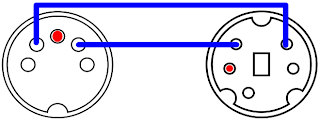
The last true Roland MPU-401 Midi Interface card was the MPU-401AT, released in 1994. This contained the interface on a small 8-bit ISA card. To communicate with external modules, it uses the same mini-DIN ports of the SCC-1. The above diagram should also work fine if you lack the proper adapter cables. The card comes with no midi module circuitry but has a 26-pin Waveblaster port to connect a midi daughterboard. Roland offered combinations of the card with its SCB-7/SCD-10 daughtercard (containing the GM-compatible circuitry of its SC-7 module) and the the SCB-55/SCD-15 daughtercard (containing the GM/GS compatible circuitry of an SC-55ST). The combinations were sold as the SCM-10AT (GM) and SCM-15AT (GS/GM). Any other waveblaster-compatible daughterboard, such as the Yamaha DB50XG and Creative WaveBlaster I or II will work well here. The SnR is better on this card than many Creative cards (which created the waveblaster standard). The MPU-401AT looks like this:

The following third party MIDI interfaces or devices have been confirmed to contain the Roland MPU-401 chipset or are 100% Roland MPU-401 compatible :
CMS CMS-401
CMS CMS-444
Midiman MM-401%
Music Quest MQX-16(s)
Music Quest MQX-32(m)*
Voyetra V-4000
Voyetra V-4001
Voyetra OP-4001
Voyetra V-22/24
* - This card has been observed to cause freezes or incorrect MIDI playback in Origin Systems games like Wing Commander and Ultima VI.
% - Has been reported to have problems with working consistently with Legend Entertainment's Gateway compared to a Roland MPU-401.
Music Quest also released a pair of basic MPU-401 compatible cards. The pure 8-bit card looks like this :

The dongle has one MIDI in and one MIDI out. The jumpers can select IRQ 2, 3, 5 and 7, and the jumper marked P controls the address. If the P jumper is covered, the address will be at Address 330, and if removed it will be at address 300.
There are two ROM versions for this card. The earlier version is v.004 and the later version is v.010. Fortunately Music Quest marked their ROMs. The earlier ROM will not work with Wing Commander or Wing Commander II and may have trouble with other Origin games that support the MT-32. The later ROM will fix the problem, but requires desoldering and replacing the old ROM. Here is a shot of a card with the old ROM for reference purposes :

Music Quest later released a version of this card with a small 16-bit connector. All the connector did was allow you to use IRQs 10, 11 or 12. The rest of the options remained the same as the older card. The ROM is embedded into the microcontroller chip, and as it is a later card it would not have the problems of the ROM v.004.
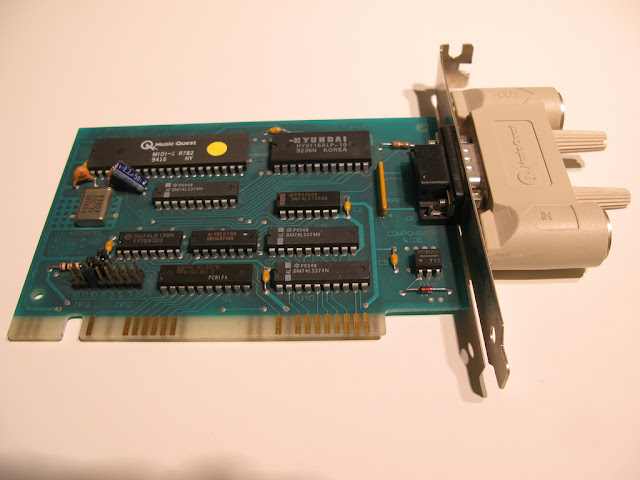
If you don't have the dongle for the card, do not despair. You can make a dongle like the one in the second picture with this handy diagram :

A final word about other MIDI interfaces, do not bother with them. The above choices are your only guaranteed choices for DOS Games using MT-32 or compatibles. The reason why? These cards are the only cards known to guarantee to implement the MPU-401 Normal (a.k.a. Intelligent) Mode reliably. DOS Games that support the MT-32 and compatibles frequently use this mode when setting up the interface or communicating through it. Most later games, including games that are GM compatible, use the MPU-401 UART mode, which is much simpler to implement in "MPU-401 compatible" hardware. The Sound Blaster 16 and up only support MPU-401 UART mode, making them unsuitable as a reliable interface for older DOS Games with MT-32 support. The older Sound Blasters do not support MPU-401 at all. Even later Roland products, including the Roland S-MPU, S-MPU II, SCP-55 or RAP-10AT do not support intelligent mode or have problems with it. Some MT-32 DOS games will work with an interface that supports Normal/Intelligent Mode, but a true MPU-401 interface will ensure hassle-free operation.
There are cards that try to fool games into thinking that an intelligent MPU-401 interface exists by sending an ACK byte in response to every command to the MPU-401. However, the actual command sent to the MPU-401 is not processed. This works for most games, but not games from Legend Entertainment, whose MPU-401 usage cannot be defeated by such simple tricks. Cards with this functionality incldue the Ensoniq Soundscape ISA series, the Yamaha SW-20PC and the MediaTrix AudioTriX Pro.
Even if you have a true MPU-401 Interface, if your computer is too fast, your game may be sending MIDI data to the MT-32 or compatible faster than the module can handle. This is the cause of the dreaded Exec. Buffer Overflow (first gen MT-32s only) and the Exec. Checksum Error (all modules). The first is very common in faster computers, the second is a lot less common. Expect either issue if you are using an MT-32 with a Pentium III computer (the last that generally had ISA slots as standard).
Method Number 2 : DOSBox
(a.k.a. the easy way out). DOSBox is an PC emulator that concentrates on getting DOS games to work. It emulates a lot of video and sound cards. It also emulates an MPU-401 interface, including the Normal/Intelligent Mode. For MT-32 and compatibles and GM/GS/XG modules, the emulation is superb. Considering that DOSBox takes the need for a Roland MPU-401 Interface and a computer with ISA slots out of the equation, it is easy to see why people prefer it. DOSBox is mostly a matter of configuring software, but a Midi Interface is still required.
This part of the guide will only consider DOSBox MIDI interface support in Windows operating systems, since that is all I am familiar with. In order to work with DOSBox, your sound card must have its MIDI drivers installed in Windows. On-board sound chips on modern motherboards tend not to support external midi. If you have a chip or a sound card that does, it generally will connect through the DA-15 game port. If you have a midi/gameport in your computer or on your card, you will need a gameport midi cable. Creative Sound Blaster cards also can use the I/O Drives or external breakout boxes that have midi ports on them.
If your audio device will not support an external midi connector, then you can use a USB MIDI adapter. However, you have to be picky, as not all USB midi adapters are created equal. I have used a Roland UM-1X for years and never have had a problem. Unfortunately it has been discontinued. Some USB MIDI adapters have had problems being able to transmit system exclusive messages to an MT-32, which is what DOS Games use create custom sounds with the MT-32.
Having obtained some kind of MIDI interface with support for external modules, connect the MIDI OUT cable to the MIDI IN port on the MT-32 or compatible module. That completes the hardware assembly. Having properly installed your drivers for your midi product, you need to set the Windows midi device to use external interface. In Windows XP, go to your Control Panel and click on "Sound and Audio Devices". Under the "Audio" tab, go to the Midi dropbox and select the name of your external device. Usually it is quite evident. Press the OK button. Under Windows 98, go to your Control Panel and click on "Multimedia". Under the MIDI tab, in the Single instrument box select the name of your external device. Press the OK button. This completes your Windows configuration.
Since Microsoft, in its infinite wisdom eliminated the selection of midi devices in the Control Panel in Windows Vista & 7, you have to select the MIDI device to use program by program. To do this in DOSBox, start DOSBox up and enter the command "mixer /listmidi". This command will show you all the MIDI devices available in your system. Make a note of the number next to the name of the external midi device. Go to your dosbox.conf file, and under [midi] there will be a line that says "midiconfig=". Enter the number of your MIDI device as DOSBox reported it after the =, save the configuration and DOSBox will use your external MIDI interface instead of the Windows default midi. If the external device is the only other midi device other than the Windows GM/GS synthesizer, then the number will be 1.
DOSBox configures its settings through the dosbox.conf (really a text) file or through a shortcut under its program folder in the start menu. Open the config file up and make sure [midi] that "mpu401=intelligent" is there. It should be by default I believe. Once that has been done, start DOSBox and configure your game to use MT-32 for its music and/or sound effects. Exit your game's configuration program, start the game and get ready to listen to some great music. Watch the MT-32 display for midi messages and make sure that there are no errors in transmission. If you are getting buffer overflow errors on a first gen MT-32, adjust the machine cycles down by using Ctrl F11. 2000 cycles should be good to start, and if you are not using a joystick you can increase them later in the game.
Currently there is a good Roland MT-32 and CM-32L emulator called Munt. Munt is a device that emulates an MT-32 or CM-32L in software on a modern machine. It requires the PCM ROM and Control ROM from an MT-32 or CM-32L. You should dump your own, or if you own one of these devices you can find it without too much difficulty on the Internet. Once installed and configured with the appropriate ROM set, it will show up in DOSBox's mixer /listmidi and you can use it by setting the MIDI device.
With that out of the way, there are two guaranteed methods get your MT-32 or compatible working with DOS games. Method 1 is by using a hardware Roland MPU-401 Midi interface. Method 2 is using DOSBox.
Method 1 : Hardware Midi Interface
(a.k.a. the Intended Way). Ah, if you are going the Method 1 route, you are truly adventurous and deserve respect for attempting it. You have your MT-32 or compatible unit, probably acquired off eBay or Yahoo Auctions Japan. Now you need a midi interface for the game to communicate with the module. (That is what those DINs on the back of these modules are for.) Since we are playing DOS games on an IBM PC or compatible, you are going to need a midi interface in the machine. (Atari ST users had midi interface ports with DIN ports built into the system, a design feature that never made it into the PC world.) Moreover, most of the DOS games of the MT-32 era, which runs from 1988-1992, assumed that the interface would be a Roland MPU-401 interface.
A bit of back-history here: Roland, makers of the MT-32, designed an interface box called the MPU-401 Midi Processing Unit so a computer could communicate with midi modules, whether its own or from a competitor such as Yamaha, Casio or Korg. The original MPU-401 could have been released in 1984 but would certainly have been available in 1985. The Unit is pretty large and looks like this:

It is a little hard to make out from the picture, but the Unit has two MIDI OUT ports. The rest of the ports are unimportant to a gamer. You have to connect a 5-pin DIN cable from the MIDI OUT of the Unit to the MIDI IN of your MIDI module or keyboard. On the other side, which is not visible, there is a DB-25 pin female connector.
The MPU-401 Midi Processing Unit was not tied to any specific computer. Roland made adapter cards and cartridges to allow the Unit to work with Apple IIs (MIF-APL), Commodore 64s (MIF-C64), IBM PCs (MIF-IPC & MIF-IPC-A) and most popular Japanese PCs. These MIF cards/cartridges only contained some simple glue logic to give the computer access to the data port and command/status port on the Unit. The adapter card/cartridge connect to the Unit via a mostly standard DB-25 male to male cable. The only difference between a standard cable and an MIF-IPC or MIF-IPC-A card is that pins 13 & 25 (ground) are connected in the cable.
If you obtain an MPU-401 Unit, it is useless without an adapter card. As previously mentioned, Roland made two for IBM PCs and compatibles, the MIF-IPC and MIF-IPC-A. The MIF-IPC came first and is designed for bus of the IBM PC and IBM PC/XT (also works with the IBM PC Portable should work with most 8088 processor-based PC compatibles). It is an 8-bit ISA card, and does not reliably work properly with an IBM PC AT or faster computer (essentially anything with an 80286 processor or better) The MIF-IPC-A is the simplified version and is compatible with the IBM PC, IBM PC/XT & IBM PC AT. It is also an 8-bit card and is not bus-sensitive, so it should work in any ISA slot of any IBM-PC compatible, regardless of CPU speed. The MIF-IPC-A is an incredibly simple card, someone with the proper skills and a few parts could easily reproduce it on an ISA prototype board. The schematic is here:

Although the Unit was developed and sold long before Roland convinced Sierra On-Line to support its MT-32 in King's Quest IV and other high-profile 1988 games, Sierra used the MPU-401 to provide the interface between computer and module. Sierra sold the MT-32 to its customers so they could hear great music in its games, and also bundled a MPU-401 interface.
By this time, Roland had made an IBM PC-specific product called the MPU-IPC. This product contained an 8-bit ISA card, which contained the midi interface, and a smaller breakout box which contained the connectors for midi modules. A DB-25 pin cable connected the two. Often on ebay you may see either the card or the breakout box but not both. Both are required to communicate with an MT-32 or compatible. If you have the interface card, you can make a midi output port with a few electronic parts. Like its immediate predecessor, the MPU-IPC should work in any computer with an available ISA slot.
Before I continue with my description of MPU-401 interfaces, I must talk for a moment about setting up your game and card to work with the interface. The MPU 401 interface on an IBM PC or compatible requires certain system resources, two input/output ports and one IRQ. The previously mentioned cards are all wired to use I/O 330/331 and IRQ 2/9. This cannot be changed absent soldering and trace cutting on the cards. As this was the default, games expect that the interface will use these ports and IRQ. Later cards allow the user to change these resources, but I always say that you should keep to the default. All you need to do with your game is to set it to use the MT-32 whenever offered (chiefly for music but sometimes for sound effects) and it will work. You do not need to load any drivers (outside of the game) or type any strings in your AUTOEXEC.BAT file.
The next year, Roland introduced two new MPU-401 compatible products, the MPU-IPC-T and LAPC-I. The first was a cost reduced version of the MPU-IPC and and for our purposes, is identical to it with one exception. This was the first interface product whereby Roland allowed the user to change the settings for the system resources to be used via jumpers. If you obtain this card, you should make sure the jumpers are set to use the default system resources I/O 330/331 and IRQ 2/9. The proper settings are illustrated in the manual, which is available at Roland's US site, backstage.rolandus.com/login.php, after a free registration. Also, there is a schematic diagram in that manual that will allow you to make a MIDI OUT port for either the MPU-IPC or MPU-IPC-T if you don't have the breakout box. Finally, the breakout box for the MPU-IPC will work with the MPU-IPC-T and vice versa. The MPU-IPC-T looks like this (the MPU-IPC looks almost exactly the same):

The second product, the LAPC-I, combines the MPU-401 MIDI Interface with the circuitry from a Roland CM-32L module all one one 8-bit ISA card. It is a perfect solution for MT-32 DOS games except for those (few) games that utilize bugs on the first generation MT-32 modules. It also allows you to change the settings, so please refer to the manual (available at Roland's US site) for the proper settings. All the caveats that I mentioned in my previous post on the subject of the Roland LA Synthesis devices apply here. This card is 13" long, so your case and motherboard cannot block it. It needs a -5v power source from the PSU, which may not be available on all computers. It also tends to go for very high prices on eBay. If you want to use an external module, such as a Roland SC-55 or MT-32 for the MIDI messages, you will need the MCB-1 breakout box.
In 1991, Roland released the SCC-1 GS Sound Card. Similar to the LAPC-I, the card combines the MPU-401 MIDI Interface with the circuitry from a Roland CM-300 module all on one 8-bit ISA card. This card should be compatible with all IBM PCs, and is much smaller than the LAPC-I. To connect to external midi modules, it uses mini-DINs on the card bracket. You will need a mini-DIN to DIN adapter to connect to an MT-32 or compatible. Two were included with the card, but if your eBay purchase did not come with them, you will need to find a substitute. No one makes these adpaters, but Creative Labs included compatible adapters on their Sound Blaster Live! Audigy and X-Fi card that came with I/O Drives that fit inside a 5.25" computer case drive bay. I do not believe that Roland or Creative carry any spares in stock anymore. Here is the pinout to make an adapter cable yourself (red is ground) :

The last true Roland MPU-401 Midi Interface card was the MPU-401AT, released in 1994. This contained the interface on a small 8-bit ISA card. To communicate with external modules, it uses the same mini-DIN ports of the SCC-1. The above diagram should also work fine if you lack the proper adapter cables. The card comes with no midi module circuitry but has a 26-pin Waveblaster port to connect a midi daughterboard. Roland offered combinations of the card with its SCB-7/SCD-10 daughtercard (containing the GM-compatible circuitry of its SC-7 module) and the the SCB-55/SCD-15 daughtercard (containing the GM/GS compatible circuitry of an SC-55ST). The combinations were sold as the SCM-10AT (GM) and SCM-15AT (GS/GM). Any other waveblaster-compatible daughterboard, such as the Yamaha DB50XG and Creative WaveBlaster I or II will work well here. The SnR is better on this card than many Creative cards (which created the waveblaster standard). The MPU-401AT looks like this:

The following third party MIDI interfaces or devices have been confirmed to contain the Roland MPU-401 chipset or are 100% Roland MPU-401 compatible :
CMS CMS-401
CMS CMS-444
Midiman MM-401%
Music Quest MQX-16(s)
Music Quest MQX-32(m)*
Voyetra V-4000
Voyetra V-4001
Voyetra OP-4001
Voyetra V-22/24
* - This card has been observed to cause freezes or incorrect MIDI playback in Origin Systems games like Wing Commander and Ultima VI.
% - Has been reported to have problems with working consistently with Legend Entertainment's Gateway compared to a Roland MPU-401.
Music Quest also released a pair of basic MPU-401 compatible cards. The pure 8-bit card looks like this :
The dongle has one MIDI in and one MIDI out. The jumpers can select IRQ 2, 3, 5 and 7, and the jumper marked P controls the address. If the P jumper is covered, the address will be at Address 330, and if removed it will be at address 300.
There are two ROM versions for this card. The earlier version is v.004 and the later version is v.010. Fortunately Music Quest marked their ROMs. The earlier ROM will not work with Wing Commander or Wing Commander II and may have trouble with other Origin games that support the MT-32. The later ROM will fix the problem, but requires desoldering and replacing the old ROM. Here is a shot of a card with the old ROM for reference purposes :
Music Quest later released a version of this card with a small 16-bit connector. All the connector did was allow you to use IRQs 10, 11 or 12. The rest of the options remained the same as the older card. The ROM is embedded into the microcontroller chip, and as it is a later card it would not have the problems of the ROM v.004.

If you don't have the dongle for the card, do not despair. You can make a dongle like the one in the second picture with this handy diagram :
There are cards that try to fool games into thinking that an intelligent MPU-401 interface exists by sending an ACK byte in response to every command to the MPU-401. However, the actual command sent to the MPU-401 is not processed. This works for most games, but not games from Legend Entertainment, whose MPU-401 usage cannot be defeated by such simple tricks. Cards with this functionality incldue the Ensoniq Soundscape ISA series, the Yamaha SW-20PC and the MediaTrix AudioTriX Pro.
Even if you have a true MPU-401 Interface, if your computer is too fast, your game may be sending MIDI data to the MT-32 or compatible faster than the module can handle. This is the cause of the dreaded Exec. Buffer Overflow (first gen MT-32s only) and the Exec. Checksum Error (all modules). The first is very common in faster computers, the second is a lot less common. Expect either issue if you are using an MT-32 with a Pentium III computer (the last that generally had ISA slots as standard).
Method Number 2 : DOSBox
(a.k.a. the easy way out). DOSBox is an PC emulator that concentrates on getting DOS games to work. It emulates a lot of video and sound cards. It also emulates an MPU-401 interface, including the Normal/Intelligent Mode. For MT-32 and compatibles and GM/GS/XG modules, the emulation is superb. Considering that DOSBox takes the need for a Roland MPU-401 Interface and a computer with ISA slots out of the equation, it is easy to see why people prefer it. DOSBox is mostly a matter of configuring software, but a Midi Interface is still required.
This part of the guide will only consider DOSBox MIDI interface support in Windows operating systems, since that is all I am familiar with. In order to work with DOSBox, your sound card must have its MIDI drivers installed in Windows. On-board sound chips on modern motherboards tend not to support external midi. If you have a chip or a sound card that does, it generally will connect through the DA-15 game port. If you have a midi/gameport in your computer or on your card, you will need a gameport midi cable. Creative Sound Blaster cards also can use the I/O Drives or external breakout boxes that have midi ports on them.
If your audio device will not support an external midi connector, then you can use a USB MIDI adapter. However, you have to be picky, as not all USB midi adapters are created equal. I have used a Roland UM-1X for years and never have had a problem. Unfortunately it has been discontinued. Some USB MIDI adapters have had problems being able to transmit system exclusive messages to an MT-32, which is what DOS Games use create custom sounds with the MT-32.
Having obtained some kind of MIDI interface with support for external modules, connect the MIDI OUT cable to the MIDI IN port on the MT-32 or compatible module. That completes the hardware assembly. Having properly installed your drivers for your midi product, you need to set the Windows midi device to use external interface. In Windows XP, go to your Control Panel and click on "Sound and Audio Devices". Under the "Audio" tab, go to the Midi dropbox and select the name of your external device. Usually it is quite evident. Press the OK button. Under Windows 98, go to your Control Panel and click on "Multimedia". Under the MIDI tab, in the Single instrument box select the name of your external device. Press the OK button. This completes your Windows configuration.
Since Microsoft, in its infinite wisdom eliminated the selection of midi devices in the Control Panel in Windows Vista & 7, you have to select the MIDI device to use program by program. To do this in DOSBox, start DOSBox up and enter the command "mixer /listmidi". This command will show you all the MIDI devices available in your system. Make a note of the number next to the name of the external midi device. Go to your dosbox.conf file, and under [midi] there will be a line that says "midiconfig=". Enter the number of your MIDI device as DOSBox reported it after the =, save the configuration and DOSBox will use your external MIDI interface instead of the Windows default midi. If the external device is the only other midi device other than the Windows GM/GS synthesizer, then the number will be 1.
DOSBox configures its settings through the dosbox.conf (really a text) file or through a shortcut under its program folder in the start menu. Open the config file up and make sure [midi] that "mpu401=intelligent" is there. It should be by default I believe. Once that has been done, start DOSBox and configure your game to use MT-32 for its music and/or sound effects. Exit your game's configuration program, start the game and get ready to listen to some great music. Watch the MT-32 display for midi messages and make sure that there are no errors in transmission. If you are getting buffer overflow errors on a first gen MT-32, adjust the machine cycles down by using Ctrl F11. 2000 cycles should be good to start, and if you are not using a joystick you can increase them later in the game.
Currently there is a good Roland MT-32 and CM-32L emulator called Munt. Munt is a device that emulates an MT-32 or CM-32L in software on a modern machine. It requires the PCM ROM and Control ROM from an MT-32 or CM-32L. You should dump your own, or if you own one of these devices you can find it without too much difficulty on the Internet. Once installed and configured with the appropriate ROM set, it will show up in DOSBox's mixer /listmidi and you can use it by setting the MIDI device.
Wednesday, February 10, 2010
Choices for Roland LA Synthesis
In 1988 games that supported the sixteen color Enhanced Graphics Adapter (EGA) began to really emerge in the marketplace. While some games had appeared in the previous years, 1988 marks the first year when, unless you had a Tandy, you really should have bought a PC with EGA card inside it. Also in 1988, sound cards finally began to be supported by the major gaming companies. Many early cards competed for a coveted expansion slot in a user's computer, but only two really gained any market acceptance. The first was the Adlib card. This card contains a Yamaha sound chip that works via frequency modulation (FM) synthesis. As it was reasonably priced ($190) and offered far better sound than the PC Speaker or the Tandy/PCjr. sound chip and could be installed in any computer with an available slot, it rapidly became the sound card of choice.
On the high end, game developers had begun to support Roland Corporation's MT-32 multitimbral sound module. This was an external midi sound module that interfaced to the computer through an MPU-401 interface card and breakout box. This device was intended primarily for computer composers and cost approximately $600 between the module and the interface. However, the synthesis method used, LA synthesis, produced sounds far better than the Adlib's chip. What is more, the user could program his own sounds into the unit and make music with it from a physical keyboard.
Thus, there were choices for both types of computer user. Many, many games supported both devices. The music quality generally was far more impressive on the MT-32 than an Adlib. Soon, however, there was competition in this area. Creative Labs' Sound Blaster cards quickly eclipsed the Adlib by using the same chip and adding a midi/joystick interface and digitized sound playback and recording at around the same price. The lack of standardization in the midi world in which the MT-32 was designed was solved when the General Midi standard became effective. Once GM devices began to proliferate, companies quickly abandoned the prickly MT-32.
The MT-32 and compatible modules may have been resigned to obscurity, and the games which used them to obsolescence, if not for the DOSBox emulator and the retro computing hobby. The DOSBox emulator has long supported games which use the MT-32 by emulating an MPU-401 interface. By connecting a physical unit to the modern machine's midi hardware (I use the USB Roland UM-1X), the music will play through the unit just as it would through a classic computer. Retro computer enthusiasts bypass the emulator and use a hardware MPU-401 interface.
No longer having to settle for Adlib music or having to pay extreme prices for the hardware, what is a lover of DOS games to do? There is an MT-32 emulator called Munt. While it is always in development, the current versions of the emulator sound very good and often indistinguishable from the real thing. Moreover, it can also emulate the CM-32L/LAPC-I and its extra sound effects. But if you are committed to real hardware, let this post act as a guide.
The MT-32 and all compatible devices are based off Roland's LA32 chip and there are only eight devices that are truly compatible. In addition to the MT-32, there is the CM-32L, CM-32LN, CM-64, CM-500, MT-100, LAPC-I, LAPC-N. Having had personal experience with all but three of these devices in the past decade, I would like to give the pros and cons of each:
First Generation LA32 Synthesis
The first generation devices are very speed sensitive. They required a 40ms delay between sending midi messages. While this was fine on a 286 machine, the speeds of a 486 and higher 386s would cause the game to send messages too quickly, leading to Buffer Overflows, stuttering or wrong sounds and lockups. The first generation devices are noticeably noisier than the later generations. However, a few games from Sierra and other companies exploit bugs in first generation devices to produce sound effects which the later generation devices will not play correctly.
MT-32

It has a twenty character LCD display which many games used to send cute text messages via sysex. It has a buttons on the front to control various part parameters. It can control the volume of each part as well as the overall volume digitally. There is a key combination (press Master Volume and Rhythm at the same time, then press the 1 Button) to reset the module without turning it off. There is also a diagnostic mode. You can even see the Control ROM version info. This module has 1/4" left and right audio output jacks.
One lesser known difference between the early MT-32 and later modules is that the volume control knob sets the volume digitally on the early MT-32. The later modules with volume control knobs set the volume at the analog amplifiers.
Second Generation LA32 Synthesis
These modules sound less noisy than the first generation modules. They no longer require a delay between midi messages. This means they are suitable to be used with any computer system, regardless of processor speed. Some games will only work with second and third generation devices because they do not delay their midi messages.
MT-32
The second generation of the MT-32 has a 1/4" stereo headphone jack. All modules following will have right/left and stereo headphone 1/4" jacks. The late MT-32 also contains demo tunes not present in the CM/LAPC series or the early MT-32s.
MT-100

This module is a bit more obscure than the others in this category. It is a combination of the capabilities of an MT-32 (minus some controls) and the Roland PR-100 sequencer. Its status panel only displays eight characters at a time (as opposed to the MT-32's twenty character display) and will NOT display sysex messages. Although its disk drive looks like a standard 3.5" drive, it uses 2.8" Quick Disks. These are the epitome of rare media in this country.
LAPC-I

This card has left and right audio RCA jacks and a stereo 1/8" minijack. Its MCB-1 has four midi jacks, 1IN, 2 OUTs and a SYNC. The OUTs can become THRUs by programming the MPU-401 interface.
In addition to requiring a unobstructed full-length ISA slot (it won't fit inside any Tandy 1000, for example), this card also requires a -5v power source. Modern ATX (2.0 or above) power supplies do not offer -5v power, and many computer cases cannot house 13" cards. These problems are not new, however, as Tandy 1000 compatible machines cannot accept 13" cards and sometimes do not supply -5v power. As this is an ISA card, it is more susceptible to electrical noise from the rest of the PC, but I have never read of any serious complaints.
It may be possible that the earliest LAPC-I cards may not have jumper blocks to allow the user to select the I/O ports and/or IRQ to be used for the MPU-401 interface. I have never seen a card lacking them. Besides, many games expect a Roland MPU-401 to use I/O 330-331 and IRQ 2/9 and fail to work if the card isn't using those resources.
Because of this card's MPU-401 interface, Windows XP and older OSes can detect and install the card as a midi device. DOSBox can use it directly in this fashion as can DOS games run in a DOS window. If your DOSBox machine lacks ISA slots, you may wish to look at a USB2ISA adapter, but they are expensive and whether the card will work with such an adapter is uncertain. Instead, you should stick it in a retro computer and connect your modern machine's midi interface to the MCB-1 midi box.
If you use this method, in order to avoid resetting or restarting the retro machine every time you play a new game, you will need to send a reset command through a sysex program or embedded in a midi file. However, by default the MPU-401 interface will not transmit sysex from the MCB-1 to the LA32 synthesis component on the card. From the retro computer, you will need to run a program called MPUTHRU to instruct the MPU-401 interface to allow sysex messages to be accepted and sent to the LA32 component.
CM-32L

CM-64

LAPC-N

This is just like the LAPC-I, but it is designed for the Japanese PC-98xx series of computers. It uses the C-bus, which is similar to the ISA bus of the IBM PCs but utterly useless on them. The only practical value this rare device may have for PC games is if you use it with its Midi Expansion Box (MCB-2), installed inside a PC-98xx machine and use the combo as a midi module.
There is a device called the C86BOX which allows you to interface with a pair of C-bus audio cards. http://c86box.com/ The device is not cheap, but it can allow you to use an LAPC-N like an external module if you have the MCB-2 expansion. The C86BOX can communicate with the cards by way of USB. While the programs developed to communicate with the C86BOX are for the PSGs and FM chips found on many PC-98xx sound cards, this box will provide power to the LAPC-N. Unlike the LAPC-I, the LAPC-N has "LA IN & OUT" ports which communicate directly with the synthesizer unit on the card, bypassing the MPU-401 interface. You will not need a program like MPUTHRU to allow the MPU-401 to pass system exclusive messages to the LAPC-N.
Third Generation Roland LA32 Synthesis
Third generation modules have the best sound output quality to them, but the vibrato is noticeably different sounding, leading most users to prefer a first or second generation module.
CM-500

This used to be a very prized device, as it is a combination of a Roland CM-32L and a Roland CM-300. The Roland CM-300 is the barebones version of the Roland Sound Canvas SC-55, which is GS and (with later models) General Midi compatible. A four-position switch on the back of the module needs to be set to use one, the other or both. The switches are as follows:
Mode A - CM-300 & CM-32L at the same time
Mode B - CM-64 emulation
Mode C - CM-300 only
Mode D - CM-300 on midi channels 1-10, CM-32L on channels 11-16.
Mode D is useless for DOS games that support MT-32 or compatibles, since they expect the module to use channels 2-10. Mode C is ideal for DOS games that support General Midi, but useless for MT-32 or compatible games. Mode B is generally useful for MT-32 compatible games, but it has the same problem as the CM-64 with regards to unwanted sounds coming from the emulated CM-32P. Using Mode A will solve that problem, but it requires the user to send a command to turn off the CM-300 parts before starting a game. You will not observe any results of changing the switch until you turn the device off and back on.
CM-32LN
This is another Japanese PC-98xx exclusive device, this time it was intended to connect to PC-98xx compatible notebooks through a special 110-pin connector. Fortunately it also has standard-sized midi jacks, so it can be used with IBM PC games without difficulty. It is also is grey in color, unlike the beige look of the rest of the CM modules.
Conclusion
If you want a module that just works with everything without any fuss, I would suggest a CM-32L. If you have a retro machine that can fit the card, try to get the LAPC-I, but they are not cheap anymore. If you want the best of both worlds, however, a combination of a first generation MT-32 and a CM-32L would work perfectly. If you also want GM/GS compatibility and not a bunch of modules cluttering your house, try for a CM-500. As far as places to buy, eBay is the obvious place but you should also consider Japanese Auction sites as well for some deals.
Subscribe to:
Posts (Atom)