When IBM released the Personal Computer back in 1981, it gave the buyer two choices for the video output. The buyer could buy a monochrome card and a special high resolution green screen monitor to go with it, or a color card and connect it to a color monitor. The buyer could even run both cards in the same system. If someone was on a tight budget, they could use a monochrome monitor with a color card, in this blog article we will explore what the results of that would be.

Showing posts with label IBM PC. Show all posts
Showing posts with label IBM PC. Show all posts
Saturday, July 11, 2026


Sunday, March 1, 2026
Observations on Early Versions of Wizardry

Wizardry is the first role playing game to make a substantial, widespread impact on video gaming. First released for the Apple II in 1981, it spawned many, many ports, sequels and spinoffs. Its origins tend to be obscured by later releases and re-releases, so in this blog article I will discuss what made the features of Wizardry as it was first released to the public so interesting.
Sunday, July 14, 2024
The Power of the Modern Gotek Floppy Drive Emulator

The Gotek Floppy Drive emulator is a diamond in the rough as it comes from the factory. While cheap, the common Goteks only emulate a single type of floppy. While this may be all you need if you only need a DOS or Windows 95 boot disk, running floppy disk images on vintage computers is quite possible with a Gotek flashed with community-based firmware. In this article I will take a look at what the Gotek can do with the Flash Floppy firmware.
Sunday, September 3, 2023
NuXT 2.0 Motherboard - A New 8088 Motherboard for your DIY PC Clone
In the recent past I have discussed the Book 8088 and the Hand 386, which are newly made vintage computing systems. I concluded that those products, although not uninteresting were rather flawed. The Book 8088 was by far the more disappointing of the two devices. I have also been made aware of a project which tries to fulfill a similar niche, the NuXT motherboard. The NuXT is an 8088-based motherboard you can buy brand new and can really fill that IBM PC-clone hole in your vintage collection. While I do not own one of these, I have read and seen enough about it to give my thoughts on whether this product would be right for you.
Saturday, August 26, 2023
Would you Like a Book 8088? Or How About a Hand 386?

Fairly recently (May, 2023) there has been made available for sale a retro-themed laptop called the Book 8088. The Book 8088 is a real PC running a fair amount of vintage hardware and was made in China by a company called DZT. Additionally this company has also made a portable PC called the Hand 386. However, the Book 8088 is also the subject of controversy and reviews have been mixed on both products. Although I do not own either and have no intention to buy either I have researched and viewed enough YouTube reviews of the device to offer some relevant insights on these devices.
Thursday, May 18, 2023
Random Computer and Video Game Musings
Sometimes I have something to say but the topic is not worthy of a full blog post. In this case I have gathered four topics which I believe are interesting but not necessarily related and put them into this consolidated blog post. Enjoy!
Sunday, March 26, 2023
IBM Composite Artifact Color Games and Related Topics
 |
| Top - Direct Colors Old CGA & New CGA Bottom - High Resolution Artifact Colors Old CGA & New CGA |
Back in 2013 I gave an overview of composite color usage on the IBM PC platform. I included a list of all games I knew about or could find which supported composite color graphics. Now, 10 years later, new information has made that list less than inaccurate and less than fully inclusive. Let's talk about these games and give a new, more accurate list. I will also talk about other topics related to CGA and color in more detail below.
Friday, March 3, 2023
The Saga of the Color Brown in the Early Years of the PC
 |
| top left: RGB monitor without intensity bit, bottom left: RGBI monitor without brown correction, top right: RGBI monitor with 33% brown reduction (IBM 5153), bottom right: RGBI monitor with 50% brown reduction (EGA/VGA/Tandy) |
In 1980-81 IBM developed a graphics card for its new IBM PC called the Color/Graphics Adapter. This card was designed to display 16 colors on a compatible CRT monitor via a 9-pin digital video port. IBM defined the colors in its Technical Reference Manual using a 4-bit binary code. The CGA could also display colors with a composite video connector on the card. It is the evolution of the display of one of those colors, color 6, commonly but yet simplistically referred to as brown, that we are interested in today.
Sunday, January 29, 2023
CGA and "Intended", "Incidental" and "Just Plain Wrong" Graphics
When IBM released its Color/Graphics Adapter card as one of the two display adapters supported by the IBM PC Model 5150 when it launched in August of 1981, it offered two video output options, RGB video and composite video. RGB video offered much sharper text and purer colors than composite video but required expensive and special monitors. Composite video would work with any color monitor or TV and had the unique ability to offer more colors via artifact color. The CGA output both types of video at the same time. In a sense every game that supports CGA supports both RGB and Composite color, but that does not mean that every game will look the way the graphics artists intended the game to look. In this article we will discuss some examples of the "Intended" look versus the "Incidental" look of CGA gaming graphics.
Saturday, April 17, 2021
Floppy Drives - Single Density and Double Density, FM, MFM & GCR
In the IBM PC world, there is no such thing as "single density" floppy drives. Floppy drives started out as double density and later matured into high density and even extra high density. Those of us who grew up in a PC world had no need to know about "single density". But where did single density come from and which systems used it? Moreover, what happens when system builders try to stretch single density reading into double-density capacities? The truth is a bit more complex than you might think.
Saturday, December 28, 2019
The Gotek Floppy Drive Emulator in the IBM PC World

The Gotek floppy drive emulator is a simple, cheap and little device that, as its name says, emulates a floppy drive. There are many varieties of these devices and they usually come with a USB port on the front of the unit and a 34-pin header + 4-pin power header on the back. While originally intended to replace disk drives in industrial, sewing and musical equipment, they can be used with standard PC floppy controllers. However, as they come they are at best diamonds in the rough, so in this blog entry I will describe how to make these devices more useful for vintage IBM PCs and compatibles.
Sunday, July 22, 2018
Ten Advantages of an IBM PC/XT over an IBM PC
If you are looking for an early PC-compatible "8-bit system", the IBM PC and the IBM PC/XT are good choices. They sold well, are built to last and "just work". But while you may want to get one of each, if money or space is tight, I would suggest trying to find an IBM PC/XT over the IBM PC. Some reasons why are as follows :
Saturday, April 7, 2018
Expanding Vintage IBM PC & Compatible Display Options - the GGLabs CGA2RGB Converter
 |
| GGLabs' CGA2RGB (courtesy of GGLabs) |
Getting a high quality and proper video signal from an IBM CGA or EGA card or an IBM PCjr or Tandy 1000 without their specialized monitors can be difficult. These computers used specialized RGB monitors to give a high quality solution using digital signals to tell the monitor which color to display. Unfortunately this standard was not really adopted outside of the expensive PC compatibles and most RGB monitors only accept an analog signal. When VGA and its analog RGB signal format became standard, support for the older digital RGB format went away. In this blog entry I am going to examine an inexpensive converter that can help you adapt your vintage PC compatible's digital RGB video output to the more accessible analog RGB video output.
Friday, August 25, 2017
Flawed, Risky and Dangerous Devices for your Retro Consoles and PCs
Most of us appreciate it when enterprising entrepeneurs go out of their way to make new products for us to enjoy on our vintage consoles. However, they don't always get it right. Some products can be positively dangerous to your consoles, others are not obviously dangerous but have the potential to decrease your console's lifespan. In this blog entry I will discuss modern products that are fundamentally flawed, risky to use or just plain dangerous.
He's making list, checking it twice,
Gonna find out whose naughty and nice...
He's making list, checking it twice,
Gonna find out whose naughty and nice...
Sunday, September 18, 2016
Two Late Classic Apple II to PC Ports, Unalike in Dignity
Even though the Apple II was very long in its lifespan by the end of the 1980s, there was a fair bit of software still being released for it. The Apple II was very strong in the educational market, computer labs across the United States had yet to upgrade to the PC platform. The Apple II had many, many classic games. Most of them were ported to the PC at some point, but by the end of the 1980s the number of A2-to-PC ports (that did not have the name Carmen Sandiego in the title) was dwindling.
Even so, two classics of the Apple II did make their way to the PC platform in the late 1980s and they are the subject of this blog entry. The first is MECC's 1985 update of The Oregon Trail. The second is Jordan Mechner's Prince of Persia, programmed on and released for the Apple IIe, IIc and IIgs in 1989. MECC ported the Apple II version of The Oregon Trail to the IBM PC in 1988. Mechner and Broderbund ported the Apple II version of Prince of Persia to the PC compatibles in 1990.
The Oregon Trail is the simpler game, in fact it was an update of an earlier version MECC made for the Apple II in 1980. That version was mostly text-based and occasionally displayed simple wire-frame graphics and a little music. Before personal computing, Oregon Trail was played on mainframes on a time-share basis. But the 1985 Apple II version is undoubtedly the most popular version of the game. The 1985 version requires 64KB of RAM on an Apple II. This version was ported to the PC by MECC in 1988. The PC port requires 512KB of RAM and at least a CGA card.
Prince of Persia is a spiritual successor to Mechner's Karateka, another big hit. Both were published by Broderbund. Prince of Persia takes the rotoscoped graphics and one on one combat of Karateka and combines them with running and jumping mechanics, obstacles, traps and triggers. It requires 128KB of RAM and an Apple IIe capable of displaying double high resolution graphics, a IIc or a IIgs. It only uses double high res graphics on the title screen and story text screens (four screens). Mechner supervised the ports of the game to the IBM PC compatibles and the Amiga in 1990. It supports CGA, Hercules, Tandy, EGA and VGA and a variety of sound cards and 512KB-640KB depending on the graphics mode.
When it came to porting these games to the PC, MECC did an outstanding job. Broderbund and Mechner, not so much.
Even so, two classics of the Apple II did make their way to the PC platform in the late 1980s and they are the subject of this blog entry. The first is MECC's 1985 update of The Oregon Trail. The second is Jordan Mechner's Prince of Persia, programmed on and released for the Apple IIe, IIc and IIgs in 1989. MECC ported the Apple II version of The Oregon Trail to the IBM PC in 1988. Mechner and Broderbund ported the Apple II version of Prince of Persia to the PC compatibles in 1990.
The Oregon Trail is the simpler game, in fact it was an update of an earlier version MECC made for the Apple II in 1980. That version was mostly text-based and occasionally displayed simple wire-frame graphics and a little music. Before personal computing, Oregon Trail was played on mainframes on a time-share basis. But the 1985 Apple II version is undoubtedly the most popular version of the game. The 1985 version requires 64KB of RAM on an Apple II. This version was ported to the PC by MECC in 1988. The PC port requires 512KB of RAM and at least a CGA card.
Prince of Persia is a spiritual successor to Mechner's Karateka, another big hit. Both were published by Broderbund. Prince of Persia takes the rotoscoped graphics and one on one combat of Karateka and combines them with running and jumping mechanics, obstacles, traps and triggers. It requires 128KB of RAM and an Apple IIe capable of displaying double high resolution graphics, a IIc or a IIgs. It only uses double high res graphics on the title screen and story text screens (four screens). Mechner supervised the ports of the game to the IBM PC compatibles and the Amiga in 1990. It supports CGA, Hercules, Tandy, EGA and VGA and a variety of sound cards and 512KB-640KB depending on the graphics mode.
When it came to porting these games to the PC, MECC did an outstanding job. Broderbund and Mechner, not so much.
Saturday, September 10, 2016
Recording the IBM PC Speaker's Sound
The PC Speaker was the first audio device that PCs used. In some form or another, it is contained in almost every PC ever made. In the original IBM PC, the Model 5150 released in 1981, the speaker was a distinct cone 2.25" in diameter. And it was loud, but it had to be in order to compete with the noisy power supply fan and the seeking of the disk drives! The tones it output were pure, and while they were rather harsh they were also clear.
However, eventually the PC Speaker began to shrink in size and eventually give way to the tiny piezoelectric tweeters that are just too quiet to do justice to any kind of complicated audio. (You can blame IBM for putting the idea into other manufacturer's heads because the IBM PCjr., released in 1983, used a piezo tweeter for the PC Speaker.)
When emulators like DOSBox became mature, they could easily output basic PC Speaker audio. Basic PC Speaker audio is essentially a square wave with a fixed volume level and a 16-but frequency selector. They can have difficulty with the more complex sounds produced by Pulse Width Modulation, which essentially sends changes to the frequency of the square wave to the speaker faster than the speaker cone's driving circuitry was intended to handle. This requires a much more rigorous emulation of the CPU, the timer and the "analog" characteristics of the audio generation.
However, eventually the PC Speaker began to shrink in size and eventually give way to the tiny piezoelectric tweeters that are just too quiet to do justice to any kind of complicated audio. (You can blame IBM for putting the idea into other manufacturer's heads because the IBM PCjr., released in 1983, used a piezo tweeter for the PC Speaker.)
When emulators like DOSBox became mature, they could easily output basic PC Speaker audio. Basic PC Speaker audio is essentially a square wave with a fixed volume level and a 16-but frequency selector. They can have difficulty with the more complex sounds produced by Pulse Width Modulation, which essentially sends changes to the frequency of the square wave to the speaker faster than the speaker cone's driving circuitry was intended to handle. This requires a much more rigorous emulation of the CPU, the timer and the "analog" characteristics of the audio generation.
Thursday, January 14, 2016
Milestones in the IBM PC Compatible Software Renaissance
Over the past decade (and a bit) people have been writing new software for "oldskool" PC systems like the IBM PC, IBM PCjr. and the Tandy 1000 computers. Some of these programs have been really impressive or have pushed these systems in ways never envisioned by their creators. While other systems like the Apple II, Commodore and Atari computers may have had comparatively more software released during the same time period, the early PC world has not lain dormant. Starting by the year of announcement, I will identify each project I have found particularly worthwhile or noteworthy and explain why they deserve to be here. I hope this blog entry will serve as a Thank You for all the programmers who put their effort into making new software for the oldest PCs.
2004 - 8088 Corruption
In 2004, Trixter, the creator of The Oldskool PC website and the co-founder of MobyGames, discovered a way to play full motion video on an IBM PC with a CGA card. He did not have much to work with, an 8088 CPU running at 4.77MHz, 640KB of RAM, and a CGA card that could display 16 colors maximum, and all those colors on the screen only in text mode. Moreover, in 80-column text mode, many CGA cards would show "snow", random mosquito noise, when refreshed too quickly.
Trixter looked to the 40 column (by 25 rows) mode for his implementation of full motion video. That mode supports 16 colors, 256 distinct but unchangeable character glyphs, and 8x8 character cell sizes. Most importantly, each 8x8 character cell can choose from any two of the 16 colors for foreground and background colors. A single screenshot using text characters this large would often not show recognizeable objects, but at 30 frames per second, video can be much more watcheable. The 40 column mode has the benefit of only requiring 2,000 bytes to fill the screen compared to 4,000 bytes for an 80-column mode screen or 16,000 bytes for any of the CGA graphics modes.
Of course, the illusion of video is often helped by the use of audio. Use of the PC Speaker was out because too much time would be spent decompressing and displaying the graphics. So Trixter targeted the only devices that would work in a PC's 8-bit slot, could output digital audio and were sufficiently common, the Sound Blaster. 8088 Corruption required a Sound Blaster that supported the auto-init DMA commands so the card could keep its digital audio buffer fed with minimal CPU involvement. The final piece of the puzzle is having a hard drive, preferably a fast one, to hold the video file to be played.
Trixter originally presented 8088 Corruption in 2004 but continually improved the video playback software. However, just about every year thereafter it saw attention at demoparties and news outlets. Eventually an encoder was released that converted .AVI files into the TMV format files the 8088 Corruption (called 8088flex) player needs to load. It can support 60fps video and at least 22kHz 8-bit audio. The most recent versions no longer require a sound card and have much better buffering than older versions. Here is Trixter's original 2006 video showing off 8088 Corruption and proving that it was real :
You can obtain 8088 Corruption from here : http://www.oldskool.org/pc/8088_Corruption
2008 - Monotone
The concept of a tracker was not a new one in 2008. Music tracker programs had first appeared on the Commodore Amiga in 1987 with Ultimate Soundtracker, which have a graphical interface to music programmers so they could assign PCM samples to their music in a programming-friendly format. The Gravis Ultrasound card was a popular target of early DOS-based tracker programs. Eventually tracker programs were released for the Adlib OPL2 and OPL3 chips as well as other popular platforms that used chiptune music like the NES, the Sega Genesis and the Game Boy.
Trixter noted that there was no tracker program that worked with the PC Speaker, so he sought to change that. The PC Speaker is musically a very limited device, essentially a 1 channel square wave with no volume control but a 16-bit frequency divider. While it could produce digitized and multiple voices by toggling the speaker cone on and off faster than it was designed, there were several disadvantages to this. First, the resulting volume is often very low. Second, these techniques require a large amount of CPU time, leaving little time for much else on 8088 and 80286 machines. Third, the audio can sound very "buzzy" and have a high noise floor, leaving the listener with an uncomfortable experience. Was there any other way to allow the PC Speaker to sing in more than beeps and boops?
Enter Monotone, a solution for a problem few had. Monotone is the first and only tracker designed to support the PC Speaker. Monotone supports 1-4 "voices" for the PC Speaker. It supports multiple voices by giving a programmer a precise time base to change his sound. The PC Speaker still plugs away, but the rapid transitioning of the music, facilitated by the program can give the illusion that the PC Speaker is a multi-channel device. Monotone also supports the Adlib and the Tandy 3-voice sound chip, but both chips have other trackers available to them. You can compare the PC Speaker version of a song in the first video with its Adlib version in the second video :
You can obtain Monotone from here : http://www.oldskool.org/pc/MONOTONE
2008 - mTCP
You like the Internets, right? I do too, but those people still stuck with DOS can have a hard time getting online and enjoying it. Enter mTCP, a suite of utilities developed by VCF forum member mbrutman in 2008. At first he released the utilities separately, starting with IRCjr. IRCjr. is a very slimmed down IRC client that can be run on any PC and intended for the IBM PCjr. Since mbrutman is a IBM PCjr. fan and runs the only IBM PCjr. fansite on the web, it would be natural for him to ensure that the client is sufficiently light-weight to work on a PCjr. or a PC. He also released other programs like a DOS Telnet program and soon began to bundle a whole package of 8088-friendly Internet utilities called mTCP.
mTCP has been continuously updated since 2008. Using the utilities in the package make it very easy to get online with an Ethernet card and a packet driver. For the earlier systems, a Xircom PE3 parallel port Ethernet adapter can work with anything with a standard parallel port (except for the Tandy parallel port). 8-bit Ethernet cards usually work just fine with a transceiver, and 16-bit cards often have RJ-45 jacks so you can directly plug them into a router. Some of these cards are hybrid cards that can work in an 8-bit or 16-bit slot. Wireless Ethernet adapters can be made to work with older systems. If you can find a DOS packet driver for the card, and most major brands and chipsets have one, you are all set to play with mTCP.
mTCP provides a host of utilities. The first one that most people run is DHCP, which obtains all the configuration information you need to get online. You can use IRCjr for connecting to IRC chat rooms so long as you have the relevant information to connect. Similarly, if you need to connect to a BBS, you can use the TELNET application. If your system lacks a real time clock, you can obtain the correct date and time using the SNTP tool. You can also PING the router to check connectivity. You can turn your vintage computer into a basic webpage hosting machine with HTTPSERV
My favorite programs are FTP and FTPSRV. FTP is an FTP client, and you can use it to obtain files from an FTP Server. This of course includes your own FTP server, making for easy file and directory transfers to and from your old computer to your new computer across the network. However, being a lazy guy, I prefer to use FTPSRV on my vintage computer. This allows me to obtain full access to my old computer from my new computer. I can use the FTP client on the new computer to move, copy, delete files on the old computer's storage devices, and I can send files to them or take files from them. It sure beats sneakernet.
The genius of the mTCP program suite is how easy it is to use. Even though it does not come with a web browser or an email client, it can allow you to get on the Internet easily so you can use those programs without any further configuration headaches. mTCP works on all speeds and stripes of DOS computers, but no program requires more than 256KB to run. You can download the mTCP suite from here : http://www.brutman.com/mTCP/mTCP.html
2011 - Paku Paku

A new game that can run on the IBM PC? Who would want to write a new game for that ancient thing? Enter VCF forum member deathshadow, a man determined. He was determined to write a Pac-Man clone that played fast with an IBM PC without the 4-color limitations of the official Pac-Man from Atarisoft or PC-Man and other unofficial clones.

Deathshadow decided to use the CGA 160x100 "graphics" mode. This gave him freedom to use the whole 16-color palette on any display at the expense of resolution. He decided to keep the aspect ratio of the maze to be true to the original arcade game and to have the maze use the proper orientation. He used red, cyan, magenta and brown for the ghosts, yellow for Pac-Man and appropriate blues for the mazes and colors for the fruit. He included all eight types of fruit, both warps and the exact number of dots found on the original arcade. It saves the high scores and can fit onto a floppy disk. He did not include the intermissions that the original game had, and I doubt there is a split screen level 256.

Deathshadow cast a wider range of hardware support, his game can support CGA, PCjr., Tandy, EGA, MCGA and VGA graphics adapters. He quickly added joystick and high score saving support. He added support for the PC Speaker, Tandy 3-voice sound, Adlib and even CMS/Game Blaster for music and sound effects. Later he added MT-32 and General MIDI support. It runs at full speed on an IBM PC with 128KB, even with the joystick reading, although you will have to put up with a bit of snow with many CGA cards. The game even runs on an unexpanded 128KB PCjr. Now there is a feat! He later ported the game to the Commodore 64, which utilizes a 160x200 resolution, smoother graphics and 3-voice music.

You can obtain Paku Paku from here : http://www.deathshadow.com/pakuPaku
2012 - Tandy 85-Color Picture Viewer
Tandy's can only display 16 colors on a screen at once, right? A VCF forum member called chjmartin2 challenged that idea. While it technically can only display 16 colors in a 320x200 mode, or in a 640x200 mode for the Tandy TL, SL and later machines, color blending has often been used to try to give the appearance of more color.
Most RGB monitors, even the crappy Tandy CM-5, make most dithering techniques look very obvious. What chjmartin2 did differently was instead of trying to put two colors next to each other to try to simulate a third color, he displayed two colors in a rapid cycle and relied on the viewer's persistence of vision to make a third color. By displaying two images 30 times per second, he could obtain a result that, while looking somewhat flickery, could give the impression of greater than 16 colors. He made a tool that can take 24-bit BMPs and split them into two images which his program would then display 30 times per second, each following the other.
So finally we have a first for the Tandy, the ability to display lifelike images with sufficient color. Because each combination of two colors does not give a unique third color, 85 colors can be obtained. His program relied on the GW-BASIC included with Tandy DOS, demonstrating that you do not need to master Turbo Pascal or Microsoft Assembler to produce something cool with an old machine! He released his program in 2013 and also included a converter that runs in Windows and will convert any 320x200 24-bit BMP image into a pair of files his program can display on a Tandy 1000. It works on my Tandy 1000 SX and he wrote the program on a Tandy 1000 TL, so it should work with any Tandy 1000 with a built-in Tandy Graphics Adapter. I do not believe it would run in a PCjr. without modification because of the reliance on Tandy GW-BASIC.
Here is a video demonstrating the picture viewer :
You can download the program from post #49 of this VCF post : http://www.vintage-computer.com/vcforum/showthread.php?35007-Tandy-1000-TL-85-Color-Demo
2013 - INTROjr
This year brought us the first demos for the IBM PCjr. from Hornet. Hornet is the demo "group" of Trixter and Phoenix. They not only ran it on a PCjr., premiering it at @party 2013, but also coded the demo on the machine. Given the chicklet and rubber dome keyboard that the PCjr. uses, that must have been fun. Trixter wanted a "world first" and in these programs he obtained it.
He targeted the PCjr. because he found a video mode unique to it. Even the Tandy 1000s do not replicate IBM's hardware sufficiently to make this video mode work. By accident, he had programmed the PCjr.'s gate array to display each line in 160x200x16 mode twice, giving him something unexpected. His video mode this uses an effective 160x100x16 resolution, but is not set up the same way as it would be on a CGA card. Instead of ASCII values and attribute bytes, he has a 160x100 graphics mode where each pixel determines the color of two bytes. Moreover, there is no interlaced memory organization as there is with other CGA and PCjr. graphics modes. He and Phoenix made a little demo called INTROjr with several demo-effects like plasma and scrolling text and 3-voice music, and it was widely acclaimed. Here you can see it for yourself without the extra scanlines :
Later he made a "silly joke game" called SHAKEjr using the 160x100x16 PCjr. graphics mode. The game requires you to jerk your joystick back and forth as many times as you can within a certain time frame. Then it tells you how many "microfractures" you made to your joystick. Video shows people doing the "Harlem Shake" during the "game". Here is a very tongue-in-cheek video "advertising" SHAKEjr :
While the demo will work in a Tandy 1000, it will show a row of black lines after each row of graphic lines. This is because the Tandy cannot double the scanlines as a PCjr would. Nor does DOSBox properly emulate this functionality of the PCjr. Late in 2015, VOGONS forum member NewRisingSun discovered how any Tandy, except for the original 1000/A/HD, could double the scanlines via another method and released a fixed version of INTROjr that displays properly on the Tandys.
You can obtain INTROjr from here : http://www.pouet.net/prod.php?which=61547
You can obtain SHAKEjr from here : http://www.pouet.net/prod.php?which=61535
2014 - 8088 Domination
Trixter believed that 8088 Corruption was the limit of the IBM PC and CGA's graphics capabilities. But then he discovered the potential of CGA's high resolution composite color mode. But the old problems surfaced. How do you run video at 24fps when you have to output 8x the graphics data on a system so slow as the 8088-based IBM PC? Moreover, when hard disk interfaces of the time only pushed 90KB/sec, how can you get so much data to the graphics card?
Trixter discovered he could do it if refined his techniques. When he had finished dancing naked in the streets, he wrote a new video player that made 8088 Corruption obsolete. Instead of always transferring 2KB per frame as he did with 8088 Corruption, he would only transfer as much pixel data as his demo needed, up to 2KB. He would only update those portions of the frame that needed updating. His encoder would do all the hard work on a modern system and leave the video file simply to tell the 8088 which pixels to update and when. Moreover, instead of just pointing to data and telling the 8088 to fill the graphics memory, he converted that data into code, allowing much faster execution.
He premiered his 8088 Domination decoder @party 2014, an event I was privileged to witness and assist. The first part of the video uses essentially the same video samples he used for 8088 Corruption back in 2004. However, by using high resolution color composite mode, the graphics were much clearer. You could now see something resembling a human face during the Tron sequence. The second part used the Bad Apple animation to show the detail that can be obtained in black and white. Here is a video capture of the demo :
Trixter also released a player that allows people to play back video files as his demo did. He documented the video/animation system as XDC, (X86 Delta Compiler) People can make their own videos, although the process is not as easy as running a video file through a converter. The XDC format supports graphics in 160x200 resolution (Tandy/PCjr only) or 160x100 resolution at 16 colors or 640x200 resolution in two colors (you can specify B&W or color in the encoder). The video must be broken down into individual frames in the bmp format which are accompanied by a 8-bit PCM wav file up to 44.1kHz. Then you use a script file to run it through an encoder in DOS, which makes the XDV file which you can play.
If you want to see just how huge the difference is between 8088 Corruption and 8088 Domination, which Trixter's comparison video here :
Trixter set up a website for 8088 Domination, you can find the player and encoder there : https://x86dc.wordpress.com/
The original demo is hosted here : http://www.pouet.net/prod.php?which=63591
2015 - 8088MPH
2015 began slightly inauspiciously for oldskool PC demos. GP-01 was a demo that relied on CGA. Unfortunately the demo did not work on real hardware, it was coded in DOSBox and ran only on DOSBox, making it a DOSBox specific demo. As CGA may be improved to more closely emulate real hardware, eventually this demo may fail to run on DOSBox. A VOGONS/VCF forum user named Scali eventually fixed the demo to run on a real IBM PC with CGA.
Much more impressive was the demo 8088MPH, which premiered at Revision 2015 and won first place there in its demo category. Hornet (Trixter and Phoenix) was only part of this demo this time, the project was comparatively huge. Also joining in were VOGONS/VCF forum members known as reengine from the group CRTC, VileR(ancour) and the previously mentioned Scali affiliated with the group DESiRE. Here is the video of the demo as shown at Revision :
The demo version of 8088MPH was extremely picky about the hardware it would run on. If you did not have an IBM PC, XT, Portable or true clone, you could forget about running all parts of the demo correctly. Moreover, the demo was designed for an "old-style" IBM CGA card's composite colors. "New-style" IBM CGA's colors were a bit off. Finally, the CRT controller on the CGA card had to be a Motorola 6845 and many CGA cards came with a Hitachi 6845. The demo took advantage of a text-mode feature found on Motorola chip that was not duplicated on the Hitachi chip.
Fortunately, the demo was cleaned up a bit and the developers released a final version. Now there was official support for new IBM CGA cards and the Hitachi 6845 chip. Additionally, the program offered a calibration screen so you can tweak the colors to get something close to the intended result. By some clever pixel positioning, the program could now even tell you whether you had an old or a new CGA card. Here is the final version of the demo on a new IBM CGA card :
There were several firsts for this demo. The most visibly spectacular was the demo's ability to display 1,024 colors using 80-column text mode and color composite graphics. Using color composite graphics with a text mode is usually undesirable, the monitor does not have sufficient bandwidth to keep up with all those color changes, usually making for a blurry mess of text. However, by using certain carefully selected ASCII values, like the U, the !! and the ▓, cutting down the cell size to 8x2 and using different foreground and background color combinations, a vastly greater color palette is possible.
Another first for the demo was implementing a MOD player for the PC Speaker. While the main two music pieces use songs adapted for Monotone, the final music played during the credits would have taken too much time away from the visual effect earlier in the demo. The Amiga MOD format supports 4-channel playback. Playing MODs using the PC Speaker is nothing new, but playing them at an acceptable sample rate with a 4.77MHz 8088 is a lot more difficult. With some amazing 8088 trickery, they were able to obtain an effective 16.6KHz sample rate from the PC speaker through Pulse Width Modulation..
Because of all these code optimizations and cycle timing, the number of machines on which this demo is guaranteed to run correctly still amount to three, the IBM PC, the IBM PC/XT and the IBM PC Portable (which is really just an XT in a "portable" case). Even the Tandy 1000SX running at 4.77MHz runs a bit too fast for the Kefrens bars, that portion of the demo will lose sync. DOSBox will not run that and several other portions of the demo, you may be able to skip them if it does not crash the emulator. A recent fork of PCem called PCem-X can almost complete the demo, but the Kefrens Bars does not look right and the demo crashes as it tries to play the MOD at the end.
You can find both the demo and the final version of 8088MPH here : http://www.pouet.net/prod.php?which=65371
2015 - MagiDuck

Although not finished, another program of note is a game called MagiDuck. This game, like Paku Paku, is designed to run on an IBM PC with CGA and 256KB. The author, VCF forum member mangis, is learning as he goes. Judging by the beta released in December of 2015, he has learned his craft very well.

MagiDuck is a sidescroller with a vertical orientation with a simple control scheme of three directionals and two buttons, one for shooting fireballs and one for jumping. Your character, the duck, can jump and float downwards and move left and right and look down. She can jump on some enemies and collect keys and treasures to score points. She has four hearts which function as a health meter. There are passages that open touching switches and levels that only open by finding secret stars. There are eight kinds of enemies and six different types of special blocks. There are three save slots and the game tracks your completion level. The game feels reminiscent of Kirby's Adventure for the NES in this regard.

This game has the feel of a shareware game from the early 90s. There are only PC Speaker sound effects, no sound card support has been implemented. Neither Commander Keen 1-3 nor Duke Nukem/Nukum had sound card support either and both are very fun to play. So is this game, which has 10 levels, 3 secret levels and a boss level. You can complete any of the levels in any order and the game saves high scores to disk. The large characters make up much of the challenge because you do not necessarily know what may be in front of you or above you, so you have to be careful.

What makes this game particularly well-suited for the IBM PC is the graphics. MagiDuck can show all 16 colors on the screen at a time. It does this by tweaking the CGA 40 column by 25 row mode to show 50 rows and then uses the half-filled character to give two distinct "pixels". The foreground and background attributes allow each half of the "pixel" to show a different color. The effective resolution is only 80x50 pixels, half the semi-official CGA 160x100 mode. What MagiDuck loses in terms of resolution, it gains in that there is no CGA snow to deal with and maintains a smooth framerate. The game does detect EGA and VGA cards, so it should work in any PC compatible that can run DOS (with the possible exception of the PCjr.) and supports at least a floppy disk. Hopefully the final version 1.0 will work with a joystick, because these games lend themselves well to Gravis Gamepads.
You can download the latest beta and the prior alpha's of MagiDuck here : http://www.indiedb.com/games/magiduck
2004 - 8088 Corruption
In 2004, Trixter, the creator of The Oldskool PC website and the co-founder of MobyGames, discovered a way to play full motion video on an IBM PC with a CGA card. He did not have much to work with, an 8088 CPU running at 4.77MHz, 640KB of RAM, and a CGA card that could display 16 colors maximum, and all those colors on the screen only in text mode. Moreover, in 80-column text mode, many CGA cards would show "snow", random mosquito noise, when refreshed too quickly.
Trixter looked to the 40 column (by 25 rows) mode for his implementation of full motion video. That mode supports 16 colors, 256 distinct but unchangeable character glyphs, and 8x8 character cell sizes. Most importantly, each 8x8 character cell can choose from any two of the 16 colors for foreground and background colors. A single screenshot using text characters this large would often not show recognizeable objects, but at 30 frames per second, video can be much more watcheable. The 40 column mode has the benefit of only requiring 2,000 bytes to fill the screen compared to 4,000 bytes for an 80-column mode screen or 16,000 bytes for any of the CGA graphics modes.
Of course, the illusion of video is often helped by the use of audio. Use of the PC Speaker was out because too much time would be spent decompressing and displaying the graphics. So Trixter targeted the only devices that would work in a PC's 8-bit slot, could output digital audio and were sufficiently common, the Sound Blaster. 8088 Corruption required a Sound Blaster that supported the auto-init DMA commands so the card could keep its digital audio buffer fed with minimal CPU involvement. The final piece of the puzzle is having a hard drive, preferably a fast one, to hold the video file to be played.
Trixter originally presented 8088 Corruption in 2004 but continually improved the video playback software. However, just about every year thereafter it saw attention at demoparties and news outlets. Eventually an encoder was released that converted .AVI files into the TMV format files the 8088 Corruption (called 8088flex) player needs to load. It can support 60fps video and at least 22kHz 8-bit audio. The most recent versions no longer require a sound card and have much better buffering than older versions. Here is Trixter's original 2006 video showing off 8088 Corruption and proving that it was real :
You can obtain 8088 Corruption from here : http://www.oldskool.org/pc/8088_Corruption
2008 - Monotone
The concept of a tracker was not a new one in 2008. Music tracker programs had first appeared on the Commodore Amiga in 1987 with Ultimate Soundtracker, which have a graphical interface to music programmers so they could assign PCM samples to their music in a programming-friendly format. The Gravis Ultrasound card was a popular target of early DOS-based tracker programs. Eventually tracker programs were released for the Adlib OPL2 and OPL3 chips as well as other popular platforms that used chiptune music like the NES, the Sega Genesis and the Game Boy.
Trixter noted that there was no tracker program that worked with the PC Speaker, so he sought to change that. The PC Speaker is musically a very limited device, essentially a 1 channel square wave with no volume control but a 16-bit frequency divider. While it could produce digitized and multiple voices by toggling the speaker cone on and off faster than it was designed, there were several disadvantages to this. First, the resulting volume is often very low. Second, these techniques require a large amount of CPU time, leaving little time for much else on 8088 and 80286 machines. Third, the audio can sound very "buzzy" and have a high noise floor, leaving the listener with an uncomfortable experience. Was there any other way to allow the PC Speaker to sing in more than beeps and boops?
Enter Monotone, a solution for a problem few had. Monotone is the first and only tracker designed to support the PC Speaker. Monotone supports 1-4 "voices" for the PC Speaker. It supports multiple voices by giving a programmer a precise time base to change his sound. The PC Speaker still plugs away, but the rapid transitioning of the music, facilitated by the program can give the illusion that the PC Speaker is a multi-channel device. Monotone also supports the Adlib and the Tandy 3-voice sound chip, but both chips have other trackers available to them. You can compare the PC Speaker version of a song in the first video with its Adlib version in the second video :
You can obtain Monotone from here : http://www.oldskool.org/pc/MONOTONE
2008 - mTCP
You like the Internets, right? I do too, but those people still stuck with DOS can have a hard time getting online and enjoying it. Enter mTCP, a suite of utilities developed by VCF forum member mbrutman in 2008. At first he released the utilities separately, starting with IRCjr. IRCjr. is a very slimmed down IRC client that can be run on any PC and intended for the IBM PCjr. Since mbrutman is a IBM PCjr. fan and runs the only IBM PCjr. fansite on the web, it would be natural for him to ensure that the client is sufficiently light-weight to work on a PCjr. or a PC. He also released other programs like a DOS Telnet program and soon began to bundle a whole package of 8088-friendly Internet utilities called mTCP.
mTCP has been continuously updated since 2008. Using the utilities in the package make it very easy to get online with an Ethernet card and a packet driver. For the earlier systems, a Xircom PE3 parallel port Ethernet adapter can work with anything with a standard parallel port (except for the Tandy parallel port). 8-bit Ethernet cards usually work just fine with a transceiver, and 16-bit cards often have RJ-45 jacks so you can directly plug them into a router. Some of these cards are hybrid cards that can work in an 8-bit or 16-bit slot. Wireless Ethernet adapters can be made to work with older systems. If you can find a DOS packet driver for the card, and most major brands and chipsets have one, you are all set to play with mTCP.
mTCP provides a host of utilities. The first one that most people run is DHCP, which obtains all the configuration information you need to get online. You can use IRCjr for connecting to IRC chat rooms so long as you have the relevant information to connect. Similarly, if you need to connect to a BBS, you can use the TELNET application. If your system lacks a real time clock, you can obtain the correct date and time using the SNTP tool. You can also PING the router to check connectivity. You can turn your vintage computer into a basic webpage hosting machine with HTTPSERV
My favorite programs are FTP and FTPSRV. FTP is an FTP client, and you can use it to obtain files from an FTP Server. This of course includes your own FTP server, making for easy file and directory transfers to and from your old computer to your new computer across the network. However, being a lazy guy, I prefer to use FTPSRV on my vintage computer. This allows me to obtain full access to my old computer from my new computer. I can use the FTP client on the new computer to move, copy, delete files on the old computer's storage devices, and I can send files to them or take files from them. It sure beats sneakernet.
The genius of the mTCP program suite is how easy it is to use. Even though it does not come with a web browser or an email client, it can allow you to get on the Internet easily so you can use those programs without any further configuration headaches. mTCP works on all speeds and stripes of DOS computers, but no program requires more than 256KB to run. You can download the mTCP suite from here : http://www.brutman.com/mTCP/mTCP.html
2011 - Paku Paku
A new game that can run on the IBM PC? Who would want to write a new game for that ancient thing? Enter VCF forum member deathshadow, a man determined. He was determined to write a Pac-Man clone that played fast with an IBM PC without the 4-color limitations of the official Pac-Man from Atarisoft or PC-Man and other unofficial clones.
Deathshadow decided to use the CGA 160x100 "graphics" mode. This gave him freedom to use the whole 16-color palette on any display at the expense of resolution. He decided to keep the aspect ratio of the maze to be true to the original arcade game and to have the maze use the proper orientation. He used red, cyan, magenta and brown for the ghosts, yellow for Pac-Man and appropriate blues for the mazes and colors for the fruit. He included all eight types of fruit, both warps and the exact number of dots found on the original arcade. It saves the high scores and can fit onto a floppy disk. He did not include the intermissions that the original game had, and I doubt there is a split screen level 256.
Deathshadow cast a wider range of hardware support, his game can support CGA, PCjr., Tandy, EGA, MCGA and VGA graphics adapters. He quickly added joystick and high score saving support. He added support for the PC Speaker, Tandy 3-voice sound, Adlib and even CMS/Game Blaster for music and sound effects. Later he added MT-32 and General MIDI support. It runs at full speed on an IBM PC with 128KB, even with the joystick reading, although you will have to put up with a bit of snow with many CGA cards. The game even runs on an unexpanded 128KB PCjr. Now there is a feat! He later ported the game to the Commodore 64, which utilizes a 160x200 resolution, smoother graphics and 3-voice music.
You can obtain Paku Paku from here : http://www.deathshadow.com/pakuPaku
2012 - Tandy 85-Color Picture Viewer
Tandy's can only display 16 colors on a screen at once, right? A VCF forum member called chjmartin2 challenged that idea. While it technically can only display 16 colors in a 320x200 mode, or in a 640x200 mode for the Tandy TL, SL and later machines, color blending has often been used to try to give the appearance of more color.
Most RGB monitors, even the crappy Tandy CM-5, make most dithering techniques look very obvious. What chjmartin2 did differently was instead of trying to put two colors next to each other to try to simulate a third color, he displayed two colors in a rapid cycle and relied on the viewer's persistence of vision to make a third color. By displaying two images 30 times per second, he could obtain a result that, while looking somewhat flickery, could give the impression of greater than 16 colors. He made a tool that can take 24-bit BMPs and split them into two images which his program would then display 30 times per second, each following the other.
So finally we have a first for the Tandy, the ability to display lifelike images with sufficient color. Because each combination of two colors does not give a unique third color, 85 colors can be obtained. His program relied on the GW-BASIC included with Tandy DOS, demonstrating that you do not need to master Turbo Pascal or Microsoft Assembler to produce something cool with an old machine! He released his program in 2013 and also included a converter that runs in Windows and will convert any 320x200 24-bit BMP image into a pair of files his program can display on a Tandy 1000. It works on my Tandy 1000 SX and he wrote the program on a Tandy 1000 TL, so it should work with any Tandy 1000 with a built-in Tandy Graphics Adapter. I do not believe it would run in a PCjr. without modification because of the reliance on Tandy GW-BASIC.
Here is a video demonstrating the picture viewer :
You can download the program from post #49 of this VCF post : http://www.vintage-computer.com/vcforum/showthread.php?35007-Tandy-1000-TL-85-Color-Demo
2013 - INTROjr
This year brought us the first demos for the IBM PCjr. from Hornet. Hornet is the demo "group" of Trixter and Phoenix. They not only ran it on a PCjr., premiering it at @party 2013, but also coded the demo on the machine. Given the chicklet and rubber dome keyboard that the PCjr. uses, that must have been fun. Trixter wanted a "world first" and in these programs he obtained it.
He targeted the PCjr. because he found a video mode unique to it. Even the Tandy 1000s do not replicate IBM's hardware sufficiently to make this video mode work. By accident, he had programmed the PCjr.'s gate array to display each line in 160x200x16 mode twice, giving him something unexpected. His video mode this uses an effective 160x100x16 resolution, but is not set up the same way as it would be on a CGA card. Instead of ASCII values and attribute bytes, he has a 160x100 graphics mode where each pixel determines the color of two bytes. Moreover, there is no interlaced memory organization as there is with other CGA and PCjr. graphics modes. He and Phoenix made a little demo called INTROjr with several demo-effects like plasma and scrolling text and 3-voice music, and it was widely acclaimed. Here you can see it for yourself without the extra scanlines :
Later he made a "silly joke game" called SHAKEjr using the 160x100x16 PCjr. graphics mode. The game requires you to jerk your joystick back and forth as many times as you can within a certain time frame. Then it tells you how many "microfractures" you made to your joystick. Video shows people doing the "Harlem Shake" during the "game". Here is a very tongue-in-cheek video "advertising" SHAKEjr :
While the demo will work in a Tandy 1000, it will show a row of black lines after each row of graphic lines. This is because the Tandy cannot double the scanlines as a PCjr would. Nor does DOSBox properly emulate this functionality of the PCjr. Late in 2015, VOGONS forum member NewRisingSun discovered how any Tandy, except for the original 1000/A/HD, could double the scanlines via another method and released a fixed version of INTROjr that displays properly on the Tandys.
You can obtain INTROjr from here : http://www.pouet.net/prod.php?which=61547
You can obtain SHAKEjr from here : http://www.pouet.net/prod.php?which=61535
2014 - 8088 Domination
Trixter believed that 8088 Corruption was the limit of the IBM PC and CGA's graphics capabilities. But then he discovered the potential of CGA's high resolution composite color mode. But the old problems surfaced. How do you run video at 24fps when you have to output 8x the graphics data on a system so slow as the 8088-based IBM PC? Moreover, when hard disk interfaces of the time only pushed 90KB/sec, how can you get so much data to the graphics card?
Trixter discovered he could do it if refined his techniques. When he had finished dancing naked in the streets, he wrote a new video player that made 8088 Corruption obsolete. Instead of always transferring 2KB per frame as he did with 8088 Corruption, he would only transfer as much pixel data as his demo needed, up to 2KB. He would only update those portions of the frame that needed updating. His encoder would do all the hard work on a modern system and leave the video file simply to tell the 8088 which pixels to update and when. Moreover, instead of just pointing to data and telling the 8088 to fill the graphics memory, he converted that data into code, allowing much faster execution.
He premiered his 8088 Domination decoder @party 2014, an event I was privileged to witness and assist. The first part of the video uses essentially the same video samples he used for 8088 Corruption back in 2004. However, by using high resolution color composite mode, the graphics were much clearer. You could now see something resembling a human face during the Tron sequence. The second part used the Bad Apple animation to show the detail that can be obtained in black and white. Here is a video capture of the demo :
Trixter also released a player that allows people to play back video files as his demo did. He documented the video/animation system as XDC, (X86 Delta Compiler) People can make their own videos, although the process is not as easy as running a video file through a converter. The XDC format supports graphics in 160x200 resolution (Tandy/PCjr only) or 160x100 resolution at 16 colors or 640x200 resolution in two colors (you can specify B&W or color in the encoder). The video must be broken down into individual frames in the bmp format which are accompanied by a 8-bit PCM wav file up to 44.1kHz. Then you use a script file to run it through an encoder in DOS, which makes the XDV file which you can play.
If you want to see just how huge the difference is between 8088 Corruption and 8088 Domination, which Trixter's comparison video here :
Trixter set up a website for 8088 Domination, you can find the player and encoder there : https://x86dc.wordpress.com/
The original demo is hosted here : http://www.pouet.net/prod.php?which=63591
2015 - 8088MPH
2015 began slightly inauspiciously for oldskool PC demos. GP-01 was a demo that relied on CGA. Unfortunately the demo did not work on real hardware, it was coded in DOSBox and ran only on DOSBox, making it a DOSBox specific demo. As CGA may be improved to more closely emulate real hardware, eventually this demo may fail to run on DOSBox. A VOGONS/VCF forum user named Scali eventually fixed the demo to run on a real IBM PC with CGA.
Much more impressive was the demo 8088MPH, which premiered at Revision 2015 and won first place there in its demo category. Hornet (Trixter and Phoenix) was only part of this demo this time, the project was comparatively huge. Also joining in were VOGONS/VCF forum members known as reengine from the group CRTC, VileR(ancour) and the previously mentioned Scali affiliated with the group DESiRE. Here is the video of the demo as shown at Revision :
The demo version of 8088MPH was extremely picky about the hardware it would run on. If you did not have an IBM PC, XT, Portable or true clone, you could forget about running all parts of the demo correctly. Moreover, the demo was designed for an "old-style" IBM CGA card's composite colors. "New-style" IBM CGA's colors were a bit off. Finally, the CRT controller on the CGA card had to be a Motorola 6845 and many CGA cards came with a Hitachi 6845. The demo took advantage of a text-mode feature found on Motorola chip that was not duplicated on the Hitachi chip.
Fortunately, the demo was cleaned up a bit and the developers released a final version. Now there was official support for new IBM CGA cards and the Hitachi 6845 chip. Additionally, the program offered a calibration screen so you can tweak the colors to get something close to the intended result. By some clever pixel positioning, the program could now even tell you whether you had an old or a new CGA card. Here is the final version of the demo on a new IBM CGA card :
There were several firsts for this demo. The most visibly spectacular was the demo's ability to display 1,024 colors using 80-column text mode and color composite graphics. Using color composite graphics with a text mode is usually undesirable, the monitor does not have sufficient bandwidth to keep up with all those color changes, usually making for a blurry mess of text. However, by using certain carefully selected ASCII values, like the U, the !! and the ▓, cutting down the cell size to 8x2 and using different foreground and background color combinations, a vastly greater color palette is possible.
Another first for the demo was implementing a MOD player for the PC Speaker. While the main two music pieces use songs adapted for Monotone, the final music played during the credits would have taken too much time away from the visual effect earlier in the demo. The Amiga MOD format supports 4-channel playback. Playing MODs using the PC Speaker is nothing new, but playing them at an acceptable sample rate with a 4.77MHz 8088 is a lot more difficult. With some amazing 8088 trickery, they were able to obtain an effective 16.6KHz sample rate from the PC speaker through Pulse Width Modulation..
Because of all these code optimizations and cycle timing, the number of machines on which this demo is guaranteed to run correctly still amount to three, the IBM PC, the IBM PC/XT and the IBM PC Portable (which is really just an XT in a "portable" case). Even the Tandy 1000SX running at 4.77MHz runs a bit too fast for the Kefrens bars, that portion of the demo will lose sync. DOSBox will not run that and several other portions of the demo, you may be able to skip them if it does not crash the emulator. A recent fork of PCem called PCem-X can almost complete the demo, but the Kefrens Bars does not look right and the demo crashes as it tries to play the MOD at the end.
You can find both the demo and the final version of 8088MPH here : http://www.pouet.net/prod.php?which=65371
2015 - MagiDuck
Although not finished, another program of note is a game called MagiDuck. This game, like Paku Paku, is designed to run on an IBM PC with CGA and 256KB. The author, VCF forum member mangis, is learning as he goes. Judging by the beta released in December of 2015, he has learned his craft very well.
This game has the feel of a shareware game from the early 90s. There are only PC Speaker sound effects, no sound card support has been implemented. Neither Commander Keen 1-3 nor Duke Nukem/Nukum had sound card support either and both are very fun to play. So is this game, which has 10 levels, 3 secret levels and a boss level. You can complete any of the levels in any order and the game saves high scores to disk. The large characters make up much of the challenge because you do not necessarily know what may be in front of you or above you, so you have to be careful.
What makes this game particularly well-suited for the IBM PC is the graphics. MagiDuck can show all 16 colors on the screen at a time. It does this by tweaking the CGA 40 column by 25 row mode to show 50 rows and then uses the half-filled character to give two distinct "pixels". The foreground and background attributes allow each half of the "pixel" to show a different color. The effective resolution is only 80x50 pixels, half the semi-official CGA 160x100 mode. What MagiDuck loses in terms of resolution, it gains in that there is no CGA snow to deal with and maintains a smooth framerate. The game does detect EGA and VGA cards, so it should work in any PC compatible that can run DOS (with the possible exception of the PCjr.) and supports at least a floppy disk. Hopefully the final version 1.0 will work with a joystick, because these games lend themselves well to Gravis Gamepads.
You can download the latest beta and the prior alpha's of MagiDuck here : http://www.indiedb.com/games/magiduck
Monday, December 14, 2015
Alley Cat - Epitome of a Timeless Early PC Classic


IBM PC Screenshots on the Left Side of the Page IBM PCjr. Screenshots on the Right Side of the Page
Alley Cat from Synapse Software is one of the best examples of a classic game released for the IBM PC. Originally programmed for the Atari 8-bit computers by Bill Williams in 1983, it was soon ported over for the PC by Williams and published by IBM.
Alley Cat is not an overly complex game and is easy to pick up and play. You play as an alley cat named Freddy who is trying to impress his would-be girlfriend Felicia by doing all sorts of alley cat things that people who live in the alley find to be a nuisance. The object of each level is to get into one of the rooms of the condominiums above the alley using the windows that open and then complete the challenge in that room. Once you complete the challenge, Felicia will beckon to you through an open window. There you must dodge her brothers and reach her to get a kiss. Once you kiss her you will advance to the next level, which is more difficult than the last. When you start you can select one of four difficulty levels, Kitten (easiest), House Cat, Tomcat or Alley Cat.
You can control the game with the cursor keys or a joystick, but I highly recommend using a joystick.
Moving Freddy is done by pushing left or right and jumping by pressing up. Pressing down descends off clotheslines, fences and other platforms. Jumping left and right is done with by holding the up and left or right cursor keys or directionals on the joystick. Freddy can cover a lot more distance from a running jump than a walking or stationary jump. The jumping mechanics are a bit stiff in this game, but eventually you should be able to get a feel for the game's mechanics.
Holding down the cursor key down will make Freddy move faster. The same thing happens with an analog joystick no matter how far from the center the stick's position is held. Considering that Alley Cat was originally programmed for the Atari 8-bit computers and their digital joysticks, it is not surprising that there is no real analog joystick support. It seemed to have no problem with a "digital" Gravis Gamepad when run on a real IBM PC. You can "paws the game" by pressing the Escape key.


You begin in the alley with three lives and can earn up to an appropriate nine. Your task is to hop on the small or large trash cans, then onto the fence. You can run on top of the fence but not on the clotheslines. You must jump onto the clotheselines where there are clothes hanging off them. From there you can leap or descend into an open window. This screen is the most lethal between the dog patrolling the ground (helped by the other alley cat that pushes you off trash cans) and the things thrown out of windows. You can catch the three mice for points, but they can knock you off a clothesline by touching Freddy as he clings to laundry. The high score is displayed on the left side of the fence and the current score is on the right side of the fence (as telephone numbers) with the number of lives you have remaining.
There are five challenge rooms and when you jump into a window you can encounter any of them :


The first room you may enter is the Aquarium. Your first task is to hop into the bowl by touching it. Then the screen will change to Freddy swimming in the bowl. He needs to catch all twelve fish without touching the increasing number of electric eels or suffocating. Freddy and the screen border will change color as his oxygen runs out. You can replenish your air supply by swimming to the surface.


The second room is the Pantry. Here there is a huge wedge of cheese with multiple holes. You have to catch four mice in this stage. You can jump across the cheese or use the action button to crawl between holes in the cheese.


The third room is the Aviary. Here you must knock the bird cage off the table by touching it several times. Once the bird cage falls to the floor, it will break and a bird will fly out. Catch the bird to complete the challenge.


The fourth room is the Library. Here you must collect all three flower plants on top of the bookshelf without touching the two spiders.


The fifth room is the Kennel. Here you must drink all the dogs' water bowls (twelve in all) with the action button without waking up the dogs. You only have a certain amount of time to drink bows next to a dog before he wakes up. The screen will flash red when one starts to wake up and if he does wake up, he will attack you like the dog in the alley.


In each of these rooms is a mad housekeeping broom that will chase you and fling you about the room with contact. It will also sweep up your paw prints, which you can use to distract it. Sometimes, it is helpful to propel Freddy to a hard to reach area. In each of these challenge rooms, the dog from the alley can run across the screen and the consequences are identical as if you encountered him in the alley. You can jump out of the window from which you entered, which causes you to lose the challenge room and return to the alley. You earn points depending on how quickly you completed the challenge room, and on the score screen the background and border will flash green.


Felicia's room is a little different. No dogs or broomsticks here. However, there are six levels between you and her, and each one is patrolled by one of her feline siblings who will knock you down to the level below. Moreover, the cupids shoot arrows that can turn parts of the floor solid or allow you to fall. If you fall off the lowest level, you lose and must complete a challenge room before you can get to Felicia's room again. When you enter Felicia's room, you will find one present for each time you have tried the room. If you drop this present and one of her cat brothers touch it, it will leave the room. The black colored objects and border will change to blue when you have a present. All the colors change if you get to kiss Felicia. If you kiss Felicia you will get a bonus depending on how fast you cleared the level and may also earn extra lives.


You will not lose a life if you fall off the fence, get knocked off a clothesline by a mouse, fall off a clothesline and go behind the fence, jump into the window from whence you came after entering a room or falling below the lowest level in Felicia's room. You will lose a life if you get hit by an object thrown out of a window, being touched by an awake dog, an electric eel, a spider or drowning in the fish bowl.
Alley Cat is a very fun game, one you can or could have found yourself losing half an hour of time (when you should be working). The challenge rooms are fun without getting too frustrating at the lower levels. The graphics are cute and clear, the sound effects are quite appropriately done for the PC speaker. Getting the noise sound effect when the dog attacks you is pretty impressive. This game was a product of its time when character control was seen as part of the challenge, but the jumping control is still on par with Mario Bros. It proves that fast paced, engaging arcade-style games are quite possible on the limited graphics and sound capabilities of the PC speaker.
Many other games from the IBM-dominated PC era (1981-1986) will fail when run at a playable on hardware substantially faster than that in the IBM PC. One of the most interesting things about Alley Cat for the IBM PC is that it is very speed friendly when it comes to faster machines, something very rare in its day. However, this is not quite as forward thinking as you may believe. When this port was released in 1984, IBM had no less than three speed classes of PCs on the market during that year. First there was the 8088 running at 4.77MHz running in the IBM PC, IBM PC/XT and IBM PC Portable. Second was the PCjr., which had the same CPU and ran it at the same speed as the PC, but system is slower with 128KB due to the sharing of the memory between the CPU and PCjr. graphics adapter. Third was the IBM PC AT with a 80286 CPU running at 6MHz and up to three times as fast as the IBM PC. The developer probably had to sign a few non-disclosure agreements and put up with the legendary IBM secrecy in order to gain access to that information or hardware, since the AT was not released until August of 1984 and was incredibly expensive when first released. The result is a same that runs at a consistent speed regardless of the hardware being used to run it. It does a speed test prior to loading and uses it to adjust its timing appropriately.


On any system other than a PCjr., Alley Cat is displayed using CGA color limitations. Alley Cat has better color selections and some 3-voice music when run on an IBM PCjr. However, this information had to be re-discovered at some point during the 2000s, Alley Cat has some support of PCjr. graphics and sound. There is three voice PCjr. sound chip music on the title screen. (The PCjr. can play the PC speaker music by selecting N for the prompt "Are you using a TV or an external speaker (Y/N)?") However, all in-game music and sound effects use the PC speaker with the PCjr.
For graphics, as with the CGA card, only four colors are used. However, the PCjr. allows the colors to be selected freely from its 16 color palette. Of course this is not a patch on the Atari 8-bit plaform, which could display 16 colors from a 256 color palette, and on some screens even more can be seen because Alley Cat uses scanline interrupts. You can see differences in the screenshots posted throughout this blog entry. CGA screenshots are on the left side of the page, PCjr. screenshots are on the right side of the page.

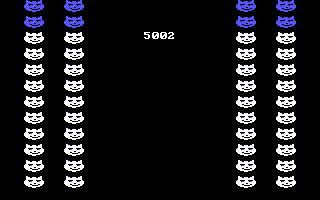
Outside the PCjr., all later graphics cards should display the colors and effects correctly. Alley Cat strove for compatibility by avoiding direct hardware access to the CGA card and instead used BIOS functions for its graphics control. All other graphics cards except for Hercules monochrome are or should be CGA compatible at the BIOS level. The BIOS functions are more limited than direct hardware access; BIOS functions only allow the programmer to change the palette color in 320x200 Mode 4 to either green/red/brown or cyan/magenta/light gray and to set the background and border color. It does not allow you to change the palette intensity and emulation of BIOS functions after the Tandy Graphics Adapter tend not to allow you to show the alternate cyan/red/white palette by selectiong 320x200 Mode 5 (which is a side-effect of how the color palettes work on the CGA card). Many other games write to the CGA registers directly to change modes and colors displayed by the card and these tend to fail on the PCjr. and graphics adapters more advanced than Tandy's. Some cards may show this game using the intense versions of the standard CGA palettes, but you should see both palettes employed.
Very recently, there have been patches made to allow the 3-voice introduction music and the PCjr. colors to be seen and heard on Tandy 1000s. Also there are patches to allow EGA and VGA cards to display the PCjr. palette colors. Find them here : http://www.vogons.org/viewtopic.php?f=24&t=45896&view=unread#unread
Wednesday, November 11, 2015
IBM PC Floppy Disks - A Deeper Look at Disk Formats and Copy Protection
I. Overview of Low-Level Floppy Disk Structure
A track's data starts with the Index Pulse which is sent when a disk's index hole passes over the index sensor. Then follow various kinds of fields on the disk which provide information about the disk's position, the location of the data and the data itself. There are three types of Fields found on a disk, the Index Field, the Sector ID Fields and the Sector Data Fields.
A. Gap & Sync Bytes
Gap Bytes precede and follow all three Fields and are first seen immediately following the Index Pulse. These Gap bytes, typically hex 4E, are used to compensate between slight differences between the drive that originally wrote the disk and the drive that is currently writing the disk. They separate the three types of Fields found a disk. Without some tolerance, the Fields may overwrite each other.
After the Gap bytes come the Sync bytes, which help tell the drive that there will be location information or data to follow. Sync bytes follow a typical pattern of twelve 00s followed by three A1s. These A1 bytes are missing the normal clocks bits and do not follow proper MFM encoding rules so the drive controller can figure out that this is not real data and the real data is coming up. The A1s are also called the Sync Mark or just "A1 Sync".
B. The Index Field
There is only one Index Field on a track and it is the first Field which is present after an Index Pulse. The Index Field is not normally used by PC compatible disks and IBM did not even define the area in its manuals. Many disks do not have a distinguishable Index Field but others do. If a disk has no Index Field there will just be GAP bytes until the first Sector ID Field. The Index Field came from Shugart, which invented the floppy disk drive. There are protection schemes which rely on the presence of an Index Field.
The Index Field is a little different from other two Fields. Instead of having Sync bytes of twelve 00s followed by three A1s, the Index Field has twelve 00s followed by three C2 bytes. These C2 bytes also are not valid MFM bytes (see the discussion for A1 Sync below). Following the C2 bytes there is a single byte of FC, called the Index Address Mark (IAM).
C. Sector ID Fields
Each sector on the disk has a Sector ID Field and a corresponding Sector Data Field.
After the A1 Sync Bytes, a Sector ID Field begins with an FE byte as an ID Address Mark (IDAM). Then the Sector ID field continues with four bytes: the track/cylinder number (00-27), the side/head number (00-01), the sector number (01-09) and finally the sector size ID byte (00-06). Unlike everything else, sector numbers use a convention starting with 01, not 00. The size ID byte tells the system how large the following Sector Data field is and is interpreted as follows :
Size ID Byte Actual Size in Bytes
00 128
01 256
02 512
03 1024
04 2048
05 4096
06 8192
The only sector size the standard DOS FORMAT command will use is a 512 byte sector size. This applies to all standard 5.25" and 3.5" disks and drives, whether double density (160KB, 180KB, 320KB, 360KB & 720KB), high density (1.2MB and 1.44MB) or extra high density (2.88MB). You can use third party utilities to format disks with other sector sizes, but DOS will not read them. Note that a track on a 360KB disk cannot really fit 8192 data bytes. I have never come across a 5.25" double density disk that has had more than 10 x 512 byte sectors.
The next two bytes form a 16-bit Cyclic Redundancy Check (CRC) value. The CRC value verifies that the information contained in the Sector ID field is correct. The bytes calculated include the A1 Sync bytes and the IDAM byte with a Polynomial of 0x1021 and an Initial Value of 0xFFFF. The CRC value is given in big-endian on the disk.
D. Sector Data Fields
As stated above, after the next series of Sync bytes comes a Sector Data Field. The Sector Data Field begins with an FB byte as a Data Address Mark (DAM). Then comes the actual data, the bytes you see with a standard disk dump. Finally comes the 16-bit CRC value, calculated as with the Sector ID Field but with the whole 512 bytes of data.
A Sector ID Field, without the ID Address Mark and CRC Value, is 4 bytes large. A Sector Data Field without the Data Address Mark and CRC Value, is typically 512 bytes large, otherwise the size is whatever the Size ID Byte indicates.
For standard DOS compatible 160KB, 180KB, 320KB and 720KB disks, the only thing that changes is the track number, side number and sector number. 160KB and 180KB disks only use 1 side of the disk, 160KB and 320KB disks only use 8 sectors, and 720KB and larger disks use 80 tracks. High density disks use 15 (1.2MB), 18 (1.44MB) or 36 (2.88MB) sectors per track.
In a hex viewer, a full dump of the start of a disk's track plus its first sector from the index pulse might look like this :
4E 4E 4E 4E 4E 4E 4E 4E 4E 4E 4E 4E 4E 4E 4E 4E 4E
4E 4E 4E 4E 4E 4E 4E 4E 4E 4E 4E 4E 4E 4E 4E 4E 4E
4E 4E 4E 4E 4E 4E 4E 4E 4E 4E 4E 4E 4E 4E 4E 4E 4E
4E 4E 4E 4E 4E 4E 4E 4E 4E 4E 4E 4E 4E 4E 4E 4E 4E
4E 4E 4E 4E 4E 4E 4E 4E 4E 4E 4E 4E 00 00 00 00 00
00 00 00 00 00 00 00 C2 C2 C2 FC 4E 4E 4E 4E 4E 4E
4E 4E 4E 4E 4E 4E 4E 4E 4E 4E 4E 4E 4E 4E 4E 4E 4E
4E 4E 4E 4E 4E 4E 4E 4E 4E 4E 4E 4E 4E 4E 4E 4E 4E
4E 4E 4E 4E 4E 4E 4E 4E 4E 4E 00 00 00 00 00 00 00
00 00 00 00 00 A1 A1 A1 FE 01 00 01 02 E1 07 4E 4E
4E 4E 4E 4E 4E 4E 4E 4E 4E 4E 4E 4E 4E 4E 4E 4E 4E
4E 4E 4E 00 00 00 00 00 00 00 00 00 00 00 00 A1 A1
A1 FB 55 53 45 52 44 41 54 41 55 53 45 52 44 41 54
41 55 53 45 52 44 41 54 41 55 53 45 52 44 41 54 41
55 53 45 52 44 41 54 41 55 53 45 52 44 41 54 41 55
53 45 52 44 41 54 41 55 53 45 52 44 41 54 41 55 53
45 52 44 41 54 41 55 53 45 52 44 41 54 41 55 53 45
52 44 41 54 41 55 53 45 52 44 41 54 41 55 53 45 52
44 41 54 41 55 53 45 52 44 41 54 41 55 53 45 52 44
41 54 41 55 53 45 52 44 41 54 41 55 53 45 52 44 41
54 41 55 53 45 52 44 41 54 41 55 53 45 52 44 41 54
41 55 53 45 52 44 41 54 41 55 53 45 52 44 41 54 41
55 53 45 52 44 41 54 41 55 53 45 52 44 41 54 41 55
53 45 52 44 41 54 41 55 53 45 52 44 41 54 41 55 53
45 52 44 41 54 41 55 53 45 52 44 41 54 41 55 53 45
52 44 41 54 41 55 53 45 52 44 41 54 41 55 53 45 52
44 41 54 41 55 53 45 52 44 41 54 41 55 53 45 52 44
41 54 41 55 53 45 52 44 41 54 41 55 53 45 52 44 41
54 41 55 53 45 52 44 41 54 41 55 53 45 52 44 41 54
41 55 53 45 52 44 41 54 41 55 53 45 52 44 41 54 41
55 53 45 52 44 41 54 41 55 53 45 52 44 41 54 41 55
53 45 52 44 41 54 41 55 53 45 52 44 41 54 41 55 53
45 52 44 41 54 41 55 53 45 52 44 41 54 41 55 53 45
52 44 41 54 41 55 53 45 52 44 41 54 41 55 53 45 52
44 41 54 41 55 53 45 52 44 41 54 41 55 53 45 52 44
41 54 41 55 53 45 52 44 41 54 41 55 53 45 52 44 41
54 41 55 53 45 52 44 41 54 41 55 53 45 52 44 41 54
41 55 53 45 52 44 41 54 41 55 53 45 52 44 41 54 41
55 53 45 52 44 41 54 41 55 53 45 52 44 41 54 41 55
53 45 52 44 41 54 41 55 53 45 52 44 41 54 41 55 53
45 52 44 41 54 41 55 53 45 52 44 41 54 41 55 53 45
52 44 41 54 41 55 53 45 52 44 41 54 41 55 53 45 52
44 41 54 41 71 12 4E 4E 4E 4E 4E 4E 4E 4E 4E 4E 4E
4E 4E 4E 4E 4E 4E 4E 4E 4E 4E 4E 4E 4E 4E 4E 4E 4E
4E 4E 4E 4E 4E 4E 4E 4E 4E 4E 4E 4E 4E 4E 4E 4E 4E
4E 4E 4E 4E 4E 4E 4E 4E 4E 4E 4E 4E 4E 4E 4E 4E 4E
4E 4E 4E 4E 4E 4E 4E 4E 4E 4E 4E 4E 4E 4E 4E 4E 4E
4E
Green = Gap Bytes
Red = Sync Bytes
Blue = Index, ID and Data Address Mark Bytes
Magenta = CRC Bytes
Black = ID and Data Fields
The hex values in the data field repeat the ASCII for USERDATA over 64 times.
E. Gap Length Conventions
The number of bytes for any given gap, and the value of the gap byte itself, are usually standardized. There are 80 Gap Bytes before the IAM (Post-Index Gap Bytes), 50 Gap Bytes after the IAM, 22 Gap Bytes between an ID Sector Field and a Data Sector Field and 80 Gap Bytes between a preceding Data Sector Field and the following ID Sector Field. There is also a variable number of Gap Bytes following the last Data Sector on the disk. Following the last data sector, there are Gap Bytes until the Index Pulse is sensed (Pre-Index Gap Bytes). These various Gap Byte areas have been given certain identifiers in historical data sheets and manuals:
Pre-Index Gap Bytes/GAP 4B = variable, normally 218 bytes (4E)
Index Pulse
Post-Index Gap Bytes/GAP 4A = 80 bytes (4E)
Index Field Sync = 12 bytes (00) + 3 bytes (C2)*
Index Address Mark = 1 byte (FC)*
Post Index Field Gap Byte/GAP 1 = 50 bytes (4E)
ID Field Sync = 12 bytes (00) + 3 bytes (A1)
ID Address Mark = 1 byte (FE)
ID Area = 4 bytes
CRC = 2 bytes
Post-ID Field Gap Bytes = GAP 2 (22 x 4E)
Data Field Sync = 12 bytes (00) + 3 bytes (A1)
Data Address Mark = 1 byte (FB)
Data Area = 512 bytes
CRC = 2 bytes
Post-Data Field Gap Bytes = GAP 3 (80 x 4E)
* - optional, if not present Gap bytes of 4E are typically present.
This article shows the layout in a visual format with remarkable clarity in Fig 4 with the exception of the position of GAP 4B. The box for GAP 4B should be at the other end of the image, just before the red dot identifying the index hole.
II. Floppy Disk Encoding
A floppy disk is a magnetic storage mechanism. Data is encoded through a change in the polarity of a magnetic field from north to south and south to north. The direction of the change, called a flux reversal, does not matter. Only the fact that the polarity has changed is relevant.
A flux reversal, or a flux pulse, takes a certain amount of time as the drive head passes over the surface of a disk. What distinguishes MFM encoding from its predecessor, FM encoding, is the amount of time required for a flux pulse.
A flux reversal could signify a 0 or a 1 bit. We start with the proposition that a 0 is represented by no flux reversal and a 1 is represented by a flux pulse over a specified length of time. However, this scheme is not workable because it becomes too difficult to keep track of the bits when there is a prolonged period with no flux reversals.
Thus the Frequency Modulation (FM) method was first used to encode data onto floppy disks flux reversals. In this method, a 0 bit is encoded by a flux pulse followed by a no flux pulse , and a 1 bit is encoded by two flux pulses. In order to avoid desynchronization, a clock bit is inserted for every data bit, either 1 or 0. FM uses 4μs for timing to encode a single data bit. In other words, in FM you must have a flux bit every 4μs. There are 50,000 bits of 4μs clock periods on an FM-formatted track and with half of those being clock bits, the maximum data capacity of a track is 3,125 bits.
This method is used in the earliest floppy disk controllers, but for home computers only the Atari 8-bit computer disk drives used it. These disk drives were called single density. The IBM PC floppy disk controllers that use an NEC uDP765 or 100% compatible like the Intel 8272 support FM encoding. Later floppy disk controllers lose that functionality.
This system was easy to implement, but not very efficient. The next improvement was the Modified Frequency Modulation (MFM) method, which is what PC disk drives use. The fundamental distinction of MFM over FM is that fewer bits are needed to encode the same data bytes as FM. The fewer the flux reversals needed, the more data can be stored on a disk. The disks that supported this system were called double density. All IBM PC compatible floppy disk controllers use the MFM encoding scheme, as did the earliest hard disk drives.
In the MFM encoding method a 0 bit preceded by a 0 bit would be encoded by flux reversal then no flux reversal. A 0 bit preceded by a 1 bit would be two clocks of no flux reversal. A 1 bit would be no flux pulse followed by a flux pulse. No more than three clock periods of no flux reversals are permitted at a time with MFM encoding. On average this only requires half the flux reversals per bit as in the FM scheme. In MFM encoding, there will never be more than three 0 bits between a 1 bit. The effective timing rate for an MFM flux reversal is 2μs versus 4μs for FM flux reversals. MFM still has a clock bit for every data bit, but because there are fewer clock bits required in MFM, the pulses can be half as long than they are in FM. There are 100,000 bits of 2μs clock periods on an MFM-formatted track and with half of those being clock bits, the maximum data capacity of a track is 6,250 bits. MFM could be said that a flux reversal is required every 8μs.
To summarize how flux bits are encoded into FM and MFM bitcells:
FM = FLUX
0 = 10
1 = 11
MFM = FLUX
0 preceded by 0 = 10
0 preceded by 1 = 00
1 = 01
Let's try to describe the hex value AA, which is binary 1010 1010.
1 0 1 0 1 0 1 0 - Data Bits
1110111011101110 - FM Encoding, 12 bits
0100010001000100 - MFM Encoding, 4 bits
The inversion of AA is 55:
0 1 0 1 0 1 0 1 - Data Bits
1011101110111011 - FM Encoding, 12 bits
?001000100010001 - MFM Encoding, 4-5 bits
Now consider 00:
0 0 0 0 0 0 0 0 - Data Bits
1010101010101010 - FM Encoding, 8 bits
?010101010101010 - MFM Encoding, 7-8 bits
And at the other extreme, FF:
1 1 1 1 1 1 1 1 - Data Bits
1111111111111111 - FM Encoding, 16 bits
0101010101010101 - MFM Encoding, 8 bits
The MFM first bit for hex 55 and 00 is unknown because its value depends on the last data bit of the previous byte.
The data lines of a floppy disk drive do not operate in a vacuum. An FM or MFM bitstream includes clocking bits instead of a separate clock line. Normally the two are in sync, meaning that the clock bits correspond exactly to the MFM data bits. But there is one time when they intentionally are not by design, the Sync bytes. How this happens is as follows :
The A1 in the Sync bytes does not follow the appropriate clock and data bit pattern. A1 should be encoded in MFM as:
The A1 in the Sync bytes does not follow the appropriate clock and data bit pattern. A1 should be encoded in MFM as:
1 0 1 0 0 0 0 1 - Data Bits
0100010010101001 - MFM Encoding
0100010010001001 - MFM A1 Sync Encoding
A1 is encoded the proper way, as shown on the second line anywhere else an A1 byte might be stored on the track, such as in a Sector Data Field. However, to put the A1 out of sync, a clocking bit is skipped, as underlined as shown on the third line above. This intentional error notifies the floppy disk controller that a Sync Mark has been identified a Sector ID or a Sector Data field is about to be read. And for purposes of comprehensiveness, C2 Sync in the Index Field looks like this:
1 1 0 0 0 0 1 0 - Data Bits
0101001010100100 - MFM Encoding
0101001000100100 - MFM C2 Sync Encoding
III. Copy Protection
Copy protection methods on the IBM PC platform ultimately generally work within this scheme. Other systems like the Apple II, Commodore 64, Atari ST and Commodore Amiga have controller hardware that allows far more sophisticated protection methods to be used. The PC disk controller will not tolerate the more bizarre methods like half tracks, fat tracks, spiral streams, offset tracks or varying bitrate speeds.
The simplest methods are to use non-standard sector sizes, sector numbers or tracks. This is good enough to bypass DISKCOPY and FORMAT, but any utility that uses the PC BIOS can format a disk with a nonstandard number of tracks, sector sizes or sector numbers. Each track and sector within the track can have differing sector sizes.
Another simple method is to use the write protection tab/notch on a disk. If a program expects the disk to be write protected, it may try to write a destructive sequence of bytes to the disk. Of course, the original disk should have no tab or notch. Be wary if you see a disk notched roughly via scissors or with a hole punch.
A common method is to intentionally write a disk with erroneous CRC bytes. A standard IBM PC Diskette Adapter can read, but not write erroneous CRCs. Of course, sectors with data that cannot be reliably read will also return CRC errors. It is then up to the person de-protecting the diskette to figure out whether the error is intentional or unintentional.
Another method is to check that the exact number of Gap and Sync Bytes are on the disk. If the original disk was written with 16 of each and the copy only has 15, that is a way to detect the copy. The program could instead read data from the Gap bytes, like an encryption key. The PC disk controller's read track command would read the Gap bytes.
A method used the Sync bytes to let sectors overlap. The disk can play with the sector ID sizes to make no sense physically, like having sector 1 with an ID of 8192 bytes and then fitting the other sectors "within" sector 1. This protection can often be fooled by writing the image to a high density disk, which allows for 15 or 18 sectors per track. Of course, high density disk controllers were far from ubiquitous in the 1980s when most of these games were released.
A devious method used weak bits. In this case, the game would read an area on the disk insufficient flux transitions have been written, making the read coils increase the gain to try to find transitions. If there were sufficiently lengthy periods without a flux transition (greater than three 0 flux bits) the read head would send back random data on different track rotations as the head tried to guess where one bitcell began and the last one ended. The game would not expect the same result to be returned from multiple reads of a sector. If the same results were always read back, the game would fail to work, thinking it was being run on a copy. Unfortunately, if the disk was damaged unintentionally or the flux transitions have lost their force with age, a flux copier like an Option Board, Catweasel, Kryoflux, Super Card Pro or a Greaseweazle may misinterpret this and make a bad copy.
IV. Known Protection Schemes used in Games :
Cops Copylock II (HD Media Supported)
Legend of Mystic Zone, The
Rising Dynasty, The
Electronic Arts IBM Interlock
Used by Electronic Arts booters, involves 96 interleaved sector IDs, typically at track 15, side 0. They also use 200KB and 400KB disk sizes with 10 sectors per track.
Amnesia
Archon: The Light and the Dark
A method used the Sync bytes to let sectors overlap. The disk can play with the sector ID sizes to make no sense physically, like having sector 1 with an ID of 8192 bytes and then fitting the other sectors "within" sector 1. This protection can often be fooled by writing the image to a high density disk, which allows for 15 or 18 sectors per track. Of course, high density disk controllers were far from ubiquitous in the 1980s when most of these games were released.
A devious method used weak bits. In this case, the game would read an area on the disk insufficient flux transitions have been written, making the read coils increase the gain to try to find transitions. If there were sufficiently lengthy periods without a flux transition (greater than three 0 flux bits) the read head would send back random data on different track rotations as the head tried to guess where one bitcell began and the last one ended. The game would not expect the same result to be returned from multiple reads of a sector. If the same results were always read back, the game would fail to work, thinking it was being run on a copy. Unfortunately, if the disk was damaged unintentionally or the flux transitions have lost their force with age, a flux copier like an Option Board, Catweasel, Kryoflux, Super Card Pro or a Greaseweazle may misinterpret this and make a bad copy.
IV. Known Protection Schemes used in Games :
Cops Copylock II (HD Media Supported)
Legend of Mystic Zone, The
Rising Dynasty, The
Electronic Arts IBM Interlock
Used by Electronic Arts booters, involves 96 interleaved sector IDs, typically at track 15, side 0. They also use 200KB and 400KB disk sizes with 10 sectors per track.
Amnesia
Archon: The Light and the Dark
Chuck Yeager's Advanced Flight Trainer
Chuck Yeager's Advanced Flight Simulator
Hard Hat MackJulius Erving vs. Larry Bird Go One-on-One
Marble Madness
Murder on the Zinderneuf
Pinball Construction Set
Seven Cities of Gold, The
Super Boulder Dash
Timothy Leary's Mind Mirror
Will Harvey's Music Construction Set
Marble Madness
Murder on the Zinderneuf
Pinball Construction Set
Seven Cities of Gold, The
Super Boulder Dash
Timothy Leary's Mind Mirror
Will Harvey's Music Construction Set
World Tour Golf
Formaster Copylock
Contains a sector with a Data Field CRC error, usually at at track 20, side 0, sector 5 or track 6, side 0, sector 1. The sector ID is marked as having 256 bytes, but actually has 512 bytes, fooling copiers like TeleDisk. Used mostly by Sierra. This protection will probably fail at speeds greater than an AT (8MHz 80286)
B.C.'s Quest for Tires (Sierra release)
Crossfire (IBM PCjr floppy disk versions)
Formaster Copylock
Contains a sector with a Data Field CRC error, usually at at track 20, side 0, sector 5 or track 6, side 0, sector 1. The sector ID is marked as having 256 bytes, but actually has 512 bytes, fooling copiers like TeleDisk. Used mostly by Sierra. This protection will probably fail at speeds greater than an AT (8MHz 80286)
B.C.'s Quest for Tires (Sierra release)
Crossfire (IBM PCjr floppy disk versions)
Gato (versions 1.0-1.4)
Great Escape, The (Thunder Mountain)
Hardball (Disk 2/EGA Disk, & Tandy Release)
King's Quest (IBM PC-CGA booter rev0, rev1)
Mr. Cool
Pinball Wizard
Oil's Well
Quink (Thunder Mountain)
Sierra Championship Boxing (1984 version)
Top Gun (Thunder Mountain rev0)
Troll's Tale
Ultima II (rev0 & PCjr. version)
Ultima III (rev0, rev1, rev2)
Wizard and the Princess, The (IBM PCjr exclusive version)
Hardball (Disk 2/EGA Disk, & Tandy Release)
King's Quest (IBM PC-CGA booter rev0, rev1)
Mr. Cool
Pinball Wizard
Oil's Well
Quink (Thunder Mountain)
Sierra Championship Boxing (1984 version)
Top Gun (Thunder Mountain rev0)
Troll's Tale
Ultima II (rev0 & PCjr. version)
Ultima III (rev0, rev1, rev2)
Wizard and the Princess, The (IBM PCjr exclusive version)
H.L.S. Duplication
Accolade and Epyx used this type of protection. There is an additional sector ID field in one of the sectors.
Bad Dudes
Boot Camp
Accolade and Epyx used this type of protection. There is an additional sector ID field in one of the sectors.
Ancient Land of Ys
Apollo 18
AjaxBad Dudes
Boot Camp
Batman - The Caped Crusader
California Games
California Games
Crossword Magic
Destroyer
Final Assault
Gauntlet (rev1Grand Prix Circuit (early version only)
Hardball (Disk 1 only)
Jr. Pac-Man
Karateka
L.A. Crackdown
Mean 18
Mini-PuttRack'em
Rush 'n' Attack
Rush 'n' Attack
RoboCop (Data East)
Serve and Volley
Star Wars (Broderbund)
Street Sports Basketball
Sub Battle Simulator
Super Pac-Man (rev0)
Test DriveTest Drive II (including Expansion Disks
TKO
Microprose Protection 1
Microprose Protection 1
Protection is found on track 4, side 0. Uses overlapping sectors.
Gunship (certain versions)
Sid Meier's Pirates
Microprose Protection 2
Gunship (certain versions)
Sid Meier's Pirates
Microprose Protection 2
Protection is found on tracks 38-39, side 0. Uses overlapping sectors.
Airborne Ranger
The Amazing Spider-Man and Captain America in Dr. Doom's Revenge!
F-15 Strike Eagle II
F-19 Stealth Fighter
M1 Tank Platoon
Airborne Ranger
The Amazing Spider-Man and Captain America in Dr. Doom's Revenge!
F-15 Strike Eagle II
F-19 Stealth Fighter
M1 Tank Platoon
Megatraveller
Microprose Pro Soccer
Sid Meier's Pirates (432.02 and above)
Red Storm Rising
Rick Dangerous
Savage
Stunt Track Racer
Sword of the Samurai
X-Men - Madness in Murderworld
Sid Meier's Pirates (432.02 and above)
Red Storm Rising
Rick Dangerous
Savage
Stunt Track Racer
Sword of the Samurai
X-Men - Madness in Murderworld
Mindscape DEM
This protection uses weak bits and will probably fail at 386 speeds (16MHz and above)
Blockbuster!
Blockbuster!
Captain Blood
Contra
Defender of the Crown (rev0)
Forgotten Worlds
Gauntlet (rev0)
Italy 1990
Jackal
Moonwalker
Outrun
Paperboy (Elite)
Paperboy (Elite)
Paperboy (Mindscape)
Road Runner
Shadowgate
Space Harrier
Street Fighter
Strider
Super Pac-Man (rev1)
Top Gun (Thunder Mountain rev1)
Minder03
Used by Prism Software
Pipe Dream (European version, U.S. version by LucasFilm Games used a Codewheel)
On-Line Systems Protection #1
This protection will fail in a PCjr. or DMA-less Tandy 1000 and does not work with the 2nd and 3rd IBM PC/XT BIOS.
Crossfire (PC)
Frogger
Ulysses and the Golden Fleece
Origin Systems OSI-1
Used by all Origin Systems games with an EXE executable.
Crossfire (PC)
Frogger
Ulysses and the Golden Fleece
Origin Systems OSI-1
Used by all Origin Systems games with an EXE executable.
2400 A.D.
Bionic Commando
Ultima I (rev1)
Ultima II (Origin Ultima Trilogy Release)
Ultima IV
Ultima V
Sector ID Duplication
Ultima II (Origin Ultima Trilogy Release)
Ultima IV
Ultima V
Atarisoft
Battlezone
Defender
Ms. Pac-Man (Atarisoft & Thunder Mountain)
Stargate
Datasoft
Uses weak bit protection
Bruce Lee
Dallas Quest, The
Dig Dug (Datasoft)
Juno First
Lost Tomb
Rob Northern Copylock
Uses "strong bits", a long string of 1bits, and calculates the entropy expected. Encrypts the actual executable and stores a 32-bit decryption number on a bad sector.
Uses "strong bits", a long string of 1bits, and calculates the entropy expected. Encrypts the actual executable and stores a 32-bit decryption number on a bad sector.
Back to the Future Part III
Blade Warrior
Blasteroids
Blood Money
Borodino
Carrier Command
Castle Master
Cisco Heat
Frank Bruno's Boxing (Finale)
Kick Off 2
Klax
Lemmings (1991-07-19)
Oh No! More Lemmings (comes in disk-based and document-based versions)
Lemmings 2: The Tribes (uses High Density disks)
Midwinter
Mighty Bomb Jack
Nebulus
Onslaught
Paperboy (Finale)
Pit Fighter (Domark)
Predator 2
Pro Tennis Tour
Resolution 101
The Sentinel
Stormlord
Thunderstrike
Toobin'
Weird Dreams
Xenomorph
Xenon II
Sector ID Duplication
Sierra used this for the versions of their games distributed under Tandy's label prior to 1985. In this scheme, there are multiple sectors with identical Sector IDs, but different data. Subsequent read sector commands will read the later sectors.
BC's Quest for Tires (Tandy release)
King's Quest (Tandy version & PCjr./Tandy version)
BC's Quest for Tires (Tandy release)
King's Quest (Tandy version & PCjr./Tandy version)
Wizard of Ids WizType (Tandy release)
Softguard Superlok v3.0 with original loaderFound mostly in Taito games. Works like Sierra's version, but with a different loader that is harder to decrypt. The file CMLxxxx.FCL will be present.
Arkanoid
Arkanoid II: Revenge of DOH
Bubble Bobble
Operation Wolf
Puzznic
QIX
Rambo III
Rastan
Renegade
Sky Shark
Softguard Superlok v2.3 with Sierra's Loader
This protection was used in Sierra's games. It relied on a track with non-standard sector sizes, overlapping sectors, CRC errors in the sector data field There is a hidden file called CPC.COM on the first disk that checks for the protection. All these games could be installed to a hard drive, but required the first disk, the key disk, to be inserted in a floppy drive. Police Quest: In Pursuit of the Death Angel and Mixed Up Mother Goose, were the only AGI version 2 games that never seemed to be protected. This protection was applied to both booter and DOS games but was no found on AGI version 3 games.
3-D Helicopter Simulator (versions 1.00 & 1.10)
Black Cauldron, The (AGI versions 1.1J, 1.1K, Tandy & 2.00)
Donald Duck's Playground
King's Quest I: Quest for the Crown (AGI versions 1.0U & 2.0F)
King's Quest II: Romancing the Throne (AGI versions 1.0W, 1.1H, Tandy, 2.1 & 2.2)
King's Quest III: To Heir is Human
Leisure Suit Larry in the Land of the Lounge Lizards (AGI version)
Mickey's Space Adventure (3.5" disks only)
Sierra Championship Boxing (1985 version)
Space Quest: The Sarien Encounter (AGI version)
Space Quest II: Vohaul's Revenge
Thexder
Sierra Championship Boxing (1985 version)
Space Quest: The Sarien Encounter (AGI version)
Space Quest II: Vohaul's Revenge
Thexder
Ultima II (rev1)
Weak Bits Generic Implementation
Weak Bits Generic Implementation
Typically done by using more than three 0 bits following a 1 bit in violation of MFM encoding rules.
Green Beret
RoboCop (Ocean)
Starglider II
After Burner
Bop'N' Wresting
Harrier Combat
Horror Zombies From The Crypt
Rick Dangerous II
Shinobi
Harrier Combat
Horror Zombies From The Crypt
Rick Dangerous II
Shinobi
POLA106
Uses weak bits
Ghosts 'n Goblins (rev1)
U.S. Gold
Uses weak bits
Solomon's Key
This protection will probably fail at greater than IBM AT (8MHz 286) speeds. Most games protected by this protection use weak bits
4 Soccer Simulators
AM, FM Trivia Vol. 2
Arac
AM, FM Trivia Vol. 2
Arac
Boulder Dash (Prism Leisure, no weak bit)
Boulder Dash 2 (Prism Leisure Release)
Boulder Dash 2 (Prism Leisure Release)
Circus Games
Football Manager
Football Manager 2
Football Manager
Football Manager 2
Frank Bruno's Boxing
Hotshot
Ninja Rabbits
The King of Chicago
Mayday Squad Heroes
Speedball
Super Sunday
World Championship Soccer
Xidex Magnetics XEMAG / XELOK
Used mainly by Broderbund. Has 16 sectors instead of 8 on track 9, side 0.
Bank Street Writer
Championship Lode Runner
F-15 Strike Eagle
Friendlyware PC Arcade (v3.0)
GFL Championship Football
Inca
The Last Ninja
Lode Runner (rev0, rev1, Tandy)
Quink (CBS Software)
Rampage
Sargon 3
Spitfire Ace
Super Hang-On
Transylvania
Trivia Fever
Ultima I (rev0)
Ultima III (rev3)
Word ChallengeTitus
Baby Jo in ''Going Home'
The Blues Brothers
Crazy Cars 2
Dick Tracy
Les Aventures de Moktar (rev1)
Fire and Forget (Titus Gap Count v1)
Fire and Forget II
Fire and Forget II
Highway Patrol II
Knight Force
Off Shore Warrior
Panza Kick Boxing
Pinball Magic
Prehistorik (Titus Gap Count v1)
RKO
Agent U.S.A
Data Encore
Crime and Punishment
Sector overlap
Commando (rev0)
Ghostbusters
Ikari Warriors
Might and Magic (rev1)
Might and Magic II
Oo-Topos
Sherlock Holmes - Another Bow
World Games
Sonopress
Grand Monster Slam
RPL
Ken Uston's Professional Blackjack
MicroLeague Baseball
Infogrames
Safari Guns
Insoft
Wordtrix
Miscellaneous Protections
These disks contain unusual but valid MFM Data. Most use simple methods like non-standard sector seizes, which are probably the earliest method of copy protection and can easily be copied with TeleDisk.
Adventure in Serenia
Algebra Arcade
Alpine Tram Ride
Alleycat
Arkanoid (Imagine)+Super Tennis
Below the Root
Bivouac
Centipede
Changes
Crypto Cube
Cyrus
Czorian Siege (requires DMA controller)
Dig Dug (Atarisoft)
Electric Crayon Deluxe - TMNT - World Tour (v3.0)
Facemaker (Gold Edition)
Galaxian
Gremlins
Gryzor
IDSI's Rack 'em Up
In Search of the Most Amazing Thing (v2.0)
Jumpman
Jungle Hunt
King's Quest (128k IBM)
Microsoft Flight Simulator (v1.x)
Microsoft Flight Simulator (v2.x)
Moon Patrol
Pitstop II
Planetfall
Sid Meiers' Pirates! v432.03
Sorcerer (r4)
Touchdown Football (IBM)
Trains (DOS version)
Trap-A-Zoid
Wizardry
Wizardry II
Wizardry III
Wizardry IV
Wizardry V
ZorkQuest II
There are several programs that rely purely on the floppy disk controller to try to make a working backup, including Teledisk, ImageDisk, CopyIIPC & Snatchit. None of them is a perfect solution. TeleDisk did not take every PC protection method into account, but its great to write images with non-standard sector sizes. ImageDisk is a newer program and doesn't have that many disk images available for it, but it too is bound by the limitations of the PC disk controller. CopyIIPC and Snatchit only work on 100% compatible IBM PCs (no Tandy 1000s or PCjr.s), do not work at high 386 speeds or faster and potentially will modify the data on the disk image to crack the program.
The closest thing that was available back in the 1980s that could copy anything was Central Point Software's Deluxe Option Board. This was a hardware ISA card that intercepted the signals between the disk drive and disk controller. Because it operated on the flux transition level, it could theoretically copy anything from a double density disk. It could write bad CRCs, overlapping sectors, interleaved sectors and data in the gap bytes. This board used a program called TransCopy. TransCopy could save an image of a disk for future rewriting. 360KB disks would have an image that would be 1,088KB in size.
TransCopy was not without its flaws. The non-Deluxe Option Board could only work with TransCopy versions 4.x or earlier. TransCopy versions below 5.x would not copy 80 track disks, inlcuding 720KB disks. TransCopy images made with version 5.x would not work with earlier TransCopy versions. TransCopy would also be crippled so that it would not work with certain protections, depending on which company was threatening CPS with litigation at the time. You would need to hope that an earlier version of TransCopy would work. Copy Copylock II will not be able to written back with an Option Board or Deluxe Option Board.
The modern equivalent of the TransCopy board are the Kryoflux and SuperCard Pro. In the PC context, KryoFlux will create raw stream files of each track. There are utilities that can convert these raw stream files to TransCopy or TeleDisk formats. It can now write back raw stream files, so you no longer need to send your disk to the SPS and get an IPF file. However, writing back raw stream files is not fully reliable because it does not account for fluctuations in drive rotation speed and imperfections in the signal, possibly leading to signal loss similar to copying analog tapes. There are unsupported utilities to make your own IPF files, but it appears that unless you know the stream format well, you may not be able to write back a working disk. SuperCard Pro does the same thing but contains everything in one file. The two formats require conversion.
Subscribe to:
Posts (Atom)