In one of my recent posts, I discussed artifact color composite graphics as demonstrated by all computers which were intended to use them. In this post, I want to focus on artifact color composite graphics as available on the IBM PC and compatible systems.
IBM PC CGA Color Composite Graphics
First, I would like to address some myths. The first myth is that only a few games used composite color. This is untrue, over 100 games have been confirmed to use composite color. The second myth is that virtually all of them used the 640x200 graphics mode. In fact, many, many games used composite color, although many looked acceptable on an RGB monitor, and more games used 320x200 graphics mode and color composite graphics as those that used the 640x200 graphics mode. Here are a list of games that are known to use composite artifact color graphics and the type of graphics they use :
More accurate list located
here.
The advantage to using the 640x200 graphics mode is that a good color palette is available using white as the foreground color. White or light gray, rather than high intensity or bright white was used because the brightness level was more tolerable on composite devices. The disadvantages are that the game must support two completely different sets of graphics, otherwise users of RGB monitors would feel left out. Additionally, most games used an algorithm that requires extra coding and CPU time to implement for either the RGB or color composite mode.
The advantage to using 320x200 graphics is that only one set of graphics, or in a few cases two sets of very similar graphics, need be used. Both users of composite monitors and RGB monitors can be satisfied, although the result may not be as impressive as tailoring graphics to either RGB or composite monitors. The disadvantage is that the graphics designer has to cope with both direct and artifact colors, often giving a fuzzy image. With the green/red/brown palette, the results often look somewhat garish and it was seldom intended to be used for composite color graphics. Often that palette, many times with a blue background, would be used for the RGB graphics selection. The colors choices available in the 320x200 modes are not as flexible as they would be in the 640x200 mode.
 |
| 320x200 Palette 1 High Intensity Composite Color Graphics from L to R : RGB, Old CGA, New CGA, PCjr., Tandy |
 |
| 320x200 Palette 0 High Intensity Composite Color Graphics from L to R : RGB, Old CGA, New CGA, PCjr., Tandy |
The above palettes do not quite give the full array of color combinations which the CGA card is capable. Although the palette choices in the 320x200 modes are limited, the background & border color can be freely selected from the full 16 colors which the CGA can display. Similarly, the foreground color in the 640x200 mode can be set to any of the 16 colors CGA can display. These color choices will affect the resulting artifact colors available.
 |
| 640x200 Color Composite Graphics from L to R : Old CGA, New CGA, PCjr., Tandy |
While color composite graphics may appear to be one way to display graphics, in reality there are three major types of color composite graphics. First there are those generated by the IBM PC Color/Graphics Display Adapter and 100% compatible adapters. Within this type there are two subtypes, early cards and late cards with minor differences between them. Second, there are those generated by the IBM PCjr. Third, there are those generated by the Tandy 1000 computers.
IBM CGA cards, Catalog Part Number 1504910 come with Card and PCB numbers
Card PCB
1804456
1804464
1804472
1501486 1501453
1501981 1501982
6278550 6133807?
6447058
Cards 1804456 to 1501486 are early CGA cards. 1501981 to 6447058 re late CGA cards. The 180xxxx cards have the black brackets on them which the very earliest IBM PC cards had. Later cards use a silver bracket appropriate for an IBM PC, XT or any compatible machine. The major physical differences between the two versions of these can be seen here :
 |
| Old CGA vs. New CGA, note the increased number of resistors on the New CGA card (courtesy of minuszerodegrees.net) |
An old CGA card will have either 7, 8 or 12 resistors, a new CGA card will have 15. Note also in the above photo that the old card has a Motorola MC6845 and the new card has a Hitachi HD6845. While the two work identically for typical software, demos may require one or the other. The party-version of the 8088MPH demo only looks correct with an MC6845. The final version looks correct with either chip.
Old cards seem to come exclusively with MC6845s, while new cards will use either chip. Old cards always seem to use a green PCB color, but new cards almost always use a brown PCB color.
One of the chief differences between these cards is the number of shades of gray it can produce when connected to a monochrome composite monitor or B&W TV set through an RF modulator. Old cards can produce two shades of gray plus black, while new cards can produce 15 shades of gray plus black in black and white modes. Many computer users had to use monochrome green, amber or white monitors back in the day, and the increase in shades of gray meant that more detail could be seen in the graphics. With the old cards, you had black for black and gray, white for white and bright white and gray for all other colors. This is found in CGA Mode 5, which on an RGB monitor gives a cyan, red and white palette but on a color composite monitor will give either black and white (2 colors) or black, dark gray, light gray and white (4 colors).
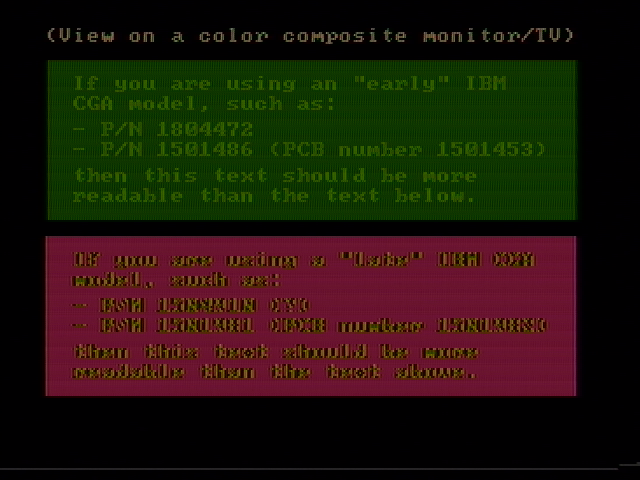
Colorwise, new CGA was adjusted to more closely adhere to the NTSC standard. It will appear more consistently across different monitors than old CGA. There are differences between the saturation and brightness between the colors output by old and new CGA. Newer monitors may make the image too dark with old CGA, requiring the user to increase the brightness level of his monitor. There is a test program that can tell you which type of CGA card you may have. Here are the screenshots of it showing how it informs you of the type you may have :
Old CGA has a raster bendiness issue with certain computers, and the black and white modes may not always eliminate all colors. Running the signal through a powered RF modulator like the Recoton Video RF Modulator V647 should eliminate the bendy horizontal sections of the picture without reducing the video quality (assuming you are not modulating an audio signal with the video.)
Unlike the Apple II, where the pixels being output in the high resolution and double high resolution modes were either white or black, on the PC the pixels being put out have direct color. The six colors in between black and white, without accounting for intensity, are generated by adjusting the phase of the 3.58MHz color burst signal for the hue and the amplitude of that signal for the brightness. Unlike on an RGB TTL monitors from IBM, color #6 is dark yellow, not brown, because a color composite monitor or TV does not have circuitry built inside it to detect color #6 and turn it to brown.
For direct or chroma colors, both the old and new CGA cards look similar to the RGB colors, but there are minor differences between them. The PCjr. and Tandy 1000 show direct or chroma colors identically with the new CGA cards. Here are the 16 direct or chroma colors :
 |
| Rows 1 & 4 : RGB CGA Colors, Rows 2 & 5 : Old CGA Direct Colors, Rows 2 & 6 : New CGA, Tandy and PCjr. Direct Colors |
For at least two games, Microsoft Decathlon and Championship Golf, the earlier card makes it much easier to read text than the later card. Championship Golf may require the brightness controls to be turned down on the monitor. Other games designed for old CGA are Sorcerer of Claymorgue Castle. Tournament Tennis, Quadrel and Willow look better with new CGA.
 |
| 320x200 Palette 1 Color Composite Graphics Example - Adventure in Serenia New CGA |
Some games like Donkey Kong, Boulder Dash II, I, Damiano: The Wizard of Partestrada and Turbo Champions look like they support color composite graphics due to the vertical striped pattern graphics seen in some screens or tiles, but they really do an overall poor job on a color composite monitor. It is suspected that the ports did not convert the graphics with a great deal of thought.
 |
| 320x200 Palette 0 Color Composite Graphics Example - Jungle Hunt (Note the Diving Bar, New CGA) |
Pitfall 2 is an interesting piece of software when it comes to color composite mode support. If you press 1 at the text screen, you will see 640x200 graphics with green as the foreground color on an RGB monitor. I know of no game other than this that uses any foreground color other than white for 640x200 color composite graphics. Obviously, this gives the graphics a greenish hue on a color composite monitor. If you press 2 at the text readability screen, you will get 320x200 graphics with intense palette 0. However, the road and the mountains have vertical stripes, which suggest that this mode is also intended to be used with a color composite monitor. However, the stripes are there as a crude dithering effect, as using this mode on a color composite monitor makes the text very difficult to read. The Fourth Protocol allows the user full control over the CGA card, and has a stripey pattern for 640x200 graphics that make them look tolerable with a color composite monitor. It may be limited to the title screen, however, because the in-game graphics appear to always be 320x200, with the pixels doubled in a 640x200 mode.
 |
| 640x200 Color Composite Graphics Example #1 - Pitstop II, New CGA |
Color composite graphics were not limited to booters. Sierra supported it in every AGI engine game it released, from King's Quest to Manhunter II : San Francisco. Interplay supported it in The Bard's Tale 1-3, Dragon Wars and Wasteland. No doubt their Apple II origins contributed to this. Interestingly, in Wasteland you must select the graphics adapter in the install program, which then converts the graphics from 16-color to composite color as it installs. To use another graphics adapter, you have to reinstall the game. Considering its support for every other type of graphics adapter on the market, the color composite support in Lucasarts' Maniac Mansion and Zak McKracken is uncharacteristically poor.
 |
| 640x200 Color Composite Graphics Example #2, - King's Quest, Old CGA |
Tandy 1000 Composite Color Graphics
Tandy can only show the same direct or chroma colors as CGA, but the Tandy 1000 artifact colors are different. Changing the hue adjust will be sufficient to change Tandy colors to late CGA colors in DOSBox, and vice versa, but only in the 640x200 mode. A hue adjustment in the 640x200 mode of 120 degrees will give a good Tandy palette. You can only approximate the palette colors for the 320x200 modes. Games that are not "Tandy-aware" with their color composite graphics will show different colors. This occurs either with either 320x200 or 640x200 graphics.
Blue Angels: Formation Flight Simulation is the only game known where the color composite graphics look correct on the Tandy 1000 but do not look right on the IBM CGA cards. It also apparently was developed on a system with a comb filter. For a 1989 game, this would not have been difficult to find, but comb filters were not used on the composite color monitor and TVs of the early 1980s when most of the composite color CGA games were developed. Many early 1980s games look better on monitors without comb filters. Compare these two screenshots :
 |
| IBM CGA Composite |
 |
| Tandy 1000 Composite |
In the Tandy extended modes 160x200x16, 320x200x16 and 640x200x4, you will see color on a color composite monitor or TV. In the 160x200x16 mode, there is no real artifact color since the pixel clock and the color burst frequencies are the same, 3.58MHz. The graphics look blocky in this mode, but reasonably sharp. Maniac Mansion on the Tandy 1000, using the Tandy graphics setting, would look very similar to how it looks on the Commodore 64, although there are color differences and the text is blockier.
Indianapolis 500 specifically supported both IBM and Tandy color composite graphics with different command line arguments so that the colors would look correct regardless of system. However, the colors in each mode are not identical. The command line switch /c1 will give colors appropriate for a CGA card, and switch /c2 will give colors appropriate for a Tandy graphics adapter.
 |
| Indianapolis 500 - The Simulation 640x200 RGB CGA |
 |
| Indianapolis 500 - The Simulation 640x200 RGB Tandy |
 |
| Indianapolis 500 - The Simulation Color Composite Early CGA |
 |
| Indianapolis 500 - The Simulation Color Composite Late CGA |
In modes using true 320x200 graphics (the AGI games use the 320x200 16 color graphics mode, but the effective graphics resolution is 160x200, at least for graphics above the command line), you can see color, but detail is lost, unintended artifacts that look like Hanover bars appear, and the game usually looks bad. As far as 640x200x4 graphics go, no game is known to use that graphics mode.
 |
| Indianapolis 500 - The Simulation Color Composite Tandy (Simulated) |
On a monochrome composite monitors or B&W TV sets, 16 shades of gray are always visible with Tandy 1000 or PCjrs.
IBM PCjr. Color Composite Graphics
The PCjr. does support color composite artifact colors, but the artifact colors are different from the CGA cards and the Tandy 1000. Again this is due not to differences in the phase of the color burst but the pixel clock delay compared with the CGA cards. In the 320x200 mode, there is a pixel clock delay of 120 degrees compared with the CGA cards. PCjr. color composite graphics can appear quite different to CGA color composite graphics.
Below the Root sounds best (at least the opening song does) when run on an IBM PCjr. and the direct colors when the game is run on a PCjr. were tweaked to look very appropriate for a color composite monitor with artifact color. Ditto for The Seven Cities of Gold, except it uses 640x200-based color composite graphics.
 |
| IBM PC CGA RGB |
 |
| IBM PCjr. RGB |
 |
| IBM PC CGA Old Composite |
 |
| IBM PC CGA New Composite |
 |
| IBM PCjr Composite |
As explained in the prior blog entry, the PCjr's default 320x200 palette is not identical to the CGA's default cyan, magenta and white palette. The PCjr. intentionally uses high intensity white instead, causing brightness and saturation differences.
 |
| Below the Root 320x200 Color Composite Late CGA |
 |
| Below the Root 320x200 Color Composite Early CGA |
 |
| Below the Root 320x200 Color Composite PCjr. |
Wilderness : A Survival Adventure may show the best composite color results using the PCjr., but the underlying patterns are not changed for the machine. Frogger II is PCjr. aware and shows good composite or RGB colors either with CGA or PCjr. A late version of Pitstop II has direct support for the PCjr.'s 160x200x16 mode, so it will always look better than the CGA with or without color composite graphics. Ditto for Murder on the Zinderneuf, all versions use 160x200x16 on the PCjr. Several other games just use 160x200x16 on the PCjr. because it looks excellent on an RGB or color composite monitor.
BC's Quest for Tires uses 320x200 composite color graphics on the PCjr. but 640x200 composite color graphics on the PC. Microsoft Flight Simulator 2.xx uses 640x200 composite color graphics for the PC and PCjr., but the patterns are different for each. There was a version of Ultima II for the PCjr. that uses appropriate composite color 320x200 graphics. M.U.L.E. also uses 320x200 composite color graphics.
Current SVNs of DOSBox emulate old and new CGA with the cga machine type, 640x200 and 320x200 color composite graphics but does not emulate color composite graphics with the tandy or pcjr machine types.
Other computers may have inaccurate CGA artifact colors. The Columbia Data Products 1600 (one of the very first PC clones) came with a CGA clone card that is almost as off as the Tandy or PCjr. A hue adjustment of 315 degrees will get something like its palette in 640x200 mode. Here are the games that intentionally support composite color on an IBM PCjr. with the type of composite color they use :
More accurate list located here.
Lode Runner : Support for All Composite Color Types
Lode Runner for the PC always looks best in composite color mode, despite using the 320x200 resolution. Only the in-game border and certain objects on the screen really take advantage of composite color, but the solid objects always look appropriate regardless of monitor.
When first released for the PC, the game only supported the IBM PC and CGA. A second release added PCjr. support by adjusting the patterns for the composite color objects. A final release under the Tandy label retained the PC and PCjr.'s respective patterns but adjusted the patterns again when it detected a Tandy 1000 machine. Here are correct screenshots for the CGA, PCjr. and Tandy both in RGB and Composite :
 |
| IBM PC CGA RGB |
 |
| IBM PC Old CGA Composite |
 |
| IBM PC New CGA Composite |
 |
| IBM PCjr RGB |
 |
| IBM PCjr Composite |
 |
| Tandy 1000 RGB |
 |
| Tandy 1000 Composite |
Limitations of the Tint Control
NTSC color TVs and monitors have a tint (hue) control dial, buttons or function. The tint control is intended to adjust for phase errors in a transmitted broadcast signal. The tint control adjusts the phase of the TV's reference color burst signal slightly toward the green or red end of the spectrum. The color burst is intended to have a phase of 180 degrees, and by using the tint control, you can adjust the TV's phase by about 40 degrees from the official phase. This was important during the era of broadcast TV before cable became ubiquitous. Here is an NTSC color wheel to give you an idea of where the colors fall by degrees :

Unfortunately, for Tandy and PCjr. display adapters, 40 degrees is not sufficient to turn Tandy or PCjr composite colors into CGA colors. Relative to late CGA, assuming its color burst is near 180 degrees, 640x200 Tandy is at 300 degrees and 640x200 PCjr. is at 120 degrees. In the 640x200 mode, you can get somewhat close to the CGA colors at the extreme end of the tint control (green for PCjr, red for Tandy), but in 320x200 mode, you really won't. In DOSBox, F11 and Alt F11 emulate the function of the tint control.
This blog entry gives a very readable overview of how composite CGA works : http://8088mph.blogspot.com/2015/04/cga-in-1024-colors-new-mode-illustrated.html
* - Game does not appear to support composite color, only color and monochrome 80-column text modes. The game has not been found.